shadcn.io is an independent project built on shadcn/ui
A browser inside the app: back, forward and reload, an address field, the page in a sandboxed frame, and a console under it that opens onto the page's logs.
Use it to show what generated code renders, a dev server's page or the HTML a model just wrote, beside the chat, where the reader can click through it and read its errors. For a still screenshot in a browser window on a landing page, use Safari: a mockup with no history and nothing to type into. In React, the toolbar is Buttons with Tooltips and an Input, the console a Collapsible, all from Radix UI.
Installation
Anatomy
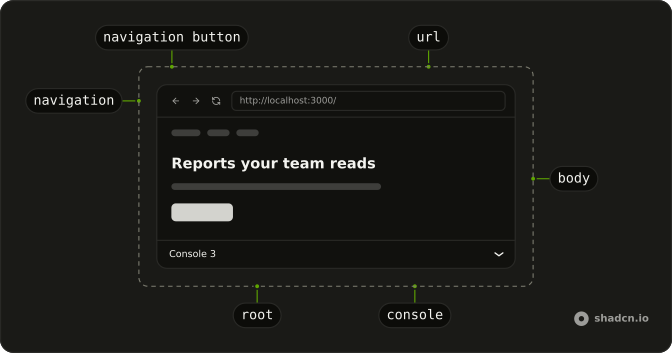
WebPreview
├── WebPreviewNavigation
│   ├── WebPreviewNavigationButton   back, forward, reload, your own
│   └── WebPreviewUrl
├── WebPreviewBody                   the iframe, loading over it
└── WebPreviewConsole                the logs, colored by level
Usage
import {
  ArrowLeftIcon, ArrowRightIcon, RefreshCcwIcon,
} from "lucide-react";
import {
  WebPreview, WebPreviewBody, WebPreviewConsole, WebPreviewNavigation,
  WebPreviewNavigationButton, WebPreviewUrl,
} from "@/components/ui/web-preview";<WebPreview className="h-96" defaultUrl="http://localhost:3000/">
<WebPreviewNavigation>
<WebPreviewNavigationButton action="back" tooltip="Go back">
<ArrowLeftIcon aria-hidden="true" />
</WebPreviewNavigationButton>
<WebPreviewNavigationButton action="forward" tooltip="Go forward">
<ArrowRightIcon aria-hidden="true" />
</WebPreviewNavigationButton>
<WebPreviewNavigationButton action="reload" tooltip="Reload">
<RefreshCcwIcon aria-hidden="true" />
</WebPreviewNavigationButton>
<WebPreviewUrl />
</WebPreviewNavigation>
<WebPreviewBody />
<WebPreviewConsole />
</WebPreview>action gives a button its job in the preview's history: back and forward disable themselves at either end, and reload loads the page again. A button without one does what its handler says, like the first demo's open-in-a-new-tab and full-screen buttons.
Demos
Console
The page's own console.log, console.warn and uncaught errors land in WebPreviewConsole: a script in the page posts each one to its parent, and the demo adds it to logs. Warnings take the warning color and errors the destructive one, each with an icon, so the level doesn't rest on color alone. The console starts open here with defaultOpen; its trigger counts the lines.
Controlled
url and onUrlChange put the address in your state, so the list of pages beside the preview, the address field, the page's own links and Back all move the same address. A link in srcDoc HTML would open your own site's path in the frame, so the page posts the address it wants instead. Every address set from outside is a visit too: Back returns from it.
Loading
loading covers the frame while it's set: here a spinner while the model writes the next version of the page. It shows whatever you pass, for as long as you pass it, so set it from your own state, such as a tool call that hasn't finished. Press the sparkles to build another version.
AI SDK
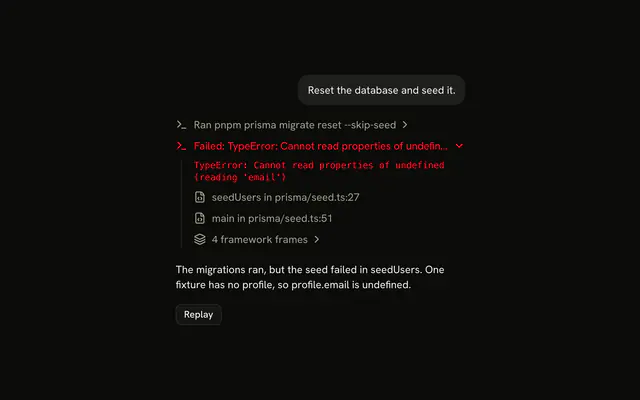
A model builds a page through a tool: createPage here, whose output is the HTML. Give the HTML to WebPreviewBody as srcDoc once the call is done, and cover the frame while it runs.
const { messages } = useChat();

const page = messages
  .flatMap((message) => message.parts)
  .filter((part) => part.type === "tool-createPage")
  .at(-1);

return (
  <WebPreviewBody
    loading={
      page && page.state !== "output-available" ? <Spinner /> : undefined
    }
    srcDoc={page?.state === "output-available" ? page.output.html : undefined}
  />
);
When the tool starts a dev server in a sandbox instead, it returns the server's address: pass that as url, or as defaultUrl the first time, and leave srcDoc out.
Migrating from AI SDK Elements
If you added Web Preview from AI SDK Elements (opens in a new tab), your project has a components/ai-elements/web-preview.tsx. Install this one, import from @/components/ui/web-preview instead, and delete the old file. Every part keeps its name, and defaultUrl, onUrlChange, tooltip, loading and logs work as before. What differs:
- WebPreview takes
urltoo, to control the address, and keeps a history:onUrlChangealso fires on back and forward. - WebPreviewNavigationButton takes
action(back,forward,reload); without it, it does what your handler says, as before. - WebPreviewBody takes
srcDocfor HTML, and dropsallow-same-originfrom the sandbox for it.loadingcovers the frame instead of sitting under it. - WebPreviewConsole is the Collapsible itself: open it with its own props, not a shared context. Times read
hh:mm:sson a 24-hour clock in every locale.
FAQ
How do I install the Web Preview in React?
Run the command in the Installation section: it adds web-preview to your components/ui folder with the Button, Tooltip, Input and Collapsible it's built on.
The command uses the shadcn CLI.
When should I use Web Preview instead of Safari?
When the page is live and the reader should use it: navigate, reload, read its console. Safari is a picture of a browser around a screenshot, a video or a page, for a landing page or a changelog, with nothing to type into.
How do I preview HTML a model wrote instead of a URL?
Pass it to WebPreviewBody as srcDoc. It runs in a sandbox with an origin of its own, so its scripts can't reach your page's cookies or storage. Its links resolve against your site, so have the page post the address it wants and set url, as the Controlled demo does.
Why does the Web Preview show a blank page for some sites?
Those sites refuse to be framed, with an X-Frame-Options header or a frame-ancestors rule, and the browser shows nothing; no component can get around it. Preview your own dev server or the generated HTML instead, and keep an open-in-a-new-tab button for the rest.
Do back and forward work in the Web Preview?
Yes, on the addresses the preview opened: what was typed and entered, and what you set through url. Give a button action="back" or action="forward" and it moves through them, disabled at either end. Navigation inside the frame isn't recorded: a page on another origin can't be read from yours.
How do I show the page's console logs?
Pass them to WebPreviewConsole as logs, each a level (log, warn or error), a message and a timestamp. For your own HTML, add a script that posts each console call to the parent and append what arrives, as the Console demo does; for a sandboxed dev server, stream its logs from your server.
API Reference
WebPreview
url?string
The address, controlled: set it with onUrlChange.
defaultUrl?string
The address it opens at, when url isn't set.
- Default
""
onUrlChange?(url: string) → void
Called with the new address when the reader navigates.
- Parameters
url– string- Returns
void
className?string
Merged with the part's classes.
WebPreviewNavigation
<div> data-slot="web-preview-navigation"
className?string
Merged with the part's classes.
WebPreviewNavigationButton
data-slot="web-preview-navigation-button"
action?"back" | "forward" | "reload"
What it does in the preview's history: back, forward (each disabled
at its end) or reload. Without it, it does what onClick says.
- Type
"back" | "forward" | "reload"
clickEffect?boolean
Apply a click effect to the button.
- Default
true
isLoading?boolean
Show a loading indicator.
- Default
false
tooltip?string
Shown on hover and focus, and its accessible name.
asChild?boolean
Merge props onto the child element instead of rendering a host.
className?string
Merged with the part's classes.
WebPreviewUrl
data-slot="web-preview-url"
className?string
Merged with the part's classes.
WebPreviewBody
<div> data-slot="web-preview-body"
loading?React.ReactNode
Shown over the page while it's set: a spinner while the page is built.
src?string
The page's address, in place of the preview's.
srcDoc?string
The page's HTML, in place of an address: what a model just wrote.
className?string
Merged with the part's classes.
WebPreviewConsole
data-slot="web-preview-console"
open?boolean
Whether it's open. Pair with onOpenChange to control it.
defaultOpen?boolean
Whether it starts open, when you don't control open.
onOpenChange?{ bivarianceHack(open: boolean): void; }["bivarianceHack"]
Called when it opens or closes.
- Type
{ bivarianceHack(open: boolean): void; }["bivarianceHack"]
disabled?boolean
Whether the console is disabled.
logs?WebPreviewLog[]
The lines to show, oldest first, each colored by its level.
- Default
[]
asChild?boolean
Merge props onto the child element instead of rendering a host.
className?string
Merged with the part's classes.
data-level?string
Mirrors level.