shadcn.io is an independent project built on shadcn/ui
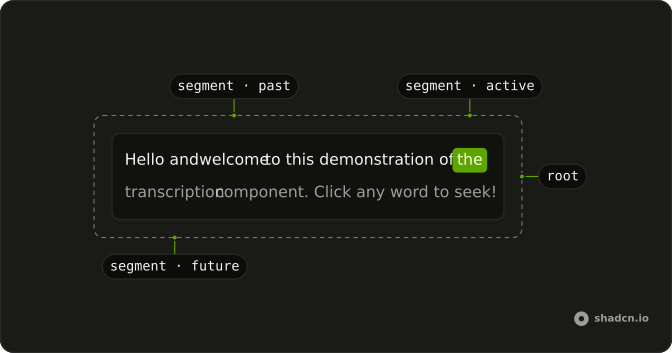
The transcript is split into segments, each with the second it starts and ends. As the audio plays, the segments already heard dim, the one playing turns to the primary color, and the rest wait in a lighter tone.
Use it under a voice reply, a recorded call or a meeting clip, fed the segments the AI SDK's transcribe returns. It plays nothing itself: pair it with Audio Player, or any player that reports its time. In React, the segments run inline, so a sentence wraps with the text around it, and with onSeek each one is a button that seeks the audio to its start.
Installation
Anatomy
Transcription
└── TranscriptionSegment (one per segment)
Usage
import { Transcription } from "@/components/ui/transcription";<Transcription currentTime={time} onSeek={setTime} segments={segments} />Without children, Transcription renders a TranscriptionSegment for each segment with words in it. Give it children to render them yourself, as the Timestamps demo does.
Accessibility
With onSeek, each segment is a button named by its text, and the one playing has aria-current. The transcript is one tab stop, on the segment playing (or the last one started), so Tab doesn't walk every word; the arrow keys move between segments in reading order. Without onSeek, the segments are plain text and none of them takes focus.
- Tab
- Moves focus to the segment playing, then out of the transcript.
- Arrow Right
- Next segment (previous in right-to-left text).
- Arrow Left
- Previous segment (next in right-to-left text).
- Home
- First segment.
- End
- Last segment.
- Enter
- Seeks to the focused segment.
- Space
- Seeks to the focused segment.
Demos
Player
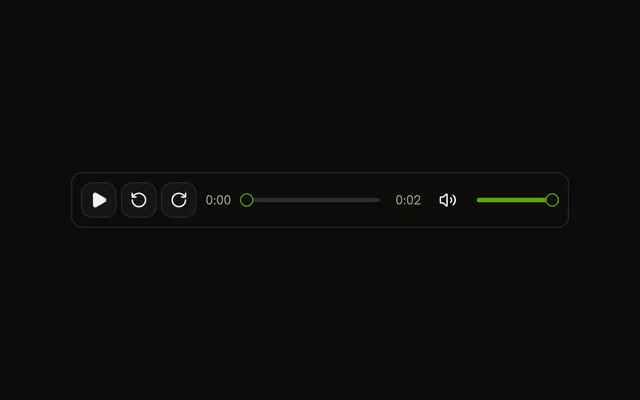
An Audio Player and the transcript share one time in state. The player reports it through onCurrentTimeChange, and a click on a sentence sets it through onSeek, which seeks the player.
Timestamps
The segments rendered by hand, each on a row after the second it starts. The transcript scrolls in its own box (max-h-28 overflow-y-auto), and while it plays it keeps the current segment in view, without scrolling the page.
Read only
Without onSeek, the segments are text: no buttons, no tab stop, no hover. defaultCurrentTime sets the position when nothing controls it, for a transcript that shows how far a message has been played.
AI SDK
transcribe returns the transcript's segments, already in the shape Transcription takes: text, startSecond and endSecond. Run it on the server and send the segments to the page.
import { openai } from "@ai-sdk/openai";
import { transcribe } from "ai";

export async function transcript(audio: URL) {
  const result = await transcribe({
    model: openai.transcription("whisper-1"),
    audio,
  });

  return result.segments;
}
Some models return the text without timings, and segments comes back empty. Show result.text as a paragraph then: there's nothing to follow.
Migrating from AI SDK Elements
If you added Transcription from AI SDK Elements (opens in a new tab), your project has a components/ai-elements/transcription.tsx. Install this one, import from @/components/ui/transcription instead, and delete the old file. segments, currentTime, onSeek and the two part names stay. What differs:
- Transcription takes no function as its child. Drop the child to render every segment, or map the segments yourself:
{segments.map((segment, index) => <TranscriptionSegment index={index} key={index} segment={segment} />)}. - TranscriptionSegment renders a
spanwith the button role, not abutton, so a sentence can wrap across lines. Its props are a span's. - Without
onSeek, segments are text instead of buttons, anddefaultCurrentTimesets the position whencurrentTimeisn't given.
FAQ
How do I keep Transcription in step with the audio?
Pass the player's position, in seconds, as currentTime, and update it as the audio plays. With Audio Player, keep the time in state and give the setter to its onCurrentTimeChange; with a plain audio element, read currentTime on its timeupdate event. A segment is current from its startSecond until its endSecond.
Can the reader click a segment to seek?
Yes, with onSeek: a click, or Enter and Space on a focused segment, calls it with that segment's startSecond. Set your player's time there. Without onSeek the segments are text, so a transcript that can't seek doesn't look clickable.
What shape does Transcription expect for its segments?
An array of { text, startSecond, endSecond }, the shape of segments from the AI SDK's transcribe, so its result goes in as it is. A segment can be a word, a phrase or a sentence. Segments with no text are skipped.
Can the reader use Transcription from the keyboard?
Yes. The transcript is a single tab stop, on the segment playing, so a long transcript doesn't take a Tab per word. The arrow keys move between segments in reading order, Home and End go to the first and last, and Enter or Space seeks to the focused one.
How do I keep a long transcript scrolled to the current segment?
Give Transcription a height and its own scroll, max-h-40 overflow-y-auto for instance. When the current segment changes and it's out of view, Transcription scrolls its own box to it, smoothly unless the reader asks for reduced motion. It never scrolls the page.
How do I style the segments or add timestamps?
Render the segments yourself as children: a TranscriptionSegment per segment, with anything around it, as the Timestamps demo does with a time on each row. Each segment has data-state set to past, active or future, for styles of your own beside className.
How do I install Transcription in React?
Run the command in the Installation section on this page. It adds one file to your ui folder, with no dependencies beyond the cn helper. Add Audio Player too if you want a player to pair it with.
The command uses the shadcn CLI.
API Reference
Transcription
segmentsTranscriptionSegmentData[]
The transcript, as the AI SDK's transcribe returns it.
currentTime?number
The playback position in seconds: the segment it falls in is current.
defaultCurrentTime?number
The position to start from when currentTime isn't given.
- Default
0
onSeek?(seconds: number) → void
Called with a segment's start, in seconds, when the reader picks it. Without it, the segments are text, not buttons.
- Parameters
seconds– number- Returns
void
className?string
Merged with the part's classes.
TranscriptionSegment
data-slot="transcription-segment"
segmentobject
The segment to show.
- Type
{ endSecond: number; startSecond: number; text: string }
index?number
Its place in the transcript, set as data-index.
className?string
Merged with the part's classes.
data-active?stringdata-index?string
Mirrors index.
data-state?string
Mirrors state.