shadcn.io is an independent project built on shadcn/ui
A package shows up as one card: its name, a badge for the kind of change, and the version it moved from and to. A description and its own dependencies can sit below.
Use it when an agent adds, removes or upgrades a dependency, so the reader sees each change before accepting it. A whole lockfile diff is too much for cards; show it in a Code Block. In React, Radix UI draws the card; the versions come from you.
Installation
Anatomy
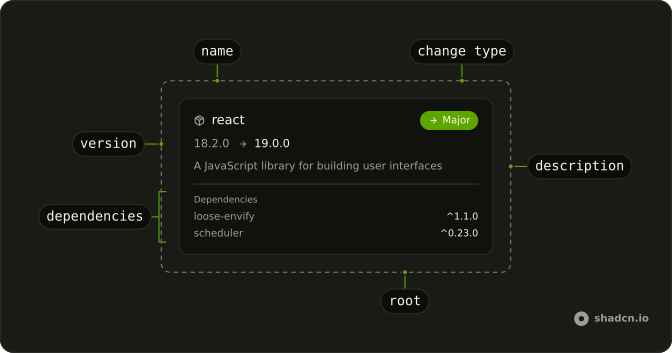
PackageInfo
├── PackageInfoHeader
│   ├── PackageInfoName
│   └── PackageInfoChangeType
├── PackageInfoVersion
├── PackageInfoDescription
└── PackageInfoContent
    └── PackageInfoDependencies
        └── PackageInfoDependency
PackageInfo holds name, currentVersion, newVersion and changeType, and the parts inside read them, so PackageInfoName, PackageInfoChangeType and PackageInfoVersion need no props of their own.
Usage
import {
  PackageInfo, PackageInfoChangeType, PackageInfoDescription,
  PackageInfoHeader, PackageInfoName, PackageInfoVersion,
} from "@/components/ui/package-info";<PackageInfo
changeType="major"
currentVersion="18.2.0"
name="react"
newVersion="19.0.0"
>
<PackageInfoHeader>
<PackageInfoName />
<PackageInfoChangeType />
</PackageInfoHeader>
<PackageInfoVersion />
<PackageInfoDescription>
A JavaScript library for building user interfaces
</PackageInfoDescription>
</PackageInfo>Demos
Change types
The five values of changeType, one package each: major in red, minor in amber, patch in green, added in blue and removed muted. Each is a Badge in its matching variant, with an arrow for a version change, a plus for an added package and a minus for a removed one. An added package has only newVersion, and a removed one only currentVersion, so its row shows one version and no arrow.
Dependencies
PackageInfoDependencies in PackageInfoContent, under a rule: one PackageInfoDependency per package, its name and version range. label renames the list, here with its count. List the dependencies when an upgrade pulls new ones in; for a patch nobody needs them.
Content
PackageInfoContent holds anything, here the breaking changes in a major upgrade, and PackageInfoDescription says what the agent changed to follow them. Use the content for what the reader has to check before accepting the upgrade, not for the package's whole changelog.
Props only
PackageInfo with no children draws the header and the version from its props: the name, the change type's badge when there is one, and the versions it has. Use it for a short list of changes; compose the parts when you need a description or dependencies.
AI SDK
Give the agent a tool that edits the dependencies and returns each change, updateDependencies in this example: the package's name, the version before and the version after. Work out the change type from the two versions:
function changeType(from?: string, to?: string) {
  if (!from) {
    return "added";
  }
  if (!to) {
    return "removed";
  }
  const [before, after] = [from, to].map((version) =>
    version.replace(/^[^\d]*/, "").split(".")
  );
  if (before[0] !== after[0]) {
    return "major";
  }
  return before[1] === after[1] ? "patch" : "minor";
}
Then render a PackageInfo for each change in each call whose output has arrived.
const changes = message.parts
  .filter((part) => part.type === "tool-updateDependencies")
  .filter((part) => part.state === "output-available")
  .flatMap((part) => part.output.changes);
Migrating from AI SDK Elements
If you added Package Info from AI SDK Elements (opens in a new tab), your project has a components/ai-elements/package-info.tsx. Install ours with the command above and import from @/components/ui/package-info instead: every part keeps its name and props, so the code that uses it keeps working. What changes:
PackageInfoChangeTypeis a Badge in the theme's variants (destructive,warning,success,infoandsecondary) instead of fixed reds and greens, andvariantpicks another one.PackageInfoDependenciestakeslabelfor its heading, Dependencies by default, and its list is aulofPackageInfoDependencyitems.- The arrows turn around in a right-to-left page, and screen readers hear "18.2.0 to 19.0.0".
FAQ
How do I install Package Info in React?
Run the command in the Installation section above: it adds package-info to your components/ui folder with the Badge it uses.
The command uses the shadcn CLI.
What change types does Package Info have?
Five, set with changeType on PackageInfo: major, minor, patch, added and removed. Each draws a Badge in its own color with an arrow, a plus or a minus. Without changeType, no badge renders. The Change types demo shows all five.
How do I show a version upgrade?
Pass currentVersion and newVersion to PackageInfo and add PackageInfoVersion: it shows the old version, an arrow and the new one in the text color. With only one of them, it shows that version alone, and with neither it renders nothing.
How do I list a package's dependencies?
Put PackageInfoDependencies in PackageInfoContent, with a PackageInfoDependency for each one: its name, and its version range when you have it. label changes the heading, as the Dependencies demo does.
How do I work out the change type from two versions?
Compare them: no old version is added, no new one is removed, a different first number is major, a different second is minor, and anything else is patch. The AI SDK section has the function.
API Reference
PackageInfo
namestring
The package's name, as in package.json.
changeType?PackageInfoChange
What kind of change it is: a semver bump, or the package added or removed.
- Default
== "removed" ? (
currentVersion?string
The version installed before the change.
newVersion?string
The version after it.
className?string
Merged with the part's classes.
- Default
{cn("mt-1 border-t pt-3"
PackageInfoChangeType
data-slot="package-info-change-type"
pill?boolean
Fully rounded corners.
size?"lg" | "md" | "sm"
The size.
- Type
"lg" | "md" | "sm"
variant?"default" | "destructive" | "ghost" | "info" | "link" | "outline" | "secondary" | "success" | "warning"
Ark default: default.
- Type
"default" | "destructive" | "ghost" | "info" | "link" | "outline" | "secondary" | "success" | "warning"- Default
CHANGE_VARIANTS[changeType]
asChild?boolean
Merge props onto the child element instead of rendering a host.
className?string
Merged with the part's classes.
data-change-type?string
Mirrors changeType.
PackageInfoContent
<div> data-slot="package-info-content"
className?string
Merged with the part's classes.
PackageInfoDependencies
<div> data-slot="package-info-dependencies"
label?string
The list's heading. * * @default "Dependencies".
- Default
"Dependencies"
className?string
Merged with the part's classes.
- Default
"flex flex-col gap-1">
PackageInfoDependency
<li> data-slot="package-info-dependency"
namestring
The dependency's name.
version?string
Its version range, such as ^1.1.0.
className?string
Merged with the part's classes.
PackageInfoDescription
<p> data-slot="package-info-description"
className?string
Merged with the part's classes.
PackageInfoHeader
<div> data-slot="package-info-header"
className?string
Merged with the part's classes.
PackageInfoName
<div> data-slot="package-info-name"
className?string
Merged with the part's classes.
PackageInfoVersion
<div> data-slot="package-info-version"
className?string
Merged with the part's classes.