shadcn.io is an independent project built on shadcn/ui
A button that shows the selected microphone and opens a searchable list of every audio input the browser sees.
Use it before recording, where a person may have a laptop microphone, a headset and a webcam at once and the browser's default isn't the one they speak into. The list follows the hardware: plug a microphone in and it appears, unplug it and it goes. In React, it's a Popover holding a Command, and it hands you the chosen deviceId: recording from it, with getUserMedia, is yours.
Installation
Anatomy
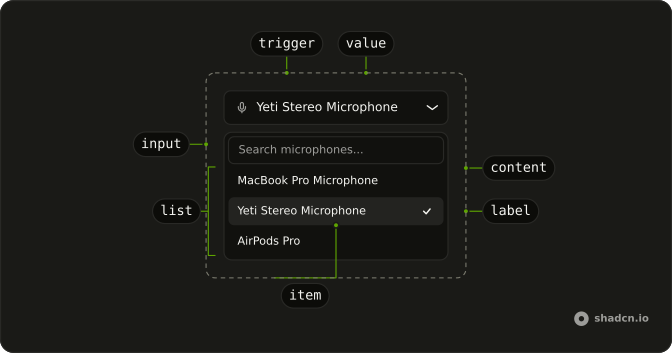
MicSelector
├── MicSelectorTrigger
│   └── MicSelectorValue
└── MicSelectorContent
    ├── MicSelectorInput
    └── MicSelectorList
        ├── MicSelectorEmpty
        └── MicSelectorItem (one per microphone)
            └── MicSelectorLabel
MicSelectorList renders the items itself, one per microphone with its label; its children are what shows when the search matches none.
Usage
import { MicIcon } from "lucide-react";
import { useState } from "react";
import {
  MicSelector, MicSelectorContent, MicSelectorEmpty, MicSelectorInput,
  MicSelectorList, MicSelectorTrigger, MicSelectorValue,
} from "@/components/ui/mic-selector";
export function MicrophonePicker() {
const [deviceId, setDeviceId] = useState<string>();
return (
<MicSelector onValueChange={setDeviceId} value={deviceId}>
<MicSelectorTrigger className="w-full">
<MicIcon aria-hidden="true" />
<MicSelectorValue />
</MicSelectorTrigger>
<MicSelectorContent>
<MicSelectorInput />
<MicSelectorList>
<MicSelectorEmpty />
</MicSelectorList>
</MicSelectorContent>
</MicSelector>
);
}Microphone access
Listing the microphones asks for nothing, but until the page may use the microphone the browser keeps their names to itself, and often the microphones too. So, until then, the list starts with an Allow microphone access row. Picking it shows the browser's prompt; once the person allows it, the list fills with every microphone by name. Opening the list never prompts on its own, and neither does loading the page.
Record from the chosen one by its deviceId:
const stream = await navigator.mediaDevices.getUserMedia({
  audio: { deviceId: { exact: deviceId } },
});
A name that ends with a USB vendor and product id, such as Yeti Stereo Microphone (046d:0ab7), shows the id muted after the name.
Demos
Devices
devices lists microphones of your own instead of the browser's: here five, the Yeti selected, as a page shows them once access is allowed. Pass it to show a list you keep yourself, or in tests and previews where there's no microphone. Each one needs a deviceId and a label, which a browser's MediaDeviceInfo has.
Audio Devices
useAudioDevices reads the browser's microphones from inside a MicSelector, for a part of your own: here a line under the trigger with how many there are, and a button that asks for access. Its loadDevices is what the Allow microphone access row calls.
Labels
Every word it shows can change: placeholder on MicSelectorValue, placeholder on MicSelectorInput, permissionLabel on MicSelectorList, and the children of MicSelectorEmpty. Here they're in French.
useAudioDevices
Called inside a MicSelector, it returns the browser's microphones, whether or not devices replaces them in the list.
| Field | What it is |
|---|---|
devices | The audio inputs as MediaDeviceInfo, kept current on devicechange |
hasPermission | Whether the page may use the microphone, so the devices have names |
loadDevices | Asks for the microphone, then lists the devices again with their names |
loading | Whether they're being listed |
error | Why they couldn't be listed or access was refused, else null |
Migrating from AI SDK Elements
If you added Mic Selector from AI SDK Elements (opens in a new tab), install this one and change the import from @/components/ai-elements/mic-selector to @/components/ui/mic-selector. The parts keep their names, and value, defaultValue, onValueChange, open and onOpenChange work the same. What differs:
MicSelectorListtakes no function: drop{(devices) => …}and keep<MicSelectorEmpty />as its child. It renders aMicSelectorItemandMicSelectorLabelper microphone itself.- Opening the list doesn't ask for the microphone: the Allow microphone access row does.
useAudioDevicesreturns the same fields, but reads theMicSelectoraround it instead of standing alone.MicSelectorContent's props go to the popover, andpopoverOptionsis gone. It matches the trigger's width without aResizeObserver.
FAQ
Why does Mic Selector show Allow microphone access instead of my microphones?
Browsers hide microphones' names, and usually the microphones themselves, until the page may use one. Pick the row and allow access in the browser's prompt, and the list fills in. Once access is allowed, for this visit or for good, the row is gone.
How do I record from the microphone picked in Mic Selector?
onValueChange gives you its deviceId. Pass it to getUserMedia as audio: { deviceId: { exact: deviceId } }, as the Microphone access section shows. Keep the id: it usually stays the same for this site in that browser, so the next visit can select it again.
Does Mic Selector update when a microphone is plugged in?
Yes. It lists the devices again on the browser's devicechange event, so a headset plugged in or out appears or goes while the page is open. A selected microphone that's unplugged leaves the trigger showing the placeholder.
How do I show Mic Selector without real microphones?
Pass devices, an array of deviceId and label pairs, as the Devices demo does. The list shows those and skips the access row. It's how to keep a list of your own, or to render it in tests and screenshots where there's no hardware.
Can Mic Selector be used with the keyboard?
Yes. Enter or Space on the trigger opens the list with the search focused; typing filters by name, the arrow keys move, Enter picks, and Escape closes. Focus goes back to the trigger, which reads out the microphone it shows.
Is this the same as AI SDK Elements' Mic Selector?
It has the same parts and props, so most code only changes its import. The list renders its own items instead of taking a function, and it asks for the microphone from a row rather than on open. The Migrating section lists every difference.
API Reference
MicSelector
open?boolean
Whether it's open (controlled).
defaultOpen?boolean
Whether it starts open, when uncontrolled.
- Default
false
onOpenChange?(open: boolean) → void
Called when it opens or closes.
- Parameters
open– boolean- Returns
void
value?string
The selected microphone's deviceId (controlled).
defaultValue?string
The microphone selected at first, when uncontrolled: its deviceId.
onValueChange?(value: string) → void
Called with the deviceId of the microphone picked.
- Parameters
value– string- Returns
void
devices?MicSelectorDevice[]
The microphones to list instead of the browser's: your own list, or a demo's. Without it, it lists the browser's.
modal?boolean
Whether it's modal: the rest of the page can't be reached and focus stays inside while it's open.
MicSelectorTrigger
data-slot="mic-selector-trigger"
clickEffect?boolean
Apply a click effect to the button.
- Default
true
isLoading?boolean
Show a loading indicator.
- Default
false
asChild?boolean
Merge props onto the child element instead of rendering a host.
className?string
Merged with the part's classes.
MicSelectorContent
data-slot="mic-selector-content"
align?(typeof ALIGN_OPTIONS)[number]
How it lines up with the trigger: start, center or end.
- Default
"start"
alignOffset?number
How far it shifts from its align position, in px.
arrowPadding?number
The space kept between the arrow and the content's corners, in px.
avoidCollisions?boolean
Whether it flips and shifts to stay in view.
collisionBoundary?Boundary | Boundary[]
The element or elements it stays inside. The viewport when unset.
- Type
Boundary | Boundary[]
collisionPadding?number | Partial<Record<Side, number>>
The distance it keeps from the boundary's edges, in px, or one per side.
- Type
number | Partial<Record<Side, number>>
deferPointerDownOutside?boolean
When true, a pointerdown event outside of the layered element will
wait for the interaction's click event before dispatching, allowing
third-party code to stop propagation of later events and cancel dismissal.
forceMount?true
Used to force mounting when more control is needed. Useful when controlling animation with React animation libraries.
hideWhenDetached?boolean
Whether it hides when its trigger is entirely out of view.
onCloseAutoFocus?{ bivarianceHack(event: Event): void; }["bivarianceHack"]
Event handler called when auto-focusing on close. Can be prevented.
- Type
{ bivarianceHack(event: Event): void; }["bivarianceHack"]
onEscapeKeyDown?{ bivarianceHack(event: KeyboardEvent): void; }["bivarianceHack"]
Event handler called when the escape key is down. Can be prevented.
- Type
{ bivarianceHack(event: KeyboardEvent): void; }["bivarianceHack"]
onFocusOutside?{ bivarianceHack(event: FocusOutsideEvent): void; }["bivarianceHack"]
Event handler called when the focus moves outside of the DismissableLayer.
Can be prevented.
- Type
{ bivarianceHack(event: FocusOutsideEvent): void; }["bivarianceHack"]
onInteractOutside?{ bivarianceHack(event: PointerDownOutsideEvent | FocusOutsideEvent): void; }["bivarianceHack"]
Event handler called when an interaction happens outside the DismissableLayer.
Specifically, when a pointerdown event happens outside or focus moves outside of it.
Can be prevented.
- Type
{ bivarianceHack(event: PointerDownOutsideEvent | FocusOutsideEvent): void; }["bivarianceHack"]
onOpenAutoFocus?{ bivarianceHack(event: Event): void; }["bivarianceHack"]
Event handler called when auto-focusing on open. Can be prevented.
- Type
{ bivarianceHack(event: Event): void; }["bivarianceHack"]
onPointerDownOutside?{ bivarianceHack(event: PointerDownOutsideEvent): void; }["bivarianceHack"]
Event handler called when the a pointerdown event happens outside of the DismissableLayer.
Can be prevented.
- Type
{ bivarianceHack(event: PointerDownOutsideEvent): void; }["bivarianceHack"]
side?(typeof SIDE_OPTIONS)[number]
The side of the trigger it opens on. It flips when there's no room, unless avoidCollisions is off.
sideOffset?number
The distance from the trigger, in px.
sticky?(typeof Sticky)[keyof typeof Sticky]
How it stays in view along its trigger: partial while the trigger is partly visible, always whatever the trigger does.
- Type
(typeof Sticky)[keyof typeof Sticky]
updatePositionStrategy?(typeof UpdatePositionStrategy)[keyof typeof UpdatePositionStrategy]
How often it updates its position: optimized, on layout changes, or always, every animation frame.
- Type
(typeof UpdatePositionStrategy)[keyof typeof UpdatePositionStrategy]
asChild?boolean
Merge props onto the child element instead of rendering a host.
className?string
Merged with the part's classes.
--radix-popover-trigger-widthstringMicSelectorInput
data-slot="mic-selector-input"
asChild?boolean
Merge props onto the child element instead of rendering a host.
MicSelectorList
data-slot="mic-selector-list"
permissionLabel?string
The row that asks for the microphone, shown until the page may use it.
- Default
"Allow microphone access"
asChild?boolean
Merge props onto the child element instead of rendering a host.
className?string
Merged with the part's classes.
MicSelectorEmpty
data-slot="mic-selector-empty"
asChild?boolean
Merge props onto the child element instead of rendering a host.
MicSelectorItem
data-slot="mic-selector-item"
valuestring
The microphone's deviceId.
asChild?boolean
Merge props onto the child element instead of rendering a host.
data-checked?stringMicSelectorLabel
<span> data-slot="mic-selector-label"
deviceobject
The microphone to name.
- Type
{ deviceId: string; label: string }
className?string
Merged with the part's classes.
MicSelectorValue
<span> data-slot="mic-selector-value"
placeholder?string
What it says before a microphone is selected.
- Default
"Select microphone..."
className?string
Merged with the part's classes.