shadcn.io is not affiliated with official shadcn/ui
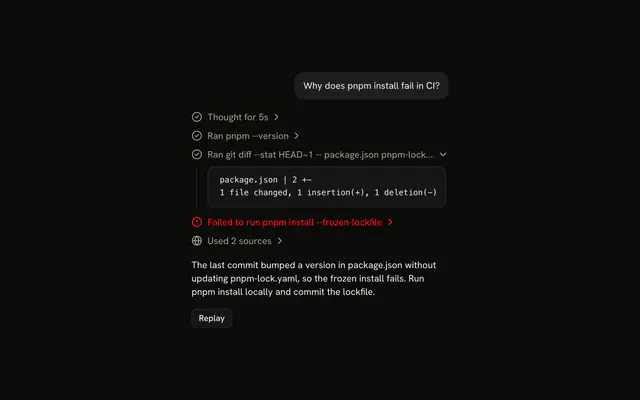
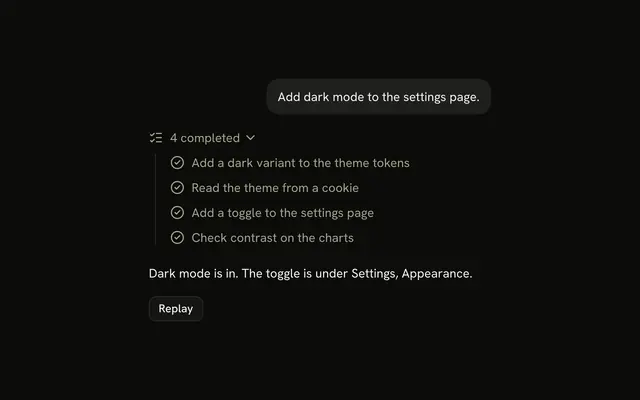
A line names the plan and counts the steps done, like 2 of 4 done, and opens onto the steps: the ones done are checked, the one running shimmers, the rest wait faded.
Use it for steps the agent decides on before it starts, such as the steps of a migration, so the reader sees the whole job and how far along it is. It is a Trace line that expands into a Trace of steps, so there is no Plan component to install in React. When the steps aren't known up front and appear as the agent finds them, use Task instead.
Installation
Plan is a pattern. The command adds the part it's built from, Trace, and the code to copy is the demo's.
Anatomy
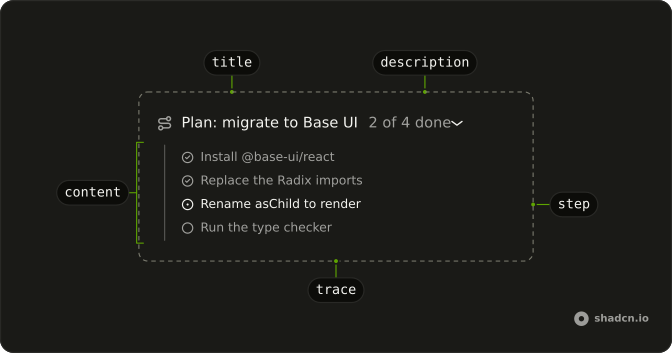
Trace
└── TraceCollapsible (the plan)
    ├── TraceCollapsibleTrigger
    │   └── TraceLine
    │       ├── TraceIcon
    │       ├── TraceTitle (Plan: migrate to Base UI)
    │       └── TraceDescription (2 of 4 done)
    └── TraceCollapsibleContent
        └── Trace (the steps)
            └── TraceLine (one per step: done, running or pending)
Usage
import {
  CircleCheckIcon, CircleDotIcon, CircleIcon, RouteIcon,
} from "lucide-react";
import {
  Trace, TraceCollapsible, TraceCollapsibleContent,
  TraceCollapsibleTrigger, TraceDescription, TraceIcon, TraceLine,
  TraceTitle,
} from "@/components/ui/trace";
export function Plan() {
return (
<Trace>
<TraceCollapsible>
<TraceCollapsibleTrigger>
<TraceLine status="running">
<TraceIcon>
<RouteIcon aria-hidden="true" />
</TraceIcon>
<TraceTitle>Plan: migrate to Base UI</TraceTitle>
<TraceDescription>1 of 3 done</TraceDescription>
</TraceLine>
</TraceCollapsibleTrigger>
<TraceCollapsibleContent>
<Trace>
<TraceLine>
<TraceIcon>
<CircleCheckIcon aria-hidden="true" />
</TraceIcon>
<TraceTitle>Replace the Radix imports</TraceTitle>
</TraceLine>
<TraceLine status="running">
<TraceIcon>
<CircleDotIcon aria-hidden="true" />
</TraceIcon>
<TraceTitle>Rename asChild to render</TraceTitle>
</TraceLine>
<TraceLine status="pending">
<TraceIcon>
<CircleIcon aria-hidden="true" />
</TraceIcon>
<TraceTitle>Run the type checker</TraceTitle>
</TraceLine>
</Trace>
</TraceCollapsibleContent>
</TraceCollapsible>
</Trace>
);
}Set defaultOpen on the plan's TraceCollapsible to show the steps at first, as the demos do.
Demos
Details
A plan to add dark mode, open, with one step done: a sentence on the approach sits above the steps, inside TraceCollapsibleContent, which stacks them with flex flex-col gap-3. Use it when the plan needs a reason the steps don't give, and keep it to one or two sentences: the steps are what the reader scans.
AI SDK
Stream the plan as a data part with a fixed id. The AI SDK replaces a data part with the same id, so it updates in place: send the whole plan again each time a step changes.
const stream = createUIMessageStream({
  execute: async ({ writer }) => {
    writer.write({ type: "data-plan", id: "plan", data: { title, steps } });
  },
});
const plan = message.parts.find((part) => part.type === "data-plan");Count the steps done for the description, and set "running" on the header and on the step in progress only while the chat streams, so the shimmer stops when the agent does.
Migrating from AI SDK Elements
If you added Plan from AI SDK Elements (opens in a new tab), your project has a components/ai-elements/plan.tsx wrapper. Paste this prompt into your coding agent to rebuild it on Trace. Every export keeps its name and props, so the code that uses it keeps working.
Migrate components/ai-elements/plan.tsx from AI SDK Elements to the shadcn.io Trace component.

Keep every export, with the same name and props, so the code that imports it keeps working. Only change how each part renders.

1. Read https://kit.dev/ui/radix/plan.md and build Plan the same way. If the project hasn't got Trace, run the command in its Installation section.
2. Rebuild each part:
   - Plan renders a Trace with a TraceCollapsible, instead of a Card. Pass isStreaming down in a context.
   - PlanHeader renders a TraceCollapsibleTrigger with a TraceLine. Set status="running" on the TraceLine while isStreaming is true, instead of the Shimmer.
   - PlanTitle renders a TraceTitle, and PlanDescription a TraceDescription, like "2 of 4 done".
   - PlanContent renders a TraceCollapsibleContent with a Trace for the steps.
   - PlanTrigger renders only its children, since the whole line opens the plan.
   - Buttons cannot sit inside a trigger. Render PlanAction next to the TraceCollapsibleTrigger, not inside it.
   - Keep PlanFooter as a plain container.
3. Remove the imports the file no longer uses.
4. Run the type checker and fix any errors.
FAQ
What does installing Plan add in React?
Trace, the part the plan and its steps are built from, with the Collapsible it opens on and the shimmer utility its running lines use. Plan is a pattern, so no plan file lands in your ui folder: copy the demo's code into your own component and change the steps. The command uses the shadcn CLI.
When should I use Plan instead of Task?
Use Plan when the agent knows its steps before it starts, so the reader sees the whole job and a count of what's done. Use Task when the steps appear as the agent works and there is no total to count against.
How does each step show where it is?
With its icon and its status: a check and no status when it's done, a dot and running while the agent works on it, an empty circle and pending until it starts. Running shimmers the title and pending fades it. Only set running while the chat streams, so a stopped agent doesn't look busy.
How does the plan update as the agent works?
The agent sends the whole plan again each time a step changes, as a data part with a fixed id, and the AI SDK replaces the old one in place. The demo does the same every 1.2 seconds: one more step done, the description's count up by one.
Can I put a button on the plan line, like Approve or Run?
Not inside the line: the line is in a trigger, which is already a button, and a button inside a button is invalid and unreachable by keyboard. Put the action next to the TraceCollapsibleTrigger or under the steps.
Can the reader open the plan with the keyboard?
Yes. The plan line is a button with aria-expanded: Tab reaches it, and Enter or Space opens or closes the steps. The steps are plain lines, so they are read but aren't tab stops. In a right-to-left page the chevron points to the inline end and the steps keep their order.
API Reference
Plan has no props of its own. The plan and each step are Trace lines: TraceLine takes each one's status, TraceDescription the count of steps done, and TraceCollapsible the open state.