shadcn.io is not affiliated with official shadcn/ui
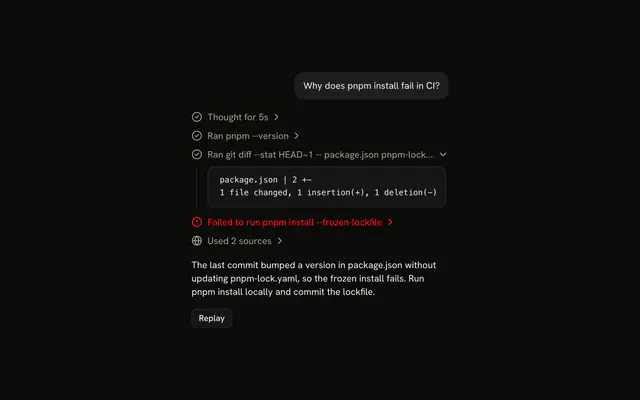
A line under the question reads Thinking while the model thinks, with the thinking streaming in under it, then reads Thought and folds shut when the answer starts.
Use it for a model's reasoning, so the reader can watch it while they wait and open it again later. It is a Trace line that expands, so there is no Reasoning component to install in React: the line is yours to edit, and it can say how long the model thought. Keep the thinking out of the answer's way: it closes once the model is done, and only the reader opens it again.
Installation
Reasoning is a pattern. The command adds the part it's built from, Trace, and the code to copy is the demo's.
Anatomy
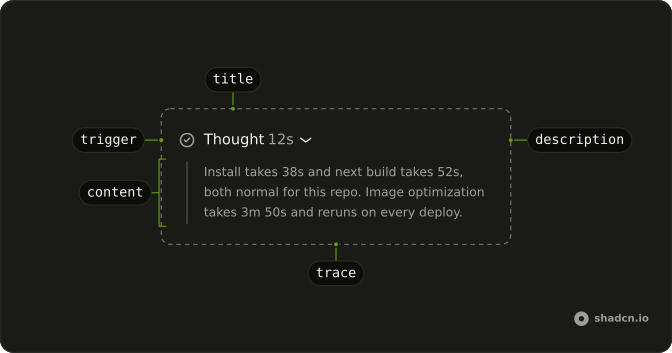
Trace
└── TraceCollapsible
    ├── TraceCollapsibleTrigger
    │   └── TraceLine (Thinking, then Thought)
    │       ├── TraceIcon
    │       ├── TraceTitle
    │       └── TraceDescription (how long it took)
    └── TraceCollapsibleContent (the thinking)
Usage
import { CircleCheckIcon } from "lucide-react";
import {
  Trace, TraceCollapsible, TraceCollapsibleContent,
  TraceCollapsibleTrigger, TraceIcon, TraceLine, TraceTitle,
} from "@/components/ui/trace";
export function Reasoning(props: { text: string }) {
return (
<Trace>
<TraceCollapsible>
<TraceCollapsibleTrigger>
<TraceLine>
<TraceIcon>
<CircleCheckIcon aria-hidden="true" />
</TraceIcon>
<TraceTitle>Thought</TraceTitle>
</TraceLine>
</TraceCollapsibleTrigger>
<TraceCollapsibleContent className="whitespace-pre-wrap">
{props.text}
</TraceCollapsibleContent>
</TraceCollapsible>
</Trace>
);
}Demos
Duration
A finished line that says how long the model thought: Thought, then 12s in a TraceDescription after the title. The AI SDK doesn't time reasoning, so measure it on the server, send it as message metadata, and show it here. Keep it to the number: the title already says what it counts.
<TraceLine>
  <TraceIcon>
    <CircleCheckIcon aria-hidden="true" />
  </TraceIcon>
  <TraceTitle>Thought</TraceTitle>
  <TraceDescription>{seconds}s</TraceDescription>
</TraceLine>
AI SDK
Render each reasoning part as a line. It starts as a plain TraceLine and becomes a TraceCollapsible once text arrives, so there is nothing to open before the model has written anything. It opens while the model thinks and closes when it finishes. If the reader opens or closes it, their choice wins: see Open.
function ReasoningLine({ text, running }: { text: string; running: boolean }) {
  const [open, setOpen] = useState<boolean>();

  const line = (
    <TraceLine status={running ? "running" : undefined}>
      <TraceIcon>
        {running ? (
          <LoaderCircleIcon aria-hidden="true" className="animate-spin" />
        ) : (
          <CircleCheckIcon aria-hidden="true" />
        )}
      </TraceIcon>
      <TraceTitle>{running ? "Thinking" : "Thought"}</TraceTitle>
    </TraceLine>
  );

  if (text.length === 0) {
    return line;
  }

  return (
    <TraceCollapsible onOpenChange={setOpen} open={open ?? running}>
      <TraceCollapsibleTrigger>{line}</TraceCollapsibleTrigger>
      <TraceCollapsibleContent className="whitespace-pre-wrap">
        {text}
      </TraceCollapsibleContent>
    </TraceCollapsible>
  );
}<Trace>
{message.parts
.filter((part) => part.type === "reasoning")
.map((part, index) => (
<ReasoningLine
key={index}
running={streaming && part.state === "streaming"}
text={part.text}
/>
))}
</Trace>Some models send several reasoning parts in one message. Each one is a line in the same Trace.
Migrating from AI SDK Elements
If you added Reasoning from AI SDK Elements (opens in a new tab), your project has a components/ai-elements/reasoning.tsx wrapper. Paste this prompt into your coding agent to rebuild it on Trace. Every export keeps its name and props, so the code that uses it keeps working.
Migrate components/ai-elements/reasoning.tsx from AI SDK Elements to the shadcn.io Trace component.

Keep every export, with the same name and props, so the code that imports it keeps working. Only change how each part renders.

1. Read https://kit.dev/ui/radix/reasoning.md and build Reasoning the same way. If the project hasn't got Trace, run the command in its Installation section.
2. Rebuild each part:
   - Reasoning renders a Trace with a TraceCollapsible. Keep isStreaming, open, defaultOpen, onOpenChange and duration, and the useReasoning context.
   - ReasoningTrigger renders a TraceCollapsibleTrigger with a TraceLine, a TraceIcon and a TraceTitle. Set status="running" while isStreaming is true, instead of the Shimmer. The title reads "Thinking" while it streams, then the duration, like "Thought for 5s".
   - ReasoningContent renders a TraceCollapsibleContent. Keep Streamdown for the text.
   - Keep the open behavior: open while it streams, close when it finishes, unless the person opened or closed it.
3. Remove the imports the file no longer uses.
4. Run the type checker and fix any errors.
FAQ
What does installing Reasoning add in React?
Trace, the part the line is built from, with the Collapsible it opens on and the shimmer utility its running title uses. Reasoning is a pattern, so no reasoning file lands in your ui folder: copy the demo's code into your own component. The command uses the shadcn CLI.
Why does the reasoning open on its own and then close?
So the reader can watch the model think while they wait, and the answer isn't pushed down once it starts. The line follows the running flag until the reader opens or closes it: hold the open state as undefined, and pass your state when there is one and the running flag when there isn't.
That is open ?? running, with your state set from onOpenChange.
Why is the line not a button before the thinking arrives?
There is nothing to show yet. Until the first words stream in, the line is a plain TraceLine that reads Thinking; once text arrives it becomes a TraceCollapsible with the same line in its trigger. A button that opens onto nothing would be a tab stop with no purpose.
How do I show how long the model thought?
Measure it on the server, since the AI SDK doesn't time reasoning, and send the seconds as message metadata. Show them in a TraceDescription after the title, as the Duration demo does, or in the title itself, like "Thought for 5s".
Does the running title respect reduced motion?
Yes. The shimmer on a running title stops for readers who ask for reduced motion, and so does the height animation when the line opens and closes. The title still says Thinking, so the state doesn't depend on the motion.
Can the reader open the reasoning with the keyboard?
Yes. Once it has text, the line is a button with aria-expanded: Tab reaches it, and Enter or Space opens or closes it. The chevron after the title turns when it opens, and points to the inline end in a right-to-left page.
Is this the same as AI SDK Elements' Reasoning?
It does the same job without a wrapper: Reasoning was a Collapsible with a shimmering trigger, and here it is a Trace line with status set to running. The Migrating from AI SDK Elements section has a prompt that rebuilds the old file on Trace and keeps its exports.
API Reference
Reasoning has no props of its own. The line is a Trace: TraceCollapsible holds the open state, TraceLine takes the status, and TraceDescription the duration.