shadcn.io is an independent project built on shadcn/ui
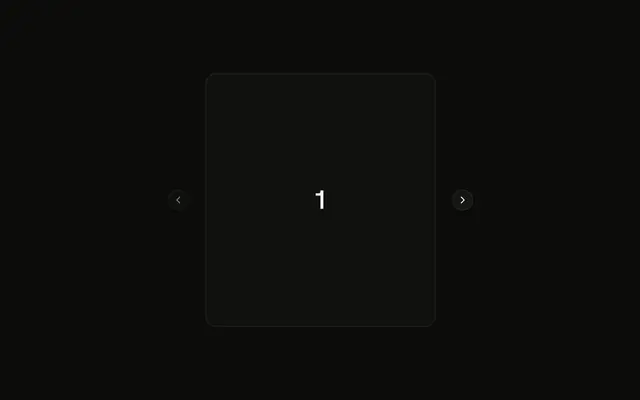
One message, several versions: the reader sees one at a time and flips between them with the arrows under it, which say "2 of 3".
Use it when a reply is regenerated or a prompt edited and the earlier version should stay: the reader can go back and compare. Each version is a MessageBranchItem around a Message, so the messages keep their own structure. In React, the selector shows only once there are two versions, so a message that was never regenerated looks like any other.
Installation
Anatomy
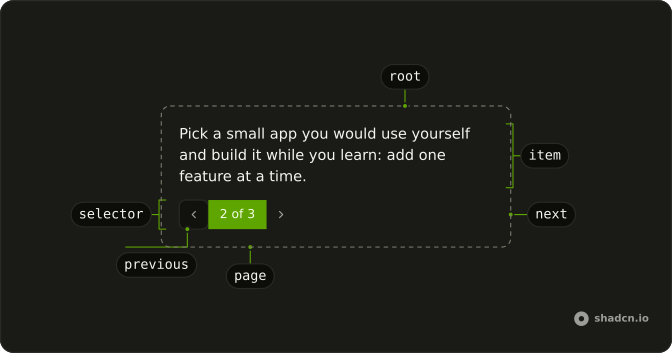
MessageBranch
├── MessageBranchContent
│   └── MessageBranchItem (one per version)
└── MessageBranchSelector
    ├── MessageBranchPrevious
    ├── MessageBranchPage
    └── MessageBranchNext
Usage
import { Message, MessageContent } from "@/components/ui/message";
import {
  MessageBranch, MessageBranchContent, MessageBranchItem,
  MessageBranchNext, MessageBranchPage, MessageBranchPrevious,
  MessageBranchSelector,
} from "@/components/ui/message-branch";<MessageBranch>
<MessageBranchContent>
{versions.map((version) => (
<MessageBranchItem key={version.id}>
<Message>
<MessageContent>{version.text}</MessageContent>
</Message>
</MessageBranchItem>
))}
</MessageBranchContent>
<MessageBranchSelector from="assistant">
<MessageBranchPrevious />
<MessageBranchPage />
<MessageBranchNext />
</MessageBranchSelector>
</MessageBranch>Demos
Regenerate
A reply with Copy and Regenerate in its footer, and the selector beside them. It starts with one version, so there is no selector; each Regenerate adds a version and shows it, through branch and onBranchChange. Put the whole message inside MessageBranch when the selector belongs in the message's own footer.
Edited Prompts
The person's prompt has two versions, each with the reply it got, so each MessageBranchItem holds a pair. defaultBranch opens on the latest edit, and from="user" puts the selector at the end, under the bubble. Use it when editing a prompt starts the conversation again from there.
AI SDK
regenerate replaces a reply with a new one. To keep the old one as a version, save it before you call it, under the prompt it answers.
const { messages, regenerate } = useChat();
const [replaced, setReplaced] = useState<Record<string, UIMessage[]>>({});

function retry(prompt: UIMessage, reply: UIMessage) {
  setReplaced({
    ...replaced,
    [prompt.id]: [...(replaced[prompt.id] ?? []), reply],
  });
  regenerate({ messageId: reply.id });
}
The reply's versions are the saved ones and the reply itself. A new reply has a new id, so keying the branch on it opens it on the newest version.
const versions = [...(replaced[prompt.id] ?? []), reply];

return (
  <MessageBranch defaultBranch={versions.length - 1} key={reply.id}>
    <MessageBranchContent>
      {versions.map((version) => (
        <MessageBranchItem key={version.id}>
          <Message>{/* the version's parts */}</Message>
        </MessageBranchItem>
      ))}
    </MessageBranchContent>
    <MessageBranchSelector from="assistant">
      <MessageBranchPrevious />
      <MessageBranchPage />
      <MessageBranchNext />
    </MessageBranchSelector>
  </MessageBranch>
);
Migrating from AI SDK Elements
AI SDK Elements keeps these parts in components/ai-elements/message.tsx, and an older project in components/ai-elements/branch.tsx as Branch, BranchMessages, BranchSelector, BranchPrevious, BranchNext and BranchPage. Run the command in Installation, then import the parts from @/components/ui/message-branch instead, under their MessageBranch names. What differs:
- Wrap each version in a
MessageBranchItem. Elements countedMessageBranchContent's children; here each version registers itself, so a version can sit in a fragment or a list, and the count is right in Vue, Svelte and Solid too. defaultBranchandonBranchChangeare the same;branchmakes it controlled.fromonMessageBranchSelectoris optional:userputs it at the end.- The selector is a
groupof ghost buttons rather than a ButtonGroup, the buttons say "Previous version" and "Next version", andMessageBranchPageis a live region.
FAQ
How do I show the versions of a regenerated reply in React?
Put MessageBranch around them, each version in a MessageBranchItem inside MessageBranchContent, and a MessageBranchSelector with the previous button, the page and the next button. The current version shows; the others stay in the page, hidden, so switching back is instant.
Why does each version need a MessageBranchItem?
So it can register with the branch: the selector counts what registered, in page order, rather than the children it was given. A version can then come from a list, a fragment or a component of your own, and it works the same way in React, Vue, Svelte and Solid.
When does the selector show?
Once there are two versions or more. A reply that was never regenerated has one, so it shows no arrows and no "1 of 1"; the first Regenerate brings the selector in, as in the Regenerate demo.
How do I show the newest version after a regenerate?
Control it: keep branch in state, pass onBranchChange, and set branch to the new version's index when you add it. Or set defaultBranch to the last index and key the branch on the newest reply's id, as the AI SDK section does.
What happens after the last version?
Next goes round to the first, and Previous from the first to the last, as in AI SDK Elements. Both buttons stay enabled while there are two versions or more.
Can the reader switch versions with the keyboard and a screen reader?
Yes. Previous and Next are buttons, named Previous version and Next version, in a group named Versions; Tab reaches them and Enter or Space presses them. The page is a polite live region, so "2 of 3" is read when it changes. The arrows point the other way in a right-to-left page.
Which version shows before the page hydrates?
The first. Versions register in the browser, so the server's HTML shows the first one and no selector; with defaultBranch set, the chosen version takes its place when the page hydrates. A chat rendered in the browser shows the chosen version from its first frame.
API Reference
MessageBranch
branch?number
The version shown, from 0, when controlled.
defaultBranch?number
The version shown at first, from 0, when uncontrolled.
- Default
0
onBranchChange?(branch: number) → void
Called with the version's index, from 0, when the reader moves to it.
- Parameters
branch– number- Returns
void
className?string
Merged with the part's classes.
MessageBranchContent
<div> data-slot="message-branch-content"
className?string
Merged with the part's classes.
MessageBranchItem
<div> data-slot="message-branch-item"
className?string
Merged with the part's classes.
data-pending?string
Present when pending is true.
data-state?string
"active" when active is true, otherwise "inactive".
MessageBranchSelector
data-slot="message-branch-selector"
from?"assistant" | "system" | "user"
Whose message it is, as AI SDK Elements takes it: a user's selector sits at the end.
- Type
"assistant" | "system" | "user"
className?string
Merged with the part's classes.
data-from?string
Mirrors from.
MessageBranchPrevious
data-slot="message-branch-previous"
clickEffect?boolean
Apply a click effect to the button.
- Default
true
isLoading?boolean
Show a loading indicator.
- Default
false
asChild?boolean
Merge props onto the child element instead of rendering a host.
className?string
Merged with the part's classes.
MessageBranchNext
data-slot="message-branch-next"
clickEffect?boolean
Apply a click effect to the button.
- Default
true
isLoading?boolean
Show a loading indicator.
- Default
false
asChild?boolean
Merge props onto the child element instead of rendering a host.
className?string
Merged with the part's classes.
MessageBranchPage
<span> data-slot="message-branch-page"
className?string
Merged with the part's classes.