shadcn.io is an independent project built on shadcn/ui
An animated avatar shows what the assistant is doing: it breathes while idle, draws ripples in while listening, churns while thinking, pulses like a voice while speaking, and dims when asleep.
Use it where the assistant needs a presence of its own: a voice chat, the header of a chat panel, the avatar beside its replies. It shows a state you set, so you decide what each step of your chat counts as. Don't use it for a loading indicator with no assistant behind it: a Spinner says that with less. In React, Persona is CSS on a few elements, with no canvas and no file to load.
Installation
The install adds the component and its CSS to your stylesheet: the clock, the state's weights and each variant's layers.
Anatomy
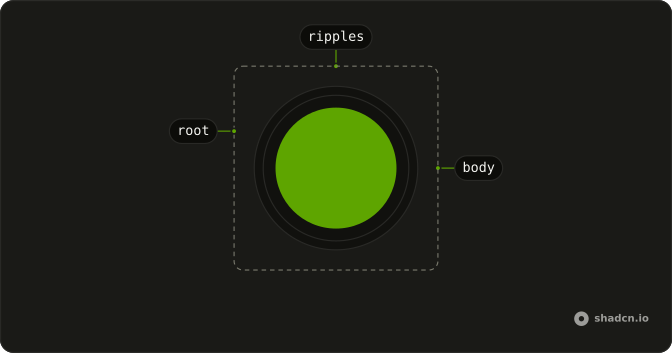
Persona (root: role="img", "Assistant is listening"; the box you size)
└── scene (hidden from assistive tech)
    ├── ripples (while listening)
    └── body (72% of the box: the stone, drop, orb, ring, sparkle or key)
Persona is one component. The scene inside it is the variant's drawing, a few layers of CSS that the state moves.
Usage
import { Persona } from "@/components/ui/persona";<Persona className="size-16" state="thinking" variant="opal" />Demos
Variants
The six values of variant, side by side, all in the state the buttons set. obsidian is a cut stone, halo a ring of light, glint a sparkle and command a terminal key, all drawn in the foreground, so they turn light on a dark page. mana, a drop of fluid, and opal, a glass orb, take the theme's primary and its two neighbours on the hue wheel. Pick one look per assistant and keep it: the state is what should change.
States
The five values of state for one variant at a time. idle breathes slowly. listening draws three ripples in toward the body, thinking churns (the stone's light sweeps round, the sparkle's sparks orbit, the cursor's dots light in turn), speaking swells on a voice-like rhythm, and asleep dims, drains the colour and slows the breath. A change of state blends over 0.7 s (1.4 s into sleep), so you can set it as often as your chat changes. Under reduced motion each state holds a still pose of its own instead.
Sizes
The same persona from size-8 to size-32. It fills its box, so size it with a class. Below 56px the body grows to fill more of the box and the ripples get less room, so it still reads as an avatar beside a message. The default is size-16.
Voice chat
A voice turn, simulated: the mic starts it, the question is heard word by word while the persona listens, it thinks, then it speaks the answer as the text arrives. The moon puts it to sleep. The line under the persona is a polite live region, so a screen reader hears the change of state that the picture shows. In your app, a recording button such as Speech Input goes where the mic is, and your audio's playing and ended events set speaking and idle.
Theming
Every colour comes from the theme's tokens. The foreground variants use --foreground, and their shading uses --background. Mana and opal mix --primary with the background and the foreground, and take the two neighbouring hues from it with oklch(from …). To give one persona its own accent, set --primary on it: className="size-16 [--primary:var(--color-sky-500)]". With a grey primary, mana and opal turn to pearl and slate.
AI SDK
Set state from the chat's status: submitted is the wait before the first token, streaming is the reply arriving.
const { status } = useChat();

const state: PersonaState =
  status === "submitted"
    ? "thinking"
    : status === "streaming"
      ? "speaking"
      : "idle";

return <Persona className="size-16" state={state} variant="opal" />;
In a voice chat, listening is while the microphone records, thinking while the recording is transcribed and the reply generated, and speaking while the reply's audio plays.
Migrating from AI SDK Elements
If you added Persona from AI SDK Elements (opens in a new tab), your project has a components/ai-elements/persona.tsx that plays Rive files. Install this one and import Persona from your ui folder instead: state and variant take the same values, and the six variants keep their names. What differs:
- No Rive. The
@rive-app/react-webgl2package and the.rivfiles it downloads are no longer needed, and the persona draws on the first paint. onReadyis called once, when the persona mounts.onLoad,onLoadError,onPlay,onPauseandonStopare gone: they reported on the Rive file and its playback, and there is none.stateis optional and defaults toidle.- Changing
variantneeds nokeyto remount, and a change ofstateblends. - Mana and opal follow your theme's primary instead of fixed colours.
FAQ
What does installing Persona add in React?
One component file in your ui folder, and its CSS in your stylesheet: two keyframes, five registered properties and a utility class for each layer. It has no dependencies: no animation library, no Rive runtime, no files to download. The command uses the shadcn CLI.
Which state should the Persona show, and when?
idle when it waits, listening while the person speaks or the mic records, thinking from the request to the first token, speaking while the reply streams or its audio plays, and asleep when the session pauses. Set state whenever your chat changes: each change blends from the last, so a quick run of changes never jumps.
Which Persona variants follow the theme?
All six. obsidian, halo, glint and command are drawn in the foreground, so they're dark on a light page and light on a dark one. mana and opal take the primary and two hues next to it. Set --primary on one persona to give it a colour of its own, as the Theming section shows.
What does the Persona do with reduced motion?
It stops. Each state keeps a still pose of its own: the ripples stand as rings while listening, the sparks or the cursor's dots hold their places while thinking, the voice's bars or swell hold one height while speaking, and asleep is smaller and dim. A change of state switches poses at once instead of blending.
What does a screen reader hear from the Persona?
It's an image named for its state, "Assistant is thinking", and its drawing is hidden. Pass aria-label to name it yourself, for example with your assistant's name. It doesn't announce changes on its own: put the state in a polite live region beside it, as the Voice chat demo does, if the change matters to someone who can't see it.
How big should the Persona be?
Any size: it fills its box, size-16 by default. size-8 sits beside a message, size-16 heads a chat panel, size-24 to size-32 lead a voice chat. Below 56px the body fills more of the box so the shape stays clear.
Does an animated Persona slow the page?
Little. Each persona runs a CSS clock that every layer reads with sin(), and three ripple rings; no script runs per frame. Its drawing isn't painted while it's off screen. Several on a page, a few dozen small layers each, are fine; hundreds in a long list are not, so use a still avatar for history and a Persona for the live turn.
How is this different from AI SDK Elements' Persona?
Same states, same six variant names, no Rive. AI SDK Elements plays a Rive file per variant; this one draws each in CSS from your theme, so it shows on the first paint and needs no runtime. The Rive callbacks are gone and onReady fires on mount. The Migrating section lists every difference.
API Reference
Persona
<div> data-slot="persona"
onReady?() → void
Called once, when the persona is on the page. AI SDK Elements calls it when its Rive file has loaded; this one has nothing to load.
- Returns
void
state?PersonaState
What the assistant is doing: idle breathes, listening draws
ripples in, thinking churns, speaking pulses like a voice, and
asleep dims and slows. A change eases from one to the next.
- Default
"idle"
variant?PersonaVariant
The look. obsidian (a cut stone), halo (a ring of light), glint
(a sparkle) and command (a terminal key) are drawn in the theme's
foreground; mana (a drop of fluid) and opal (a glass orb) in its
primary.
- Default
"obsidian"
className?string
Merged with the part's classes.
data-state?string
Mirrors state.
data-variant?string
Mirrors variant.
--persona-inkstring
The colour the ripples and glow are drawn in (the foreground; the primary for mana and opal).