shadcn.io is an independent project built on shadcn/ui
A button that opens a menu of chat apps, each a link that starts a new chat with your query already typed in.
Use it where a reader may want to keep going with their own assistant: under a docs page, beside a search result, at the end of an answer. Pass the question once as query and every item builds its app's link from it, with the encoding done. In React, it's a Dropdown Menu of links that open in a new tab: nothing is sent until the reader picks an app, and the chat itself happens there, not on your page.
Installation
Anatomy
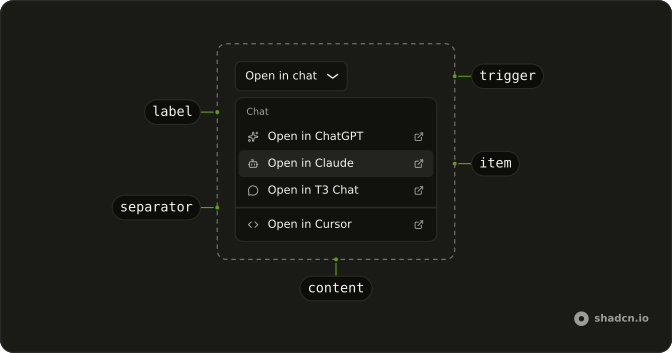
OpenIn
├── OpenInTrigger
└── OpenInContent
    ├── OpenInGroup
    │   ├── OpenInLabel
    │   ├── OpenInChatGPT
    │   ├── OpenInClaude
    │   ├── OpenInT3
    │   └── OpenInScira
    ├── OpenInSeparator
    ├── OpenInv0
    ├── OpenInCursor
    └── OpenInItem (one of your own)
OpenInTrigger draws an Open in chat button when it has no child. useOpenInContext reads the query from inside OpenIn, for an item of your own.
Usage
import {
  OpenIn, OpenInChatGPT, OpenInClaude, OpenInContent, OpenInCursor,
  OpenInTrigger,
} from "@/components/ui/open-in-chat";<OpenIn query="How can I implement authentication in Next.js?">
<OpenInTrigger />
<OpenInContent>
<OpenInChatGPT />
<OpenInClaude />
<OpenInCursor />
</OpenInContent>
</OpenIn>Providers
Each item is a link to its app with the query in the URL, opened in a new tab with rel="noopener noreferrer", so the app can't reach back into your page or see where the reader came from.
| Part | Opens | Query in |
|---|---|---|
OpenInChatGPT | https://chatgpt.com/ with search on | prompt |
OpenInClaude | https://claude.ai/new | q |
OpenInT3 | https://t3.chat/new | q |
OpenInScira | https://scira.ai/ | q |
OpenInv0 | https://v0.app | q |
OpenInCursor | https://cursor.com/link/prompt | text |
label replaces an item's text, Open in and the app's name. Each app reads its own parameter, so if one stops prefilling, check its URL before the component.
Demos
Labels
The six apps in two groups, Chat and Code, each an OpenInGroup with an OpenInLabel on top and an OpenInSeparator between them. label shortens each item to the app's name, since the heading already says what the menu does. Use groups when the list mixes chat apps with tools that build code, so the reader finds theirs at a glance.
Custom
Two items of your own beside the built-in ones: OpenInItem as a link to Perplexity, its URL built from the same query, and a Copy prompt item that copies the query and stays open to say it did. Use OpenInItem for an app the component doesn't know, and keep its link opening in a new tab like the rest.
Trigger
An Ask AI button of your own under an answer, with the question it answers as the query. Give OpenInTrigger your button and the menu opens from it, lined up with its start. Use a small ghost button where the menu is a side path, and the default outline button where opening the chat is the point.
Migrating from AI SDK Elements
If you added Open in Chat from AI SDK Elements (opens in a new tab), install this one and change the import from @/components/ai-elements/open-in-chat to @/components/ui/open-in-chat. Every part keeps its name and props, and each app's link is built the same way. What differs:
- The links open with
rel="noopener noreferrer", notnoopeneralone, so the apps don't see your page's address. OpenInSciratakes alabellike the others,OpenInGroupis new for labelled groups, anduseOpenInContextis exported for items of your own.- The menu opens lined up with the trigger's start, as
align="start"did.
FAQ
How do I install Open in Chat in React?
Run the command in the Installation section on this page. It adds open-in-chat to your ui folder with the Dropdown Menu and Button it's built from. The app marks are inline SVGs in the file, so there's no icon package beyond lucide.
The command uses the shadcn CLI.
Which apps can Open in Chat open?
ChatGPT, Claude, T3 Chat, Scira, v0 and Cursor, one part each, every one a link with the query in its URL. The Providers table lists each address and the parameter it reads. Use only the ones your readers have; an empty menu item is worse than a short menu.
How does Open in Chat pass the question to each app?
Set query on OpenIn: each item reads it and builds its link with URLSearchParams, so spaces, question marks and quotes arrive intact. Keep it to a question or a short prompt; a URL holds a few thousand characters, so link to a long page rather than pasting it.
How do I add another app to Open in Chat?
Add an OpenInItem with a link to it, as the Custom demo does for Perplexity: build its URL from the same query, and open it in a new tab with rel="noopener noreferrer". Inside OpenIn, useOpenInContext gives an item of your own the query.
Why does Open in Chat open a new tab?
So the reader keeps your page while the chat starts beside it. Each link has target="_blank" and rel="noopener noreferrer": the app gets the query and nothing else, neither a handle on your window nor the address it came from.
Can Open in Chat be used with the keyboard?
Yes. Enter, Space or the down arrow on the trigger opens the menu, and the arrow keys move through the apps. Enter opens the highlighted app in a new tab and closes the menu. Escape closes it without opening anything and puts focus back on the trigger.
Is this the same as AI SDK Elements' Open in Chat?
It has the same parts and props, so most code only changes its import. Links hide your page's address from the apps, Scira takes a label like the rest, and there's a group part for labelled groups. The Migrating section lists what differs on your stack.
API Reference
OpenIn
open?boolean
Whether it's open. Pair with onOpenChange to control it.
defaultOpen?boolean
Whether it starts open, when you don't control open.
onOpenChange?{ bivarianceHack(open: boolean): void; }["bivarianceHack"]
Called when it opens or closes.
- Type
{ bivarianceHack(open: boolean): void; }["bivarianceHack"]
querystring
The text to open each chat with: a question, a prompt or a page.
dir?"ltr" | "rtl"
The reading direction. Inherits the nearest DirectionProvider when unset.
- Type
"ltr" | "rtl"
modal?boolean
Whether it's modal: the rest of the page can't be reached and focus stays inside while it's open.
OpenInTrigger
data-slot="open-in-trigger"
asChild?boolean
Merge props onto the child element instead of rendering a host.
OpenInContent
data-slot="open-in-content"
align?(typeof ALIGN_OPTIONS)[number]
How it lines up with the trigger: start, center or end.
alignOffset?number
How far it shifts from its align position, in px.
arrowPadding?number
The space kept between the arrow and the content's corners, in px.
avoidCollisions?boolean
Whether it flips and shifts to stay in view.
collisionBoundary?Boundary | Boundary[]
The element or elements it stays inside. The viewport when unset.
- Type
Boundary | Boundary[]
collisionPadding?number | Partial<Record<Side, number>>
The distance it keeps from the boundary's edges, in px, or one per side.
- Type
number | Partial<Record<Side, number>>
forceMount?true
Used to force mounting when more control is needed. Useful when controlling animation with React animation libraries.
hideWhenDetached?boolean
Whether it hides when its trigger is entirely out of view.
loop?boolean
Whether keyboard navigation should loop around.
onCloseAutoFocus?{ bivarianceHack(event: Event): void; }["bivarianceHack"]
Event handler called when auto-focusing on close. Can be prevented.
- Type
{ bivarianceHack(event: Event): void; }["bivarianceHack"]
onEscapeKeyDown?{ bivarianceHack(event: KeyboardEvent): void; }["bivarianceHack"]
Called when Escape is pressed. Prevent its default to keep it open.
- Type
{ bivarianceHack(event: KeyboardEvent): void; }["bivarianceHack"]
onFocusOutside?{ bivarianceHack(event: FocusOutsideEvent): void; }["bivarianceHack"]
Called when focus moves outside it. Prevent its default to keep it open.
- Type
{ bivarianceHack(event: FocusOutsideEvent): void; }["bivarianceHack"]
onInteractOutside?{ bivarianceHack(event: PointerDownOutsideEvent | FocusOutsideEvent): void; }["bivarianceHack"]
Called on any pointer or focus interaction outside it. Prevent its default to keep it open.
- Type
{ bivarianceHack(event: PointerDownOutsideEvent | FocusOutsideEvent): void; }["bivarianceHack"]
onPointerDownOutside?{ bivarianceHack(event: PointerDownOutsideEvent): void; }["bivarianceHack"]
Called when a pointer goes down outside it. Prevent its default to keep it open.
- Type
{ bivarianceHack(event: PointerDownOutsideEvent): void; }["bivarianceHack"]
side?(typeof SIDE_OPTIONS)[number]
The side of the trigger it opens on. It flips when there's no room, unless avoidCollisions is off.
sideOffset?number
The distance from the trigger, in px.
sticky?(typeof Sticky)[keyof typeof Sticky]
How it stays in view along its trigger: partial while the trigger is partly visible, always whatever the trigger does.
- Type
(typeof Sticky)[keyof typeof Sticky]
updatePositionStrategy?(typeof UpdatePositionStrategy)[keyof typeof UpdatePositionStrategy]
How often it updates its position: optimized, on layout changes, or always, every animation frame.
- Type
(typeof UpdatePositionStrategy)[keyof typeof UpdatePositionStrategy]
asChild?boolean
Merge props onto the child element instead of rendering a host.
className?string
Merged with the part's classes.
OpenInItem
data-slot="open-in-item"
disabled?boolean
Whether it's disabled.
inset?boolean
Indents it to line up with items that have an icon or indicator.
onSelect?{ bivarianceHack(event: Event): void; }["bivarianceHack"]
Called when the item is selected, by pointer or keyboard. Prevent its default to keep the menu open.
- Type
{ bivarianceHack(event: Event): void; }["bivarianceHack"]
textValue?string
The text typeahead matches, when the item's content isn't plain text.
variant?"default" | "destructive"
The visual style.
- Type
"default" | "destructive"
asChild?boolean
Merge props onto the child element instead of rendering a host.
OpenInGroup
data-slot="open-in-group"
asChild?boolean
Merge props onto the child element instead of rendering a host.
OpenInLabel
data-slot="open-in-label"
inset?boolean
Indents it to line up with items that have an icon or indicator.
asChild?boolean
Merge props onto the child element instead of rendering a host.
OpenInSeparator
data-slot="open-in-separator"
asChild?boolean
Merge props onto the child element instead of rendering a host.
OpenInChatGPT
disabled?boolean
Whether the g pt is disabled.
inset?boolean
Indents it to line up with items that have an icon or indicator.
label?string
The item's text, in place of Open in and the app's name.
onSelect?{ bivarianceHack(event: Event): void; }["bivarianceHack"]
Called when the item is selected, by pointer or keyboard. Prevent its default to keep the menu open.
- Type
{ bivarianceHack(event: Event): void; }["bivarianceHack"]
textValue?string
The text typeahead matches, when the item's content isn't plain text.
variant?"default" | "destructive"
The visual style.
- Type
"default" | "destructive"
className?string
Merged with the part's classes.
OpenInClaude
disabled?boolean
Whether the de is disabled.
inset?boolean
Indents it to line up with items that have an icon or indicator.
label?string
The item's text, in place of Open in and the app's name.
onSelect?{ bivarianceHack(event: Event): void; }["bivarianceHack"]
Called when the item is selected, by pointer or keyboard. Prevent its default to keep the menu open.
- Type
{ bivarianceHack(event: Event): void; }["bivarianceHack"]
textValue?string
The text typeahead matches, when the item's content isn't plain text.
variant?"default" | "destructive"
The visual style.
- Type
"default" | "destructive"
className?string
Merged with the part's classes.
OpenInT3
disabled?boolean
Whether it's disabled.
inset?boolean
Indents it to line up with items that have an icon or indicator.
label?string
The item's text, in place of Open in and the app's name.
onSelect?{ bivarianceHack(event: Event): void; }["bivarianceHack"]
Called when the item is selected, by pointer or keyboard. Prevent its default to keep the menu open.
- Type
{ bivarianceHack(event: Event): void; }["bivarianceHack"]
textValue?string
The text typeahead matches, when the item's content isn't plain text.
variant?"default" | "destructive"
The visual style.
- Type
"default" | "destructive"
className?string
Merged with the part's classes.
OpenInScira
disabled?boolean
Whether the a is disabled.
inset?boolean
Indents it to line up with items that have an icon or indicator.
label?string
The item's text, in place of Open in and the app's name.
onSelect?{ bivarianceHack(event: Event): void; }["bivarianceHack"]
Called when the item is selected, by pointer or keyboard. Prevent its default to keep the menu open.
- Type
{ bivarianceHack(event: Event): void; }["bivarianceHack"]
textValue?string
The text typeahead matches, when the item's content isn't plain text.
variant?"default" | "destructive"
The visual style.
- Type
"default" | "destructive"
className?string
Merged with the part's classes.
OpenInv0
disabled?boolean
Whether it's disabled.
inset?boolean
Indents it to line up with items that have an icon or indicator.
label?string
The item's text, in place of Open in and the app's name.
onSelect?{ bivarianceHack(event: Event): void; }["bivarianceHack"]
Called when the item is selected, by pointer or keyboard. Prevent its default to keep the menu open.
- Type
{ bivarianceHack(event: Event): void; }["bivarianceHack"]
textValue?string
The text typeahead matches, when the item's content isn't plain text.
variant?"default" | "destructive"
The visual style.
- Type
"default" | "destructive"
className?string
Merged with the part's classes.
OpenInCursor
disabled?boolean
Whether the or is disabled.
inset?boolean
Indents it to line up with items that have an icon or indicator.
label?string
The item's text, in place of Open in and the app's name.
onSelect?{ bivarianceHack(event: Event): void; }["bivarianceHack"]
Called when the item is selected, by pointer or keyboard. Prevent its default to keep the menu open.
- Type
{ bivarianceHack(event: Event): void; }["bivarianceHack"]
textValue?string
The text typeahead matches, when the item's content isn't plain text.
variant?"default" | "destructive"
The visual style.
- Type
"default" | "destructive"
className?string
Merged with the part's classes.