shadcn.io is an independent project built on shadcn/ui
A round microphone button: press it and speak, press it again to stop, and what was said comes back as text.
Use it beside a prompt field, so a person can dictate instead of typing. Where the browser has speech recognition (Chrome, Edge, Safari) it listens with that; in Firefox it records instead and hands the audio to onAudioRecorded, your transcription service. In Vue, Ark UI draws the Button, and the text arrives through onTranscriptionChange one finished phrase at a time: where it goes, a field or a message, is yours to decide.
Installation
Anatomy
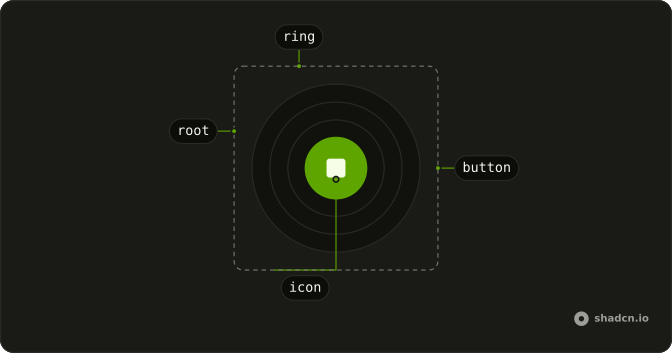
SpeechInput
├── rings (three, while it listens)
└── Button
className and every other Button prop go to the Button. The rings sit behind it, in a wrapper that carries data-state.
Usage
<script setup lang="ts">
import { SpeechInput } from "@/components/ui/speech-input";
</script>
<SpeechInput
  onTranscriptionChange={(text) => console.log(text)}
  size="icon-lg"
/>
States
The wrapper's data-state says which one it's in, and the Button's label changes with it, so a screen reader hears what a press does next.
data-state | What it shows | Label |
|---|---|---|
idle | A microphone | Start voice input |
listening | A stop square on the destructive look, with three rings pulsing out of it | Stop voice input |
processing | A spinner while onAudioRecorded transcribes a recording | Transcribing |
unsupported | The microphone, off: the browser can neither recognize nor record, or it can only record and there's no onAudioRecorded | Voice input isn't available in this browser |
The rings are CSS keyframes (speech-input-ring) that the install adds to your stylesheet. With reduced motion they don't show, and the stop square alone says it's listening.
How it listens
| Browser | How | What you give it |
|---|---|---|
| Chrome, Edge, Safari | The browser's speech recognition, which sends each finished phrase as it hears it | onTranscriptionChange |
| Firefox | A recording, from the press to the next press, handed to onAudioRecorded as a Blob | onAudioRecorded, which resolves with the text, and onTranscriptionChange |
| Neither, or the server | Nothing: the button is off, and says why |
It checks once it's mounted, so the server renders it as a plain microphone. It asks for the microphone only when pressed: the page never shows the browser's prompt on load.
Demos
Prompt Input
The microphone sits in an Input Group next to Send, as an outline button that turns into the stop button while it listens. Each phrase joins the draft with a space, so a person can type, dictate, and type again before sending. Don't send on each phrase: speech recognition splits a sentence wherever the speaker pauses.
Language
lang takes a BCP 47 tag, en-US unless you say otherwise. Here a Native Select sets it, and the next press listens in that language. Set it from the person's settings or the page's language rather than the browser's guess: recognition in the wrong language returns confident nonsense.
Sizes
size is the Button's: icon-sm in a dense toolbar, icon (the default) beside a field, icon-lg when the microphone is the main way in. It stays round at each size.
Variants
variant sets the idle look: default in your primary color, then secondary, outline and ghost. While it listens it always takes the destructive look, so stopping reads the same wherever the button sits.
AI SDK
Firefox has no speech recognition, so it needs a transcription service: the AI SDK's transcribe turns the recording into text on your server.
Call transcribe from ai in a server route (server/api/transcribe.post.ts in Nuxt) with the request's body as audio, and return { text }. Then hand the recording to it:
<script setup lang="ts">
import { ref } from "vue";

const input = ref("");

const transcribeAudio = async (audio: Blob) => {
  const response = await fetch("/api/transcribe", { body: audio, method: "POST" });
  const { text } = await response.json();
  return text;
};
</script>

<template>
  <SpeechInput
    :on-audio-recorded="transcribeAudio"
    @transcription-change="(text: string) => (input = `${input} ${text}`.trim())"
  />
</template>
Send the field's text with Chat's sendMessage({ text: input }) from @ai-sdk/vue.
Migrating from AI SDK Elements
AI SDK Elements is for React. In Vue, Speech Input takes the same props, and the demos above show them in Vue's syntax.
FAQ
How do I install Speech Input in Vue?
Run the command in the Installation section on this page. It adds speech-input to your ui folder with the Button it's built on, and the rings' keyframes to your stylesheet. It has no speech library underneath: the browser listens.
The command uses the shadcn-vue CLI.
How do I get the text from Speech Input?
Pass onTranscriptionChange. It's called with each phrase once it's final, not with the whole transcript, so append each one to what you have, as the demos do. In Firefox it's called once, with what onAudioRecorded resolved with.
Which browsers does Speech Input work in?
Chrome, Edge and Safari listen with their own speech recognition. Firefox has none, so there it records and needs onAudioRecorded to transcribe; without it the button is off there. Chrome sends the audio to its speech service, so recognition needs a connection.
Do I need a transcription service for Speech Input?
Only for browsers without speech recognition, Firefox today. Pass onAudioRecorded a function that sends the Blob to your service and resolves with its text; the button shows a spinner until it does. The AI SDK section does it with the AI SDK's transcribe.
When does Speech Input ask for the microphone?
On the first press, never on load: the browser shows its prompt then. If the person refuses, it goes back to idle and the next press asks again, as far as the browser allows. Pages served over plain HTTP can't use the microphone at all.
How do I change the language Speech Input listens for?
Pass lang a BCP 47 tag, such as fr-FR or ja-JP; it's en-US by default. The next press listens in that language, as the Language demo shows. In Firefox the recording goes to your service, so tell the service the language too.
What does Speech Input show while it records?
Three rings pulse out of the button and the microphone turns into a stop square, on your theme's destructive colors. With reduced motion the rings don't show, and the label changes to Stop voice input for screen readers.
Is this the same as AI SDK Elements' Speech Input?
It takes the same props and listens the same way, so changing the import is enough in most projects. It defaults to a round icon size, uses your theme's destructive look while recording, and labels each state. The Migrating section lists the differences.
API Reference
SpeechInput
<span> data-slot="speech-input"
clickEffect?boolean
Apply a click effect to the button.
- Default
true
isLoading?boolean
Show a loading indicator.
- Default
false
lang?string
The language it listens for, a BCP 47 tag.
- Default
"en-US"
asChild?boolean
Use the provided child element as the default rendered element, combining their props and behavior.
class?string
Merged with the part's classes.
@audio-recorded(audioBlob: Blob) → Promise<string>
Where the browser has no speech recognition (Firefox), it records instead and hands the recording to this: send it to your transcription service and resolve with its text. Without it, the button stays off in those browsers.
- Type
(audioBlob: Blob) → Promise<string>- Parameters
audioBlob– Blob- Returns
Promise<string>
@transcription-change(text: string) → void
Called with each piece of text it hears, once that piece is final.
- Parameters
text– string- Returns
void
data-state?string
Mirrors state.