shadcn.io is an independent project built on shadcn/ui
A dialog of text-to-speech voices to search and pick from, each with a button that plays it first.
Use it where a person chooses how your assistant sounds: a settings row, the first run of a voice mode, a read-aloud app. Each voice shows its name, a line on how it sounds, and its gender, accent and age, so the list reads before anything plays. In Vue, it's a Dialog holding a Command: it hands you the picked voice's value, and the play button only reports the press. Playing the sample, and speaking with the voice, is yours.
Installation
Anatomy
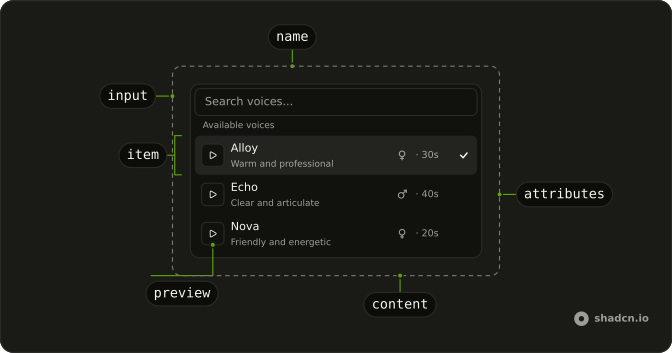
VoiceSelector
├── VoiceSelectorTrigger
└── VoiceSelectorContent
    ├── VoiceSelectorInput
    └── VoiceSelectorList
        ├── VoiceSelectorEmpty
        ├── VoiceSelectorGroup
        │   └── VoiceSelectorItem (one per voice)
        │       ├── VoiceSelectorPreview
        │       ├── VoiceSelectorName
        │       ├── VoiceSelectorDescription
        │       ├── VoiceSelectorAttributes
        │       │   ├── VoiceSelectorGender
        │       │   ├── VoiceSelectorBullet
        │       │   ├── VoiceSelectorAccent
        │       │   └── VoiceSelectorAge
        │       └── VoiceSelectorShortcut
        └── VoiceSelectorSeparator
Picking a voice sets value and closes the dialog. useVoiceSelector reads the picked value and the open state from inside a VoiceSelector, for a part of your own.
Usage
import { useListCollection } from "@ark-ui/react/collection";
import { useFilter } from "@ark-ui/react/locale";
import { useState } from "react";
import { Button } from "@/components/ui/button";
import {
  VoiceSelector, VoiceSelectorContent, VoiceSelectorDescription,
  VoiceSelectorEmpty, VoiceSelectorGroup, VoiceSelectorInput,
  VoiceSelectorItem, VoiceSelectorList, VoiceSelectorName,
  VoiceSelectorTrigger,
} from "@/components/ui/voice-selector";
const voices = [
{ description: "Warm and professional", label: "Alloy", value: "alloy" },
{ description: "Clear and articulate", label: "Echo", value: "echo" },
];
export function VoicePicker() {
const [voice, setVoice] = useState<string>();
const { contains } = useFilter({ sensitivity: "base" });
const { collection, filter } = useListCollection({
filter: contains,
initialItems: voices,
});
return (
<VoiceSelector onValueChange={setVoice} value={voice}>
<VoiceSelectorTrigger asChild>
<Button variant="outline">{voice ?? "Select a voice..."}</Button>
</VoiceSelectorTrigger>
<VoiceSelectorContent
collection={collection}
onInputValueChange={(details) => filter(details.inputValue)}
>
<VoiceSelectorInput placeholder="Search voices..." />
<VoiceSelectorList>
<VoiceSelectorEmpty>No voices found.</VoiceSelectorEmpty>
<VoiceSelectorGroup heading="Voices">
{collection.items.map((item) => (
<VoiceSelectorItem item={item} key={item.value}>
<div className="flex flex-col">
<VoiceSelectorName>{item.label}</VoiceSelectorName>
<VoiceSelectorDescription>
{item.description}
</VoiceSelectorDescription>
</div>
</VoiceSelectorItem>
))}
</VoiceSelectorGroup>
</VoiceSelectorList>
</VoiceSelectorContent>
</VoiceSelector>
);
}
The voices are a collection, as Command's are: VoiceSelectorContent takes it with onInputValueChange to filter it, and each VoiceSelectorItem takes one of its items.
Demos
Attributes
Six voices from two providers in groups, a separator between them. Under each name, VoiceSelectorAttributes lines up the voice's gender, accent and age with a word on its tone, VoiceSelectorBullet between each. Use it when the list is long enough that people choose by trait before they listen. VoiceSelectorGender draws one of six symbols and VoiceSelectorAccent a flag, each with its name for screen readers.
Preview
Each VoiceSelectorPreview speaks a line in the browser's own speech synthesis, at the voice's pitch and rate. It shows a spinner until the speech starts, pause while it plays, and play again when it ends; pressing it never picks the voice. Swap the synthesis for an <audio> element and each voice's sample URL to play a provider's real voices. Stop the sample when the dialog closes.
Shortcuts
VoiceSelectorShortcut at each row's end, from Alt+1 to Alt+4, and a key listener that picks the voice while the dialog is open. The shortcut is a hint: binding the keys is yours. Use it for a short list people switch between often, and keep the picked voice's check beside it.
Controlled
A settings row that holds open and value itself, with a Change button that opens the dialog and a line that shows the picked voice. Control open to open the dialog from somewhere other than a trigger, such as a menu item or the first run of a voice mode.
AI SDK
The picked value is the voice the speech model speaks with. Send it with the text to a route that calls generateSpeech, and play the audio that comes back:
import { openai } from "@ai-sdk/openai";
import { generateSpeech } from "ai";

export async function POST(request: Request) {
  const { text, voice } = await request.json();
  const { audio } = await generateSpeech({
    model: openai.speech("gpt-4o-mini-tts"),
    text,
    voice,
  });

  return new Response(audio.uint8Array, {
    headers: { "Content-Type": audio.mediaType },
  });
}
The same route can make each voice's preview: call it once per voice with a short line, and keep the files rather than paying for a sample on every press.
Migrating from AI SDK Elements
AI SDK Elements is for React. In Vue, Voice Selector has the same parts and props, and the demos above show them in Vue's syntax.
FAQ
How does the play button in Voice Selector play a voice?
It doesn't: VoiceSelectorPreview calls onPlay and you play the sample, then set loading while it loads and playing while it plays. The Preview demo speaks with the browser's speech synthesis; an <audio> element and a sample URL per voice play a provider's real voices.
How do I get the voice someone picks in Voice Selector?
onValueChange gives you its value, and picking closes the dialog. Pass value to control it, or defaultValue to start from one, and send the value to your speech model, as the AI SDK section does. The picked voice shows a check in the list.
What does the search in Voice Selector match?
Whatever your collection's filter matches. The demos match the voice's label; filter on the description or accent too by writing your own filter function for useListCollection.
Which genders and accents can Voice Selector show?
VoiceSelectorGender draws a symbol for male, female, transgender, androgyne, non-binary and intersex, and a small circle for anything else. VoiceSelectorAccent shows a flag for 35 accents, from american to vietnamese. Both read the name to screen readers, and children replace the drawing.
How do I open Voice Selector from my own button?
Control it: hold open in your state, set it from the button and update it from onOpenChange, as the Controlled demo does. The dialog still closes on Escape, a click outside, or a pick, and tells you through onOpenChange.
Can Voice Selector be used with the keyboard?
Yes. The trigger opens the dialog with the search focused; typing filters, the arrow keys move through the voices, Enter picks one and Escape closes. Tab reaches the play buttons, where Enter and Space play the sample without picking the voice.
Is this the same as AI SDK Elements' Voice Selector?
It has the same parts and props, so most code only changes its import. The title also takes a description, the accents read their names aloud, and the picked voice shows a check. The Migrating section lists what differs on your stack.
API Reference
VoiceSelector
open?boolean
Whether the dialog is open, when controlled. Two-way with v-model:open.
defaultOpen?boolean
Whether the dialog starts open, when uncontrolled.
- Default
false
triggerValue?string | null
The controlled active trigger value. Two-way with v-model:triggerValue.
- Type
string | null
defaultTriggerValue?string | null
The initial active trigger value when rendered. Use when you don't need to control the active trigger value.
- Type
string | null
value?string
The picked voice's value, when controlled. Two-way with v-model.
defaultValue?string
The voice picked at first, when uncontrolled.
closeOnEscape?boolean
Whether to close the dialog when the escape key is pressed.
- Default
true
closeOnInteractOutside?boolean
Whether to close the dialog when the outside is clicked.
- Default
true
dir?"ltr" | "rtl"
The document's text/writing direction.
- Type
"ltr" | "rtl"- Default
"ltr"
finalFocusEl?() → MaybeElement
Element to receive focus when the dialog is closed.
- Returns
MaybeElement
hideMode?"display-none" | "activity"
How to hide content when mounted but not present.
- display-none: HTML hidden attribute. Effects stay alive.
- activity: React 19 <Activity mode="hidden">. Effects pause. Requires React 19+.
- Type
"display-none" | "activity"- Default
"display-none"
id?string
The unique identifier of the machine.
ids?object
The ids of the elements in the dialog. Useful for composition.
- Type
{ root?: string; label?: string; control?: string; input?: string; content?: string; trigger?: string; clearTrigger?: string; item?: (id: string, index?: number) → string; positioner?: string; itemGroup?: (id: string | number) → string; itemGroupLabel?: (id: string | number) → string }
immediate?boolean
Whether to synchronize the present change immediately or defer it to the next frame.
initialFocusEl?() → MaybeElement | false
Element to receive focus when the dialog is opened.
Return false to skip moving focus, or null to use the default.
- Type
() → MaybeElement | false- Returns
MaybeElement | false
lazyMount?boolean
Whether to enable lazy mounting.
- Default
false
modal?boolean
Whether to prevent pointer interaction outside the element and hide all content below it.
- Default
true
onEnterComplete?VoidFunction
Function called when the animation ends in the open state.
onExitComplete?VoidFunction
Function called when the animation ends in the closed state.
persistentElements?Array<() → Element | null>
Returns the persistent elements that: - should not have pointer-events disabled - should not trigger the dismiss event
- Type
Array<() → Element | null>
present?boolean
Whether the node is present (controlled by the user).
preventScroll?boolean
Whether to prevent scrolling behind the dialog when it's opened.
- Default
true
restoreFocus?boolean
Whether to restore focus to the element that had focus before the dialog was opened.
role?"dialog" | "alertdialog"
The dialog's role.
- Type
"dialog" | "alertdialog"- Default
"dialog"
skipAnimationOnMount?boolean
Whether to allow the initial presence animation.
- Default
false
trapFocus?boolean
Whether to trap focus inside the dialog when it's opened.
- Default
true
unmountOnExit?boolean
Whether to unmount on exit.
- Default
false
@open-change(open: boolean) → void
Called when the dialog opens or closes.
- Parameters
open– boolean- Returns
void
@trigger-value-change(details: TriggerValueChangeDetails) → void
Function to call when the active trigger changes.
- Type
(details: TriggerValueChangeDetails) → void- Parameters
details– { value: string | null; triggerElement: HTMLElement | null }- Returns
void
@value-change(value: string) → void
Called with a voice's value when one is picked.
- Parameters
value– string- Returns
void
@escape-key-down(event: KeyboardEvent) → void
Function called when the escape key is pressed.
- Parameters
event– { altKey: boolean; charCode: number; ctrlKey: boolean; code: string; getModifierState: (key: string) → boolean; key: string; keyCode: number; locale: string; location: number; metaKey: boolean; repeat: boolean; shiftKey: boolean; which: number }- Returns
void
@focus-outside(event: FocusOutsideEvent) → void
Function called when the focus is moved outside the component.
- Type
(event: FocusOutsideEvent) → void- Parameters
event– FocusOutsideEvent- Returns
void
@interact-outside(event: InteractOutsideEvent) → void
Function called when an interaction happens outside the component.
- Type
(event: InteractOutsideEvent) → void- Parameters
event– InteractOutsideEvent- Returns
void
@pointer-down-outside(event: PointerDownOutsideEvent) → void
Function called when the pointer is pressed down outside the component.
- Type
(event: PointerDownOutsideEvent) → void- Parameters
event– PointerDownOutsideEvent- Returns
void
@request-dismiss(event: LayerDismissEvent) → void
Function called when this layer is closed due to a parent layer being closed.
- Type
(event: LayerDismissEvent) → void- Parameters
event– LayerDismissEvent- Returns
void
data-invalid?string
Present when invalid is true.
data-readonly?string
Present when readOnly is true.
VoiceSelectorTrigger
data-slot="voice-selector-trigger"
value?string
The value that identifies this specific trigger.
asChild?boolean
Use the provided child element as the default rendered element, combining their props and behavior.
data-invalid?string
Present when invalid is true.
data-readonly?string
Present when readOnly is true.
VoiceSelectorInput
data-slot="voice-selector-input"
size?InputProps["size"]
The size of the input.
- Default
"md"
asChild?boolean
Use the provided child element as the default rendered element, combining their props and behavior.
data-invalid?string
Present when invalid is true.
data-readonly?string
Present when readOnly is true.
VoiceSelectorList
data-slot="voice-selector-list"
asChild?boolean
Use the provided child element as the default rendered element, combining their props and behavior.
class?string
Merged with the part's classes.
data-invalid?string
Present when invalid is true.
data-readonly?string
Present when readOnly is true.
VoiceSelectorEmpty
data-slot="voice-selector-empty"
asChild?boolean
Use the provided child element as the default rendered element, combining their props and behavior.
data-invalid?string
Present when invalid is true.
data-readonly?string
Present when readOnly is true.
VoiceSelectorGroup
data-slot="voice-selector-group"
heading?string | VNode
The heading of the group.
- Type
string | VNode
asChild?boolean
Use the provided child element as the default rendered element, combining their props and behavior.
data-invalid?string
Present when invalid is true.
data-readonly?string
Present when readOnly is true.
VoiceSelectorItem
data-slot="voice-selector-item"
itemany
The item to render.
persistFocus?boolean
Whether hovering outside should clear the highlighted state.
asChild?boolean
Use the provided child element as the default rendered element, combining their props and behavior.
class?string
Merged with the part's classes.
data-invalid?string
Present when invalid is true.
data-readonly?string
Present when readOnly is true.
VoiceSelectorShortcut
data-slot="voice-selector-shortcut"
asChild?boolean
Use the provided child element as the default rendered element, combining their props and behavior.
data-invalid?string
Present when invalid is true.
data-readonly?string
Present when readOnly is true.
VoiceSelectorSeparator
data-slot="voice-selector-separator"
data-invalid?string
Present when invalid is true.
data-readonly?string
Present when readOnly is true.
VoiceSelectorGender
<span> data-slot="voice-selector-gender"
value?VoiceSelectorGenderValue
The voice's gender, drawn as its symbol and read out as its name.
class?string
Merged with the part's classes.
VoiceSelectorAccent
<span> data-slot="voice-selector-accent"
value?string
The accent, such as british: shown as its country's flag.
class?string
Merged with the part's classes.
VoiceSelectorAge
<span> data-slot="voice-selector-age"
class?string
Merged with the part's classes.
VoiceSelectorName
<span> data-slot="voice-selector-name"
class?string
Merged with the part's classes.
VoiceSelectorDescription
<span> data-slot="voice-selector-description"
class?string
Merged with the part's classes.
VoiceSelectorAttributes
<div> data-slot="voice-selector-attributes"
class?string
Merged with the part's classes.
VoiceSelectorBullet
<span> data-slot="voice-selector-bullet"
class?string
Merged with the part's classes.
VoiceSelectorPreview
data-slot="voice-selector-preview"
clickEffect?boolean
Apply a click effect to the button.
- Default
true
isLoading?boolean
Show a loading indicator.
- Default
false
loading?boolean
Shows a spinner and disables the button while the sample loads.
pill?boolean
Fully rounded corners.
- Default
false
playing?boolean
Shows pause instead of play while the sample plays.
size?"default" | "icon" | "icon-lg" | "icon-md" | "icon-sm" | "icon-xl" | "icon-xs" | "lg" | "md" | "sm" | "xl" | "xs"
The size.
- Type
"default" | "icon" | "icon-lg" | "icon-md" | "icon-sm" | "icon-xl" | "icon-xs" | "lg" | "md" | "sm" | "xl" | "xs"- Default
"md"
variant?"default" | "destructive" | "ghost" | "link" | "outline" | "secondary"
The visual style.
- Type
"default" | "destructive" | "ghost" | "link" | "outline" | "secondary"- Default
"default"
asChild?boolean
Use the provided child element as the default rendered element, combining their props and behavior.
class?string
Merged with the part's classes.
@play() → void
Called on press. Play or pause the sample here.
- Returns
void
data-invalid?string
Present when invalid is true.
data-readonly?string
Present when readOnly is true.