shadcn.io is not affiliated with official shadcn/ui
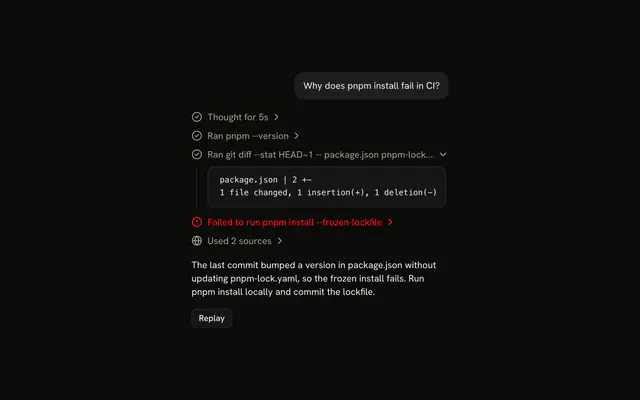
Under the reply, one line says how many pages the agent read for it, like Used 3 sources, and opens into a link to each one.
Use Sources when the agent searched or read the web to answer, so the reader can check where the answer came from. Each source is a Trace line inside a link, so there is no Sources component to install in Vue: the list is yours to edit. List each page once, with its title, and keep the count in the line so it reads closed. To point at the claim a source backs, in the text itself, use an Inline Citation.
Installation
Sources is a pattern. The command adds the part it's built from, Trace, and the code to copy is the demo's.
Anatomy
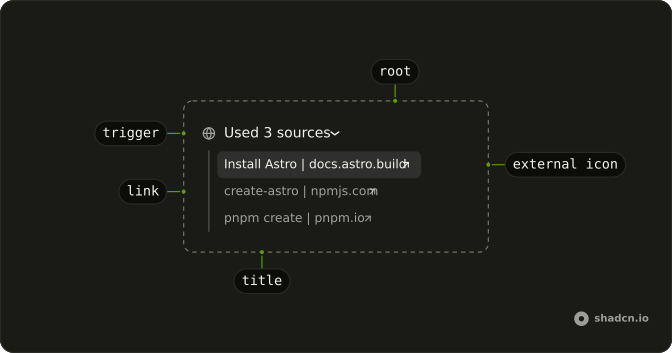
Trace
└── TraceCollapsible
    ├── TraceCollapsibleTrigger
    │   └── TraceLine (Used 3 sources)
    └── TraceCollapsibleContent
        └── Trace
            └── a (one per source, in a new tab)
                └── TraceLine
                    ├── TraceIcon
                    ├── TraceTitle (its title, and "(opens in a new tab)")
                    └── TraceIcon (an arrow up and out)
Usage
<script setup lang="ts">
import { ArrowUpRightIcon, GlobeIcon } from "lucide-vue-next";
import {
  Trace, TraceCollapsible, TraceCollapsibleContent,
  TraceCollapsibleTrigger, TraceIcon, TraceLine, TraceTitle,
} from "@/components/ui/trace";
</script>
export function Sources(props: { sources: { title?: string; url: string }[] }) {
  return (
    <Trace>
      <TraceCollapsible>
        <TraceCollapsibleTrigger>
          <TraceLine>
            <TraceIcon>
              <GlobeIcon aria-hidden="true" />
            </TraceIcon>
            <TraceTitle>Used {props.sources.length} sources</TraceTitle>
          </TraceLine>
        </TraceCollapsibleTrigger>
        <TraceCollapsibleContent>
          <Trace>
            {props.sources.map((source) => (
              <a
                href={source.url}
                key={source.url}
                rel="noreferrer"
                target="_blank"
              >
                <TraceLine>
                  <TraceIcon>
                    <GlobeIcon aria-hidden="true" />
                  </TraceIcon>
                  <TraceTitle>
                    {source.title ?? new URL(source.url).hostname}
                    <span className="sr-only"> (opens in a new tab)</span>
                  </TraceTitle>
                  <TraceIcon>
                    <ArrowUpRightIcon
                      aria-hidden="true"
                      className="rtl:-scale-x-100"
                    />
                  </TraceIcon>
                </TraceLine>
              </a>
            ))}
          </Trace>
        </TraceCollapsibleContent>
      </TraceCollapsible>
    </Trace>
  );
}
AI SDK
Collect the source-url parts of a message and render them after the text. The agent can cite the same page more than once, so dedupe them by url.
import { Chat } from "@ai-sdk/vue";

const chat = new Chat({});

// For each message in chat.messages:
const sourcesOf = (message: (typeof chat.messages)[number]) =>
  message.parts
    .filter((part) => part.type === "source-url")
    .filter(
      (part, index, all) =>
        all.findIndex((other) => other.url === part.url) === index
    );
title is optional on a source-url part. Fall back to the hostname of the URL.
Accessibility
Each source is a plain link inside the list.
- Links open in a new tab. Add
sr-onlytext, like "(opens in a new tab)", so screen readers announce it. - The arrow icon is decorative. The title is the name of the link.
- The count in the trigger, like "Used 3 sources", tells the person what opens before they open it.
Migrating from AI SDK Elements
AI SDK Elements is for React. In Vue, start from the demo above: its line and links are all there is to Sources.
FAQ
What does installing Sources add in Vue?
Trace, the one part the list is built from, with the Collapsible its line opens on. Sources is a pattern, so no sources file lands in your ui folder: copy the demo's code into your own component and pass it the reply's sources. The command uses the shadcn-vue CLI.
Why dedupe the sources?
The agent can cite the same page more than once in one reply, as the demo's agent cites the Astro docs twice. The list shows each page once, and the count in the line counts pages, not citations, so dedupe by URL before you count.
What if a source has no title?
Show the hostname of its URL, like pnpm.io. A title is optional on the AI SDK's source-url part, and a bare hostname still tells the reader which site they're about to open. Don't show the full URL: it truncates into noise.
When should the line appear?
Under the reply's text, once the message has at least one source, so the line never sits between the reader and the answer. In the demo the sources arrive with the last word. A reply with no sources has no line, rather than Used 0 sources.
Should the links open in a new tab?
Yes, so the reader keeps their place in the chat. Each link has target="_blank" and rel="noreferrer", ends in an arrow up and out, and says "(opens in a new tab)" to screen readers. The arrow flips in a right-to-left page.
Should I use Sources or Inline Citation?
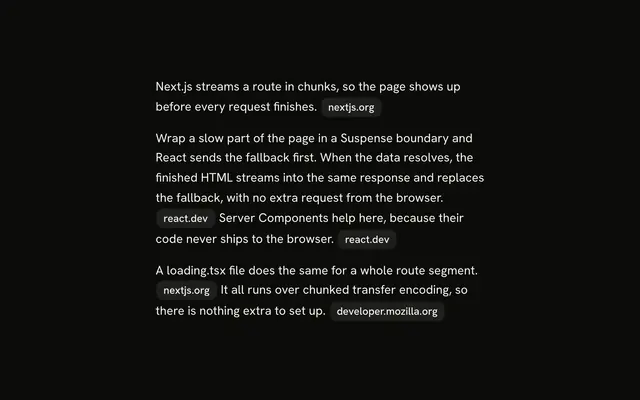
Sources lists every page under the reply; an Inline Citation marks the sentence a page backs, in the text. Use Sources when the reader wants to see where the answer came from, and add inline citations when they need to check one claim at a time.
Is this the same as AI SDK Elements' Sources?
It does the same job without a wrapper: Sources, SourcesTrigger, SourcesContent and Source were components of their own, and here they are a Trace line that opens and a link around each line. AI SDK Elements is for React, so there is nothing to migrate in Vue: start from the demo.
API Reference
Sources has no props of its own. The list is a TraceCollapsible whose title counts the pages, and each source is a link around a TraceLine: see Trace.