shadcn.io is not affiliated with official shadcn/ui
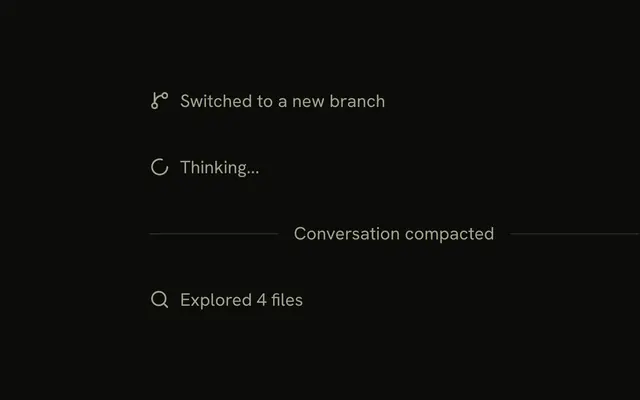
An agent's work shows up as short lines under the question: what it read, what it ran, what failed.
Use Trace for those steps, one line each, in the same column as the reply. A line can expand to show its output, link to a page, or open a dialog or a sheet. The reply itself is a Message, and a note between turns is a Marker. In React, Base UI runs the lines that expand; every other part is plain markup.
Installation
Anatomy
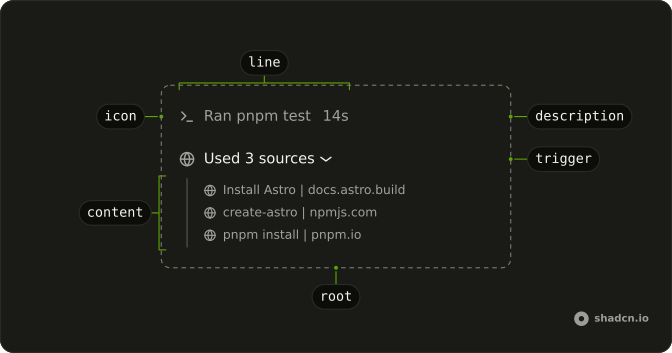
A line on its own:
Trace
└── TraceLine
    ├── TraceIcon
    ├── TraceTitle
    ├── TraceDescription
    └── TraceIcon
A line that expands:
Trace
└── TraceCollapsible
    ├── TraceCollapsibleTrigger
    │   └── TraceLine
    └── TraceCollapsibleContent
TraceLine is always the line. To make a line do something, wrap it in that thing's trigger: a collapsible, a link, a dialog or a sheet.
Usage
import { SearchIcon, TerminalIcon } from "lucide-react";
import {
  Trace, TraceCollapsible, TraceCollapsibleContent,
  TraceCollapsibleTrigger, TraceIcon, TraceLine, TraceTitle,
} from "@/components/ui/trace";<Trace className="max-w-sm">
<TraceLine>
<TraceIcon>
<SearchIcon aria-hidden="true" />
</TraceIcon>
<TraceTitle>Searched for minimumReleaseAge</TraceTitle>
</TraceLine>
<TraceCollapsible>
<TraceCollapsibleTrigger>
<TraceLine>
<TraceIcon>
<TerminalIcon aria-hidden="true" />
</TraceIcon>
<TraceTitle>Ran node --version</TraceTitle>
</TraceLine>
</TraceCollapsibleTrigger>
<TraceCollapsibleContent>v24.18.0</TraceCollapsibleContent>
</TraceCollapsible>
</Trace>Features
- One line for reasoning, tool calls, sources, plans and tasks, so they all look and behave the same
- Lines that expand, link out, or open a dialog, a sheet, a drawer or a popover
running,errorandpendingstates, with a shimmer on the title while a step runs- Nested lines, so a summary expands into steps and a step into its output
- Keyboard and screen reader support from whatever wraps each line
- The same parts and props as shadcn/ui's Trace, on every base
Built with Trace
These patterns are compositions of Trace's parts, with no code of their own.
| Pattern | Shows |
|---|---|
| Chain of Thought | A summary that expands into the steps behind it. |
| Plan | The steps the agent plans to take, and how far it has got. |
| Queue | The agent's todo list, split into what is left and what is done. |
| Reasoning | The agent's thinking as it streams. |
| Sources | The links the agent used for a reply. |
| Stack Trace | A failed tool call and its stack frames. |
| Subagent | A subagent run, with its tool calls and result. |
| Task | The steps the agent takes, as it takes them. |
| Terminal | A command the agent runs, with its output as it streams. |
| Test Results | A test run by the agent, with its suites and failures. |
| Tool | A tool call the agent makes, from input to output. |
Accessibility
Trace adds no roles of its own. Each line takes its meaning from the element that wraps it.
- A
TraceLineon its own is aspan: read as text, and not a tab stop. - In a
TraceCollapsibleTriggerit is a button witharia-expanded. In a link, or in a dialog's or a sheet's trigger, it takes that element's keyboard and focus behavior. TraceIconis hidden from assistive tech, soTraceTitleis the line's name. Write it as a sentence that says what happened, like "Edited trace.tsx", not just "trace.tsx".- A link that opens a new tab says so in its title, with "(opens in a new tab)" in an
sr-onlyspan. - Status is color and motion, so the title says it too: "Running pnpm build" while it runs, "Failed to run pnpm build" when it fails.
- The shimmer on a running title stops for readers who ask for reduced motion, and so does the height animation of a line that expands.
TraceCollapsibleContentmutes its text. A block with a muted background inside it needstext-foregroundto keep its contrast.
- Enter
- On a line that expands, opens or closes it. On a link or a dialog's trigger, follows it or opens the dialog.
- Space
- On a line that expands, opens or closes it.
- Tab
- Moves to the next line that does something. A plain line is skipped.
- Shift+Tab
- Moves to the previous line that does something.
Demos
Static
A trace line on its own: a branch icon and a title, and nothing to open. A TraceLine on its own is plain text: no button, no tab stop. Use it for a step that has no detail worth showing, and don't wrap it in a trigger just so every line looks clickable.
Status
Four lines, one per value of status: none for work that is done, error for a failed lint, running for a build in progress, pending for a test that hasn't started. The line sets data-status, so error turns the line destructive, running shimmers the title and pending fades it. Write the title in the matching tense, because the color alone says nothing to a screen reader.
Description
Secondary text after the title: a diff stat in a mono face, a duration, a result count. TraceDescription never truncates, so the title gives way first when the line runs out of room, as the long file path does here. Keep it to a number or a word; a sentence belongs in the title. The diff stat has dir="ltr" so it still reads +48 −12 in a right-to-left page.
Collapsible
A command line that opens to show its output in a Code Block. TraceLine goes inside TraceCollapsibleTrigger, which adds the chevron after it, and the output goes in TraceCollapsibleContent, under a rule. Use it when the detail is worth a look but not worth the room until someone asks.
Open
Two command lines, to show the open state: the first starts open, the second is opened by the button under them as well as by its own trigger. Lines start closed.
Set defaultOpen to start one open, or hold open yourself and update it in onOpenChange.
To keep a line open while it streams and let the reader's click win, pass your state when there is one and the running flag when there isn't (open ?? running), as the Thinking demo does.
Link
Two lines wrapped in anchors: one to a file in the app, one to a page that opens in a new tab. The Trace styles any link or trigger that wraps a TraceLine, so it hovers and takes focus as a row. The new-tab line ends in an arrow up and out and says "(opens in a new tab)" to screen readers; the in-app one ends in a chevron.
Dialog
A web search line that opens its results in a Dialog. The line sits inside the dialog's trigger, and the dialog owns its open state, Escape and the return of focus. Use it when the detail is long enough to need its own surface.
Sheet
The same shape as the dialog, with the files an agent read in a Sheet from the side. A drawer and a popover work the same way: the line goes inside their trigger. Pick a sheet when the reader wants the transcript beside the detail.
Group
Three plain lines in one Trace: a search, a file read, a command. Lines that sit next to each other belong in the same list, which spaces them and styles the triggers and links that wrap them. Start a new Trace when text from the reply breaks the run.
Sources
A line that opens into a Trace of links, one per source the reply used, each opening in a new tab. It starts open here with defaultOpen. Use it for the citations under an answer, and keep the count in the title so it reads closed.
Steps
A chain of thought: a running summary that expands into the steps behind it: a search with the domains it hit, a link to the deploys it read, and a search still in progress. Set the parent's status and title from its children, so the summary says running while any step does. Keep the steps short: each is a line, and its detail belongs one level down.
Commit
A commit that expands into a line per changed file: Added or Edited in the title, the line counts in the description, and each file's diff in a Sheet. Use it after an agent commits, so the reader can check the change without leaving the chat.
Turn
A whole turn, in three levels: the turn, a summary of its commands, and the commands themselves, one of which failed. The failure is carried up to every title above it. Text the agent wrote between the steps sits between two Trace lists, not inside one.
Thinking
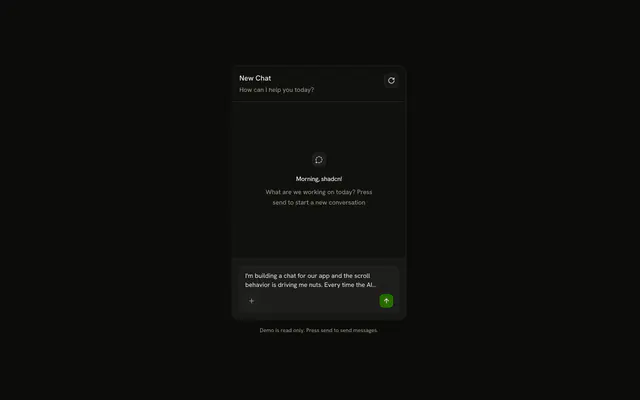
Reasoning: the agent's thinking as it streams, under the question: press Send message to play it. The line reads Thinking with a shimmer until the reasoning ends, opens while it runs and folds shut when the answer starts, unless the reader opened or closed it first. With the AI SDK, this is a reasoning part: the line until its first text arrives, then a line that expands.
Tool Calls
Tool calls: three commands, run one after another: two answer, the third fails because pnpm isn't installed. Each line reads Running while it waits and Ran or Failed to run once it has its output, which opens in a Code Block. With the AI SDK, these are tool parts: input-available is running, output-available and output-error are done.
FAQ
How do I make a Trace line expand in React?
Wrap it: TraceCollapsible around a TraceCollapsibleTrigger that holds the TraceLine, and the detail in TraceCollapsibleContent. The trigger is the button and adds the chevron, which turns when the line opens and points to the inline end in a right-to-left page. Keep the TraceLine inside the trigger rather than making the line itself the button.
How do I keep a line open while it streams?
Hold the open state as undefined until the reader clicks, and pass your state or the running flag.
Pass open={open ?? running} and set your state from onOpenChange, which receives the new boolean.
The line opens while it runs and closes when it's done, until the reader opens or closes it, after which their choice wins.
Do nested lines keep their state when their parent closes?
Yes: closed content stays mounted and hidden, so the lines inside keep their open state.
Pass keepMounted={false} on TraceCollapsibleContent to remove it while closed instead.
Closed content is hidden from the keyboard and from screen readers either way.
How do I open a dialog or a sheet from a Trace line?
Put the TraceLine inside the overlay's trigger, as the Dialog and Sheet demos do, and the overlay brings its own focus handling and Escape.
The trigger renders a button around the line, so nothing else is needed.
How do I show that a step is running or failed?
Set status on TraceLine to running, error or pending. Running shimmers the title, error turns the line destructive, pending fades it. Say the same in the title, since color and motion don't reach a screen reader, and put a spinner in TraceIcon if the step takes a while.
Where does the running shimmer come from, and does it respect reduced motion?
From the shimmer utility, which the install adds with Trace, so a running title works without any CSS of your own. It stops for readers who ask for reduced motion, as does the height animation of a line that expands. Stop a spinning icon the same way with motion-reduce:animate-none.
API Reference
Trace
<div> data-slot="trace"
className?string
Merged with the part's classes.
TraceCollapsible
open?boolean
Whether the collapsible panel is currently open.
To render an uncontrolled collapsible, use the defaultOpen prop instead.
defaultOpen?boolean
Whether the collapsible panel is initially open.
To render a controlled collapsible, use the open prop instead.
- Default
false
onOpenChange?(open: boolean, eventDetails: CollapsibleRootChangeEventDetails) → void
Event handler called when the panel is opened or closed.
- Type
(open: boolean, eventDetails: CollapsibleRootChangeEventDetails) → void- Parameters
open– booleaneventDetails– CollapsibleRootChangeEventDetails- Returns
void
disabled?boolean
Whether the component should ignore user interaction.
- Default
false
render?ReactElement | ((props: object, state: object) => ReactElement)
Replace the host element or compose it with another component.
- Type
ReactElement | ((props: object, state: object) => ReactElement)
className?string
Merged with the part's classes.
TraceCollapsibleContent
data-slot="trace-collapsible-content"
disableAnimation?boolean
Opens and closes it at once, without the height animation.
hiddenUntilFound?boolean
Allows the browser's built-in page search to find and expand the panel contents.
Overrides the keepMounted prop and uses hidden="until-found"
to hide the element without removing it from the DOM.
- Default
false
keepMounted?boolean
Whether to keep the element in the DOM while the panel is hidden.
This prop is ignored when hiddenUntilFound is used.
- Default
false
render?ReactElement | ((props: object, state: object) => ReactElement)
Replace the host element or compose it with another component.
- Type
ReactElement | ((props: object, state: object) => ReactElement)
className?string
Merged with the part's classes.
--collapsible-panel-heightstringTraceCollapsibleTrigger
data-slot="trace-collapsible-trigger"
nativeButton?boolean
Whether the component renders a native <button> element when replacing it
via the render prop.
Set to false if the rendered element is not a button (for example, <div>).
- Default
true
render?ReactElement | ((props: object, state: object) => ReactElement)
Replace the host element or compose it with another component.
- Type
ReactElement | ((props: object, state: object) => ReactElement)
className?string
Merged with the part's classes.
TraceDescription
<span> data-slot="trace-description"
className?string
Merged with the part's classes.
TraceIcon
<span> data-slot="trace-icon"
className?string
Merged with the part's classes.
TraceLine
<span> data-slot="trace-line"
status?"running" | "error" | "pending"
The state of the work the line reports.
- Type
"running" | "error" | "pending"
className?string
Merged with the part's classes.
data-status?string
Mirrors status.
TraceTitle
<span> data-slot="trace-title"
className?string
Merged with the part's classes.