shadcn.io is not affiliated with official shadcn/ui
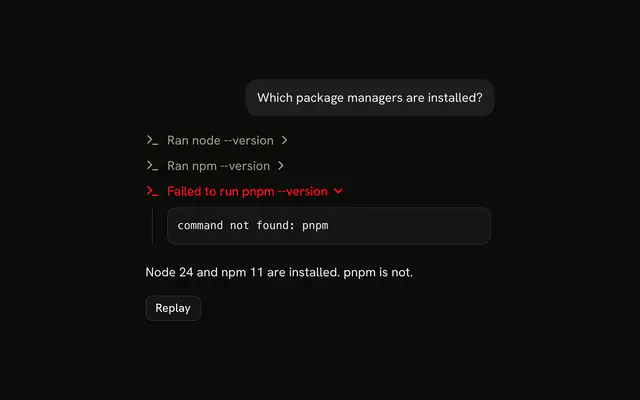
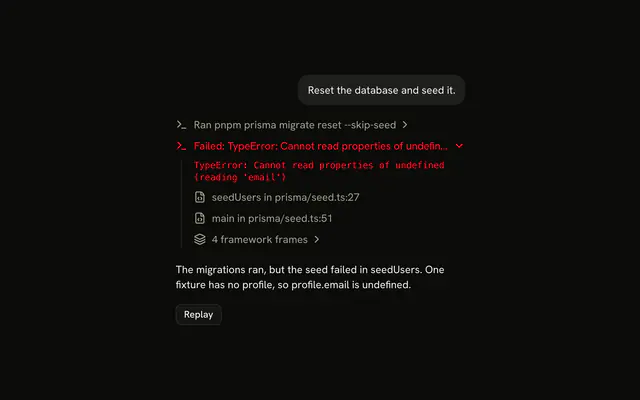
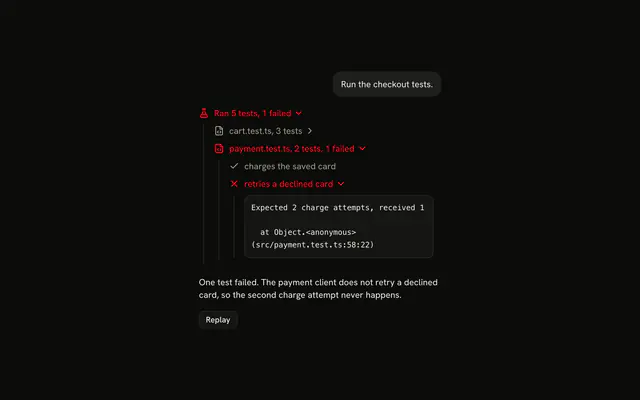
A shell command the agent runs shows up as one line, a lint, a test run, a build, and its output streams in underneath while it runs.
Use it when the output arrives line by line and the reader wants to watch it. The line is a Trace line that opens on a Code Block, so there is no Terminal component to install in React. Open the line once the first output arrives, say the exit in the title, "pnpm lint exited with code 1", and don't put buttons inside the line: a copy or clear button sits next to it, since the line itself is the button that opens it.
Installation
Terminal is a pattern. The command adds the parts it's built from, Trace and Code Block, and the code to copy is the demo's.
Anatomy
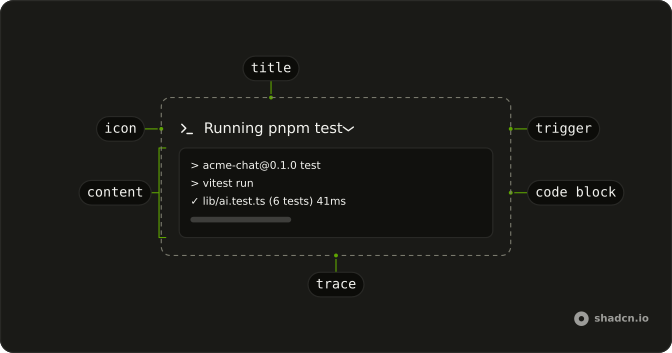
Trace
└── TraceCollapsible (one per command)
    ├── TraceCollapsibleTrigger
    │   └── TraceLine (status from the exit code)
    │       ├── TraceIcon
    │       └── TraceTitle (the command)
    └── TraceCollapsibleContent
        └── CodeBlock (size="sm")
            └── CodeBlockContent (wrap, the output)
Usage
import { TerminalIcon } from "lucide-react";
import {
  CodeBlock, CodeBlockContent,
} from "@/components/ui/code-block";
import {
  Trace, TraceCollapsible, TraceCollapsibleContent,
  TraceCollapsibleTrigger, TraceIcon, TraceLine, TraceTitle,
} from "@/components/ui/trace";
export function TerminalCommand(props: { output: string }) {
return (
<Trace>
<TraceCollapsible>
<TraceCollapsibleTrigger>
<TraceLine>
<TraceIcon>
<TerminalIcon aria-hidden="true" />
</TraceIcon>
<TraceTitle>Ran pnpm build</TraceTitle>
</TraceLine>
</TraceCollapsibleTrigger>
<TraceCollapsibleContent>
<CodeBlock size="sm">
<CodeBlockContent className="max-h-64" wrap>
{props.output}
</CodeBlockContent>
</CodeBlock>
</TraceCollapsibleContent>
</TraceCollapsible>
</Trace>
);
}Demos
Exit Code
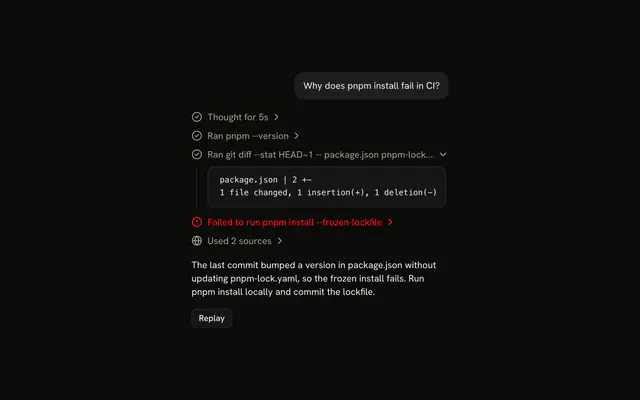
An install that ran and a lint that exited with code 1, open on its errors. A command that exits with any code other than 0 failed: set status="error" and say the code in the title.
| Command | status | Title |
|---|---|---|
| Running | "running" | Running pnpm build |
Exited with 0 | none | Ran pnpm build |
| Exited with another code | "error" | pnpm lint exited with code 1 |
The command is a tool call, so its states map the same way as in Tool.
Open While Running
Open the line once the first output arrives, so the output is visible while the command runs, and let it close when the command exits. Hold the open state as undefined until the reader opens or closes the line; after that, their choice wins, as in Trace.
The demo passes open ?? (running && output.length > 0), and sets its state from onOpenChange.
CodeBlockContent with wrap and a max-h-64 keeps a long run inside the line, scrolling, so the transcript below it doesn't jump with each line.
AI SDK
A tool result arrives only once the command exits. To stream the output while it runs, write it from the tool as a data part with the tool call's id. The AI SDK replaces a data part that has the same id, so the output grows in place.
writer.write({
  type: "data-terminal",
  id: toolCallId,
  data: { output },
});
On the client, find the data part that matches each tool part.
function getOutput(message: ChatMessage, toolCallId: string) {
  for (const part of message.parts) {
    if (part.type === "data-terminal" && part.id === toolCallId) {
      return part.data.output;
    }
  }

  return "";
}
Migrating from AI SDK Elements
If you added Terminal from AI SDK Elements (opens in a new tab), your project has a components/ai-elements/terminal.tsx wrapper. Paste this prompt into your coding agent to rebuild it on Trace and Code Block. Every export keeps its name and props, so the code that uses it keeps working.
Migrate components/ai-elements/terminal.tsx from AI SDK Elements to the shadcn.io Trace and Code Block components.

Keep every export, with the same name and props, so the code that imports it keeps working. Only change how each part renders.

1. Read https://kit.dev/ui/terminal.md and build Terminal the same way. If the project hasn't got Trace and Code Block, run the command in its Installation section.
2. Rebuild each part:
   - Import CodeBlock and CodeBlockContent from @/components/ui/code-block, not from ./code-block.
   - Terminal renders a Trace with a TraceCollapsible. Keep output, isStreaming, autoScroll and onClear.
   - TerminalHeader renders a TraceCollapsibleTrigger with a TraceLine. Set status="running" while isStreaming is true.
   - TerminalTitle renders a TraceIcon with a TerminalIcon and a TraceTitle, like "Ran pnpm build".
   - TerminalContent renders a TraceCollapsibleContent with a CodeBlock with size="sm", and a CodeBlockContent with wrap and className="max-h-64" for the output.
   - Open the line once output arrives while the command runs.
   - Buttons cannot sit inside a trigger. Render TerminalStatus, TerminalActions and the copy and clear buttons next to the TraceCollapsibleTrigger, not inside it.
3. Remove ansi-to-react from the dependencies if nothing else uses it.
4. Remove the imports the file no longer uses.
5. Run the type checker and fix any errors.
FAQ
What does installing Terminal add in React?
Trace and Code Block, the two parts a command line is built from, with the Collapsible it opens on. Terminal is a pattern, so no terminal file lands in your ui folder: copy the demo's code into your own component and feed it your command's output. The command uses the shadcn CLI.
How does the output stream into the line?
Keep the output so far as one string and pass it to CodeBlockContent; each new line re-renders it. With the AI SDK, write it from the tool as a data part under the tool call's id, which replaces the last one, as the AI SDK section shows. The line opens once the first output arrives.
How do I show that a command failed?
By its exit code: anything but 0 sets status="error", which turns the line destructive, and the title says the code, "pnpm lint exited with code 1". Open the failed line on its output, as the Exit Code demo does, so the errors are the first thing the reader sees.
Does it show ANSI colors?
Code Block can: useHighlightedCode(output, "ansi") reads SGR colors, bold, dim, italic and underline into the theme's classes, as its Terminal Output demo shows. Most tools print plain text when they aren't writing to a terminal, as the demos here do; highlight the output as ansi when yours keeps its escape codes.
Can the reader open a command's output with the keyboard?
Yes. Each command is a button: Tab reaches it, and Enter or Space opens or closes its output. The output scrolls inside its own box, which takes focus so the arrow keys can scroll it.
Is this the same as AI SDK Elements' Terminal?
It does the same job without a wrapper: Terminal was a dark box with its own header, ANSI renderer and buttons, and here a command is a Trace line over a Code Block in the theme's colors. The Migrating from AI SDK Elements section has a prompt that rebuilds the old file on these parts and keeps its exports.
API Reference
Terminal has no props of its own. Each command is a Trace collapsible, and its output a Code Block with size="sm" and CodeBlockContent's wrap.