shadcn.io is not affiliated with official shadcn/ui
A small button says how much of the context window the conversation has used, and hovering it shows the tokens behind the number.
Use it near the message field in a chat that can run long, so the reader sees the window filling before the model starts forgetting the start of the thread. The button is a Button, the card a Hover Card and the bar a Progress, so there is no Context component to install in React. Keep the percentage in the button's label: a hover card doesn't open on a tap, so the card holds the detail, never the only number.
Installation
Context is a pattern. The command adds the parts it's built from, Hover Card, Progress and Button, and the code to copy is the demo's.
Anatomy
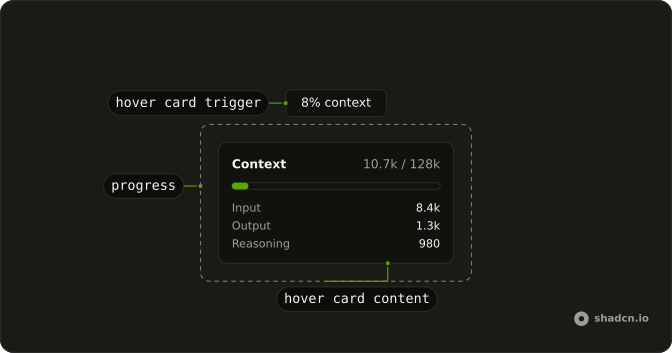
HoverCard
├── HoverCardTrigger (Button, the percentage)
└── HoverCardContent
    ├── Header (Context, used / limit)
    ├── Progress
    └── Rows (input, output, reasoning)
Usage
import { Button } from "@/components/ui/button";
import {
  HoverCard, HoverCardContent, HoverCardTrigger,
} from "@/components/ui/hover-card";
import { Progress } from "@/components/ui/progress";
const usage = {
input: 8420,
limit: 128_000,
output: 1260,
reasoning: 980,
};
const used = usage.input + usage.output + usage.reasoning;
const percent = Math.round((used / usage.limit) * 100);
const TRAILING_ZERO = /\.0$/;
function formatTokens(value: number) {
if (value < 1000) {
return String(value);
}
return `${(value / 1000).toFixed(1).replace(TRAILING_ZERO, "")}k`;
}
const rows = [
{ label: "Input", value: usage.input },
{ label: "Output", value: usage.output },
{ label: "Reasoning", value: usage.reasoning },
];
export function ContextDemo() {
return (
<div className="flex justify-center py-12">
<HoverCard>
<HoverCardTrigger
closeDelay={100}
delay={10}
render={<Button size="sm" variant="outline" />}
>
{percent}% context
</HoverCardTrigger>
<HoverCardContent className="flex w-64 flex-col gap-3">
<div className="flex items-center justify-between gap-3 text-sm">
<span className="font-medium">Context</span>
<span className="text-muted-foreground">
{formatTokens(used)} / {formatTokens(usage.limit)}
</span>
</div>
<Progress aria-label="Context used" value={percent} />
<div className="flex flex-col gap-1 text-sm">
{rows.map((row) => (
<div className="flex justify-between gap-3" key={row.label}>
<span className="text-muted-foreground">{row.label}</span>
<span>{formatTokens(row.value)}</span>
</div>
))}
</div>
</HoverCardContent>
</HoverCard>
</div>
);
}
AI SDK
Read usage from the metadata on the agent's message. messageMetadata runs when the stream finishes.
return result.toUIMessageStreamResponse({
  messageMetadata: ({ part }) => {
    if (part.type === "finish") {
      return { usage: part.totalUsage };
    }
  },
});
const usage = message.metadata?.usage;
const used = (usage?.inputTokens ?? 0) + (usage?.outputTokens ?? 0);
const percent = Math.round((used / limit) * 100);limit is the model's context window. The AI SDK does not send it, so set it from the model you use.
Migrating from AI SDK Elements
If you added Context from AI SDK Elements (opens in a new tab), your project has a components/ai-elements/context.tsx wrapper. Paste this prompt into your coding agent to rebuild it on Hover Card and Progress. Every export keeps its name and props, so the code that uses it keeps working.
Migrate components/ai-elements/context.tsx from AI SDK Elements to the shadcn.io Hover Card and Progress components.

Keep every export, with the same name and props, so the code that imports it keeps working. Only change how each part renders.

1. Read https://kit.dev/ui/context.md and build Context the same way. If the project hasn't got Hover Card, Progress and Button, run the command in its Installation section.
2. Rebuild each part:
   - Context renders a HoverCard. Keep usedTokens, maxTokens, usage and modelId in its context.
   - ContextTrigger renders a HoverCardTrigger with render={<Button variant="outline" size="sm" />}, showing the percent used. Set delay and closeDelay on the trigger.
   - ContextContent renders a HoverCardContent.
   - ContextContentHeader renders the used and max tokens, and a Progress with aria-label="Context used".
   - Keep ContextContentBody, ContextContentFooter and the usage parts as they are.
3. Remove the imports the file no longer uses.
4. Run the type checker and fix any errors.
FAQ
What does installing Context add in React?
Hover Card, Progress and Button, the three parts it's built from. Context is a pattern, so no context file lands in your ui folder: copy the demo's code into your own component and pass it the usage from your chat. The command uses the shadcn CLI.
Where do the numbers come from?
The model reports the tokens each turn used, and the AI SDK hands them over as usage in the message's metadata when the stream finishes. The limit is the model's context window, which the SDK doesn't send: set it from the model you use, and change it when the reader switches models.
Should I add up the usage of every message?
No. Each request sends the whole thread, so the latest turn's input tokens already count everything before it. Take the agent's last message, add its output tokens, and that is what the next request starts from. The demo adds input, output and reasoning for one turn.
Can the reader see the numbers without hovering?
The percentage, yes: it's the button's label. The card opens on hover and on keyboard focus, not on a tap, so on a phone it may never show. If the breakdown matters there, open it in a Popover instead.
What should happen when the window is nearly full?
Say so where the reader is already looking. Past a threshold, change the button's label or variant, and add a note to the thread that suggests a new chat or compacting the conversation. The bar alone is easy to miss.
How does a screen reader read Context?
The button's text is its name, so 8% context is read as is. Inside the card, the Progress has aria-label Context used and reads as a bar with its value. Treat the card as extra detail: what a screen reader must hear belongs in the button's label.
Is this the same as AI SDK Elements' Context?
It does the same job without a wrapper: Context was a Hover Card with usage parts and a cost estimate, and here it's a Hover Card with a Progress on a Button. The Migrating from AI SDK Elements section has a prompt that rebuilds the old file on these parts and keeps its exports.
API Reference
Context has no props of its own. The card is a Hover Card on a Button with variant outline and size sm, and the bar is a Progress with an aria-label.