shadcn.io is not affiliated with official shadcn/ui
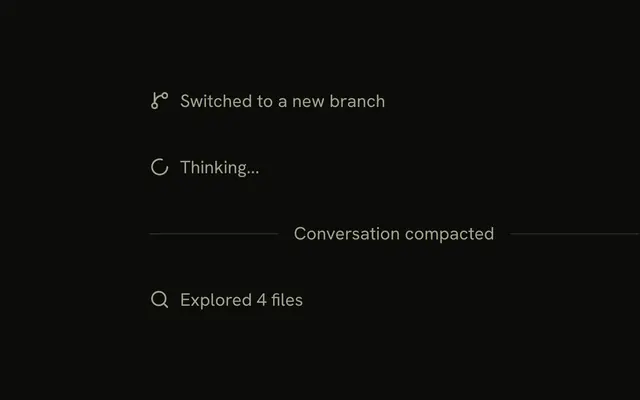
A labeled rule after the agent's turn, with a Restore button that takes the thread back to it.
Use it after a turn the reader may want to undo, such as a rename or a refactor. Checkpoint is a Marker with a Button in its label, so there is no Checkpoint component to install in React: the row is yours to edit. Restore keeps that turn and drops every message after it. It changes the thread, not the files the agent wrote, so pair it with your own undo when a turn touched them. Leave Restore off the last turn, where there is nothing after it to drop.
Installation
Checkpoint is a pattern. The command adds the parts it's built from, Marker and Button, and the code to copy is the demo's.
Anatomy
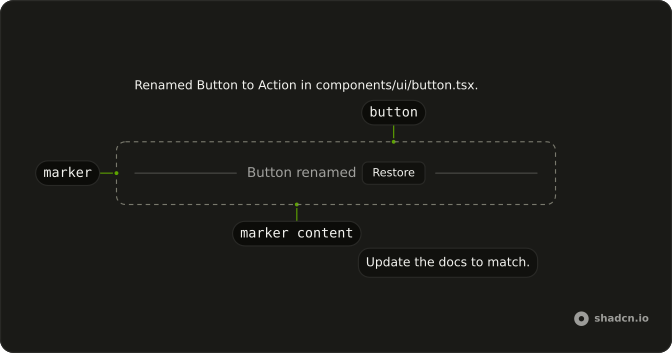
Marker (variant="separator")
└── MarkerContent
    ├── Label
    └── Button (Restore, while later turns exist)
Usage
import { Button } from "@/components/ui/button";
import { Marker, MarkerContent } from "@/components/ui/marker";
export function Checkpoint(props: { label: string; onRestore: () => void }) {
return (
<Marker variant="separator">
<MarkerContent className="inline-flex items-center gap-2">
{props.label}
<Button
aria-label={`Restore to ${props.label}`}
onClick={props.onRestore}
size="xs"
variant="outline"
>
Restore
</Button>
</MarkerContent>
</Marker>
);
}Render it after the turn it marks. The rule and its label are Marker's separator variant.
AI SDK
Restore replaces the thread with the messages up to and including that turn. Every later turn is removed. Send a new message to continue from there.
import { useChat } from "@ai-sdk/react";

const { messages, setMessages } = useChat();

function restore(messageId: string) {
  const index = messages.findIndex((message) => message.id === messageId);
  setMessages(messages.slice(0, index + 1));
}
The checkpoint itself comes from the agent, as a data part on its turn. Send the same id again only when you mean to update that checkpoint: the AI SDK replaces a data part with the same id.
const stream = createUIMessageStream({
  execute: async ({ writer }) => {
    writer.write({
      type: "data-checkpoint",
      id: "rename",
      data: { label: "Button renamed" },
    });
  },
});
const checkpoint = message.parts.find(
(part) => part.type === "data-checkpoint"
);Migrating from AI SDK Elements
If you added Checkpoint from AI SDK Elements (opens in a new tab), your project has a components/ai-elements/checkpoint.tsx wrapper. Paste this prompt into your coding agent to rebuild it on Marker and Button. Every export keeps its name and props, so the code that uses it keeps working.
Migrate components/ai-elements/checkpoint.tsx from AI SDK Elements to the shadcn.io Marker and Button components.

Keep every export, with the same name and props, so the code that imports it keeps working. Only change how each part renders.

1. Read https://kit.dev/ui/checkpoint.md and build Checkpoint the same way. If the project hasn't got Marker and Button, run the command in its Installation section.
2. Rebuild each part:
   - Checkpoint renders a Marker with variant="separator" and a MarkerContent, instead of a Separator.
   - CheckpointIcon renders a MarkerIcon.
   - CheckpointTrigger renders a Button with size="xs" and variant="outline", like "Restore". Keep its tooltip prop on the Tooltip.
3. Remove the imports the file no longer uses.
4. Run the type checker and fix any errors.
FAQ
What does installing Checkpoint add in React?
Marker and Button, the two parts the row is built from. Checkpoint is a pattern, so no checkpoint file lands in your ui folder: copy the demo's code into your own component and keep the restore logic next to your chat. The command uses the shadcn CLI.
What does Restore change?
The thread. It keeps the turn the checkpoint follows and removes every message after it, so the next message the reader sends continues from there. Files, commits and anything else the agent changed stay as they are: undo those yourself, or label the checkpoint so the reader knows what Restore leaves alone.
Why does Restore disappear after a restore?
Restoring again would drop nothing, because no turn comes after the checkpoint any more. The demo shows Restore only while later turns exist, and the label stays to mark the point. Press Continue and the button comes back once a new turn follows.
Where does a checkpoint come from?
The agent writes it as a data part on its turn, with a short label such as Button renamed. Render a Checkpoint after any message that has one. Give each checkpoint an id, and write the same id again only to update its label.
Can the reader restore while a reply streams?
The button stays, as in the demo, so stop the stream before you cut the thread, or the reply keeps writing into a turn that's gone. With the AI SDK, call stop, then set the messages. In the demo, Restore during a reply ends it at once.
How does a screen reader announce a checkpoint?
The label is the separator's text, read in place. Each Restore button's name is Restore to and the label, so a list of buttons still says which point each one returns to. Tab reaches it, and Enter or Space restores.
Is this the same as AI SDK Elements' Checkpoint?
It does the same job without a wrapper: Checkpoint was a Separator with an icon and a trigger, and here it's Marker's separator variant with a plain Button. The Migrating from AI SDK Elements section has a prompt that rebuilds the old file on these parts and keeps its exports.
API Reference
Checkpoint has no props of its own. The row is a Marker with variant set to separator and a MarkerContent, and Restore is a Button with size xs and variant outline.