shadcn.io is not affiliated with official shadcn/ui
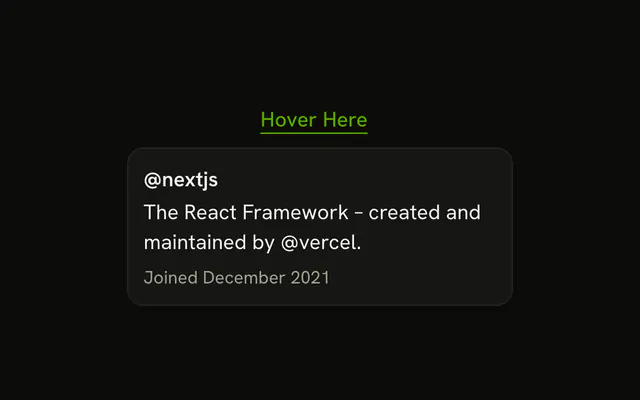
A small chip with the source's hostname ends the sentence it supports, and hovering or focusing it shows the page's title, a line about it and the link.
Use it when an answer leans on pages the reader may want to check, claim by claim. To list everything the agent read after the reply, use Sources instead. The chip is a Button that opens a Hover Card, so there is no Inline Citation component to install in React. Show the hostname rather than a number, so the reader knows where a source lives before opening it, and keep the chip after the claim, not in the middle of it.
Installation
Inline Citation is a pattern. The command adds the parts it's built from, Hover Card and Button, and the code to copy is the demo's.
Anatomy
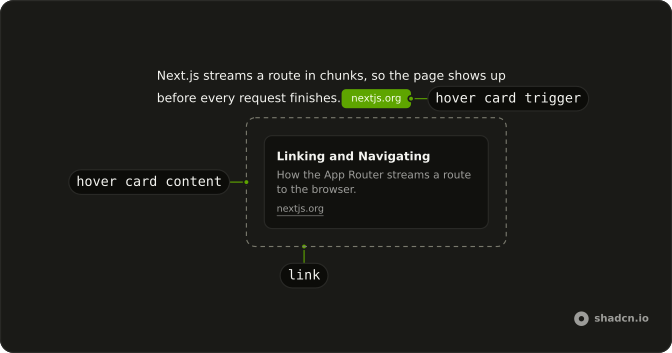
Sentence (p)
└── HoverCard (one per source)
    ├── HoverCardTrigger (Button, the hostname)
    └── HoverCardContent
        ├── Title
        ├── Description
        └── Link (opens in a new tab)
Usage
import { Button } from "@/components/ui/button";
import {
  HoverCard, HoverCardContent, HoverCardTrigger,
} from "@/components/ui/hover-card";
interface Source {
description: string;
title: string;
url: string;
}
const sources = {
chunked: {
description: "Send a response as a series of chunks.",
title: "Transfer-Encoding",
url: "https://developer.mozilla.org/en-US/docs/Web/HTTP/Reference/Headers/Transfer-Encoding",
},
loading: {
description: "Show an instant loading state for a route segment.",
title: "loading.js",
url: "https://nextjs.org/docs/app/api-reference/file-conventions/loading",
},
serverComponents: {
description: "Components that render ahead of time, on the server.",
title: "Server Components",
url: "https://react.dev/reference/rsc/server-components",
},
streaming: {
description: "How the App Router streams a route to the browser.",
title: "Linking and Navigating",
url: "https://nextjs.org/docs/app/getting-started/linking-and-navigating#streaming",
},
suspense: {
description: "Display a fallback until its children have finished loading.",
title: "<Suspense>",
url: "https://react.dev/reference/react/Suspense",
},
} satisfies Record<string, Source>;
const WWW = /^www\./;
function hostname(url: string) {
return new URL(url).hostname.replace(WWW, "");
}
function Citation({ source }: { source: Source }) {
const host = hostname(source.url);
return (
<HoverCard>
<HoverCardTrigger
closeDelay={100}
delay={10}
render={<Button size="xs" variant="secondary" />}
>
{host}
</HoverCardTrigger>
<HoverCardContent className="flex w-64 flex-col gap-1">
<div className="font-medium">{source.title}</div>
<p className="text-muted-foreground">{source.description}</p>
<a
className="text-muted-foreground text-xs underline-offset-4 hover:underline"
href={source.url}
rel="noreferrer"
target="_blank"
>
{host}
<span className="sr-only"> (opens in a new tab)</span>
</a>
</HoverCardContent>
</HoverCard>
);
}
export function InlineCitationDemo() {
return (
<div className="mx-auto flex max-w-sm flex-col gap-3 py-6 text-sm leading-relaxed">
<p>
Next.js streams a route in chunks, so the page shows up before every
request finishes. <Citation source={sources.streaming} />
</p>
<p>
Wrap a slow part of the page in a Suspense boundary and React sends the
fallback first. When the data resolves, the finished HTML streams into
the same response and replaces the fallback, with no extra request from
the browser. <Citation source={sources.suspense} /> Server Components
help here, because their code never ships to the browser.{" "}
<Citation source={sources.serverComponents} />
</p>
<p>
A loading.tsx file does the same for a whole route segment.{" "}
<Citation source={sources.loading} /> It all runs over chunked transfer
encoding, so there is nothing extra to set up.{" "}
<Citation source={sources.chunked} />
</p>
</div>
);
}
AI SDK
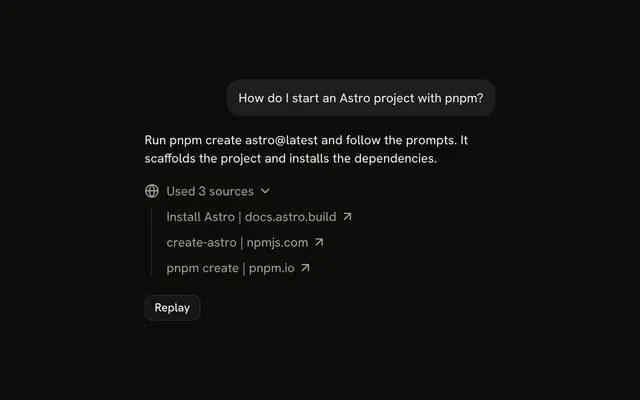
A source-url part is the citation. Set sendSources: true on toUIMessageStreamResponse(), or write the part yourself.
writer.write({
  type: "source-url",
  sourceId: "shadcn",
  url: "https://ui.shadcn.com",
  title: "shadcn/ui",
});
const sources = message.parts.filter((part) => part.type === "source-url");title is optional. Fall back to the URL's hostname.
Migrating from AI SDK Elements
If you added Inline Citation from AI SDK Elements (opens in a new tab), your project has a components/ai-elements/inline-citation.tsx wrapper. Paste this prompt into your coding agent to rebuild it on Hover Card and Button. Every export keeps its name and props, so the code that uses it keeps working.
Migrate components/ai-elements/inline-citation.tsx from AI SDK Elements to the shadcn.io Hover Card and Button components.

Keep every export, with the same name and props, so the code that imports it keeps working. Only change how each part renders.

1. Read https://kit.dev/ui/inline-citation.md and build Inline Citation the same way. If the project hasn't got Hover Card and Button, run the command in its Installation section.
2. Rebuild each part:
   - InlineCitationCard renders a HoverCard.
   - InlineCitationCardTrigger renders a HoverCardTrigger with render={<Button variant="secondary" size="xs" />} instead of a Badge, so it can take keyboard focus. Set delay and closeDelay on the trigger.
   - InlineCitationCardBody renders a HoverCardContent.
   - InlineCitationSource renders the title and a link to the URL that opens in a new tab, with "(opens in a new tab)" in an sr-only span.
   - Keep InlineCitation, InlineCitationText, InlineCitationQuote and the carousel parts as they are.
3. Remove the imports the file no longer uses.
4. Run the type checker and fix any errors.
FAQ
What does installing Inline Citation add in React?
Hover Card and Button, the two parts it's built from. Inline Citation is a pattern, so no inline-citation file lands in your ui folder: copy the demo's Citation into your own component and pass it each source. The command uses the shadcn CLI.
How do I know which sentence a source supports?
Source parts arrive as a list, with no place in the text. Ask the model to mark each claim inline, such as a number in brackets after the sentence, and swap each mark for the chip of its source. Sources it never cites inline belong in a list after the reply.
Why does the chip show the hostname?
A number says nothing until it's opened, and a full title is too long for the middle of a paragraph. The hostname tells the reader where a claim comes from at a glance, and the card adds the title and a line about the page. Drop the www, as the demo does.
Why does the link say it opens in a new tab?
It does open one, with target set to _blank, so the reader keeps the answer where it was. The words sit in an sr-only span, so a screen reader hears them before following the link, and a sighted reader isn't told twice. rel set to noreferrer keeps the source from seeing where the reader came from.
Can the reader open a citation on a phone?
A hover card opens on hover and on keyboard focus, not on a tap. The hostname in the chip still says where the claim comes from. When the reader must reach the page on a phone, list the same links after the reply, or open the card in a Popover.
Is this the same as AI SDK Elements' Inline Citation?
It does the same job with fewer parts: the trigger was a Badge and the card held a carousel of sources, and here it's a Button that opens a Hover Card for one source. The Migrating from AI SDK Elements section has a prompt that rebuilds the old file on these parts and keeps its exports.
API Reference
Inline Citation has no props of its own. Each chip is a Button with variant secondary and size xs, the trigger of a Hover Card whose content holds the title, the description and the link.