shadcn.io is not affiliated with official shadcn/ui
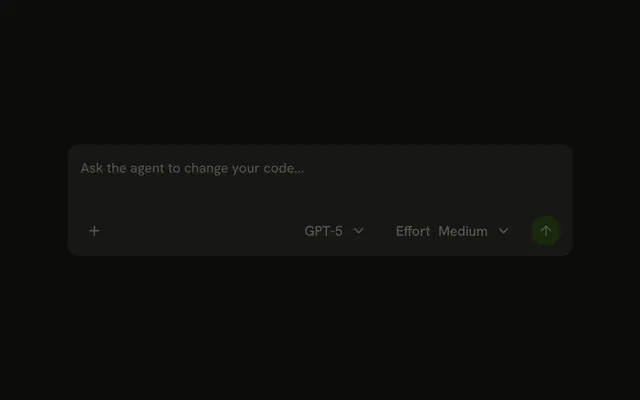
Two small menus sit in the message field, next to the send button: the model the agent runs, and how hard it thinks.
Use it when the reader can choose between models or reasoning efforts for the next message. Each menu is a Dropdown Menu of radio items, and its trigger is a button in the field's Input Group, so there is no Model Selector component to install in React. The trigger shows the current choice, so the reader sees what the next message will run on without opening the menu. With one model and no effort setting, leave the menus out. For a field with attachments around these menus, see Prompt Input.
Installation
Model Selector is a pattern. The command adds the parts it's built from, Dropdown Menu and Input Group, and the code to copy is the demo's.
Anatomy
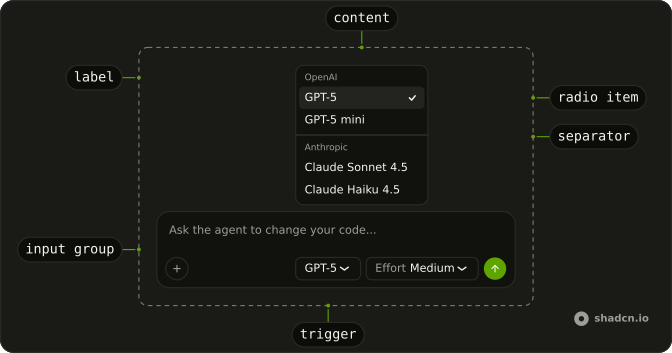
InputGroup
├── InputGroupTextarea
└── InputGroupAddon (block-end)
    ├── DropdownMenu (model)
    │   ├── DropdownMenuTrigger (an InputGroupButton)
    │   └── DropdownMenuContent
    │       └── DropdownMenuRadioGroup
    │           ├── DropdownMenuLabel (one per provider)
    │           └── DropdownMenuRadioItem (one per model)
    ├── DropdownMenu (effort)
    └── InputGroupButton (send)
Usage
import { ArrowUpIcon, ChevronDownIcon, PlusIcon } from "lucide-react";
import { type FormEvent, Fragment, useRef, useState } from "react";
import {
  DropdownMenu, DropdownMenuContent, DropdownMenuGroup,
  DropdownMenuLabel, DropdownMenuRadioGroup, DropdownMenuRadioItem,
  DropdownMenuSeparator, DropdownMenuTrigger,
} from "@/components/ui/dropdown-menu";
import {
  InputGroup, InputGroupAddon, InputGroupButton, InputGroupTextarea,
} from "@/components/ui/input-group";
const providers = [
{
models: [
{ id: "gpt-5", name: "GPT-5" },
{ id: "gpt-5-mini", name: "GPT-5 mini" },
],
name: "OpenAI",
},
{
models: [
{ id: "claude-sonnet-4-5", name: "Claude Sonnet 4.5" },
{ id: "claude-haiku-4-5", name: "Claude Haiku 4.5" },
],
name: "Anthropic",
},
];
const models = providers.flatMap((provider) => provider.models);
const efforts = [
{ id: "low", name: "Low" },
{ id: "medium", name: "Medium" },
{ id: "high", name: "High" },
];
export function ModelSelectorDemo() {
const [text, setText] = useState("");
const [model, setModel] = useState(models[0].id);
const [effort, setEffort] = useState(efforts[1].id);
const formRef = useRef<HTMLFormElement>(null);
const currentModel = models.find((item) => item.id === model) ?? models[0];
const currentEffort =
efforts.find((item) => item.id === effort) ?? efforts[1];
const canSend = text.trim().length > 0;
const handleSubmit = (event: FormEvent<HTMLFormElement>) => {
event.preventDefault();
if (canSend) {
setText("");
}
};
return (
<div className="mx-auto w-full min-w-0 max-w-lg py-6">
<form onSubmit={handleSubmit} ref={formRef}>
<InputGroup>
<InputGroupTextarea
aria-label="Message"
className="p-3"
onChange={(event) => setText(event.target.value)}
onKeyDown={(event) => {
if (event.key === "Enter" && !event.shiftKey) {
event.preventDefault();
formRef.current?.requestSubmit();
}
}}
placeholder="Ask the agent to change your code..."
value={text}
/>
<InputGroupAddon align="block-end">
<InputGroupButton
aria-label="Attach files"
pill
size="icon-sm"
variant="outline"
>
<PlusIcon aria-hidden="true" />
</InputGroupButton>
<DropdownMenu>
<DropdownMenuTrigger
render={
<InputGroupButton
aria-label={`Model: ${currentModel.name}`}
className="ms-auto"
size="sm"
variant="outline"
/>
}
>
{currentModel.name}
<ChevronDownIcon aria-hidden="true" />
</DropdownMenuTrigger>
<DropdownMenuContent align="start" className="w-48">
<DropdownMenuRadioGroup onValueChange={setModel} value={model}>
{providers.map((provider, index) => (
<Fragment key={provider.name}>
{index > 0 ? <DropdownMenuSeparator /> : null}
<DropdownMenuGroup>
<DropdownMenuLabel>{provider.name}</DropdownMenuLabel>
{provider.models.map((item) => (
<DropdownMenuRadioItem
closeOnClick
key={item.id}
value={item.id}
>
{item.name}
</DropdownMenuRadioItem>
))}
</DropdownMenuGroup>
</Fragment>
))}
</DropdownMenuRadioGroup>
</DropdownMenuContent>
</DropdownMenu>
<DropdownMenu>
<DropdownMenuTrigger
render={
<InputGroupButton
aria-label={`Effort: ${currentEffort.name}`}
size="sm"
variant="outline"
/>
}
>
<span className="text-muted-foreground">Effort</span>
{currentEffort.name}
<ChevronDownIcon aria-hidden="true" />
</DropdownMenuTrigger>
<DropdownMenuContent align="start" className="w-36">
<DropdownMenuGroup>
<DropdownMenuLabel>Effort</DropdownMenuLabel>
<DropdownMenuRadioGroup
onValueChange={setEffort}
value={effort}
>
{efforts.map((item) => (
<DropdownMenuRadioItem
closeOnClick
key={item.id}
value={item.id}
>
{item.name}
</DropdownMenuRadioItem>
))}
</DropdownMenuRadioGroup>
</DropdownMenuGroup>
</DropdownMenuContent>
</DropdownMenu>
<InputGroupButton
aria-label="Send"
disabled={!canSend}
pill
size="icon-sm"
type="submit"
variant="default"
>
<ArrowUpIcon aria-hidden="true" />
</InputGroupButton>
</InputGroupAddon>
</InputGroup>
</form>
</div>
);
}
AI SDK
Send the model and the effort with the message, and map them to a model and its provider options in the route.
sendMessage({ text }, { body: { effort, model } });import { anthropic } from "@ai-sdk/anthropic";
import { openai } from "@ai-sdk/openai";
import { convertToModelMessages, streamText, type UIMessage } from "ai";
const models = {
"claude-haiku-4-5": anthropic("claude-haiku-4-5"),
"claude-sonnet-4-5": anthropic("claude-sonnet-4-5"),
"gpt-5": openai("gpt-5"),
"gpt-5-mini": openai("gpt-5-mini"),
};
export async function POST(req: Request) {
const { messages, model, effort } = (await req.json()) as {
effort: "low" | "medium" | "high";
messages: UIMessage[];
model: keyof typeof models;
};
const result = streamText({
messages: await convertToModelMessages(messages),
model: models[model] ?? models["gpt-5"],
providerOptions: {
anthropic: { effort },
openai: { reasoningEffort: effort },
},
});
return result.toUIMessageStreamResponse();
}Each provider reads its own key in providerOptions and ignores the rest. Look the model up in a table of the ones you offer, so a request can't pick a model you didn't list.
Migrating from AI SDK Elements
If you added Model Selector from AI SDK Elements (opens in a new tab), your project has a components/ai-elements/model-selector.tsx wrapper. Paste this prompt into your coding agent to rebuild it on Dropdown Menu. Every export keeps its name and props, so the code that uses it keeps working.
Migrate components/ai-elements/model-selector.tsx from AI SDK Elements to the shadcn.io Dropdown Menu component.

Keep every export, with the same name and props, so the code that imports it keeps working. Only change how each part renders.

1. Read https://kit.dev/ui/model-selector.md and build Model Selector the same way. If the project hasn't got Dropdown Menu and Input Group, run the command in its Installation section.
2. Rebuild each part:
   - ModelSelector renders a DropdownMenu, instead of a Dialog. ModelSelectorTrigger renders a DropdownMenuTrigger.
   - ModelSelectorContent renders a DropdownMenuContent, and ModelSelectorList a DropdownMenuRadioGroup with the selected model as its value.
   - ModelSelectorGroup renders a DropdownMenuGroup with a DropdownMenuLabel for its heading.
   - ModelSelectorItem renders a DropdownMenuRadioItem with closeOnClick, so picking a model closes the menu.
   - ModelSelectorSeparator renders a DropdownMenuSeparator, and ModelSelectorShortcut a DropdownMenuShortcut.
   - A menu has no search field. Keep ModelSelectorInput, ModelSelectorEmpty and ModelSelectorDialog on Command if you use search, or remove them if nothing imports them.
   - Keep ModelSelectorLogo, ModelSelectorLogoGroup and ModelSelectorName as they are.
3. Remove the imports the file no longer uses.
4. Run the type checker and fix any errors.
FAQ
What does installing Model Selector add in React?
Dropdown Menu and Input Group, the two parts the menus are built from. Model Selector is a pattern, so no model-selector file lands in your ui folder: copy the demo's code into your own composer and change the list of models. The command uses the shadcn CLI.
How does the agent know which model to run?
The menus only hold the choice. Send the model's id and the effort with each message, in the request body next to the messages, and have the route pick the model from a table of the ones you offer. The AI SDK section shows both halves.
What should the trigger show?
The current choice, and nothing else, so the field stays short: GPT-5, or Effort Medium. Give the trigger an aria-label that names the setting and its value (Model: GPT-5), because the visible text is only the value.
Can the reader pick a model with the keyboard?
Yes. Tab reaches each trigger, Enter, Space or the down arrow opens its menu, the arrow keys move through the models, and Enter picks one and closes the menu. Escape closes it without a change, and focus goes back to the trigger.
Does it work right to left?
Yes. The first trigger's ms-auto pushes the menus toward the send button on the reading end, and the menus open from the trigger's start edge. The demo uses logical classes only, so nothing needs mirroring by hand.
Is this the same as AI SDK Elements' Model Selector?
It does the same job in less room. AI SDK Elements' was a searchable list in a Dialog; here each choice is a Dropdown Menu in the message field, and there is no search. The Migrating from AI SDK Elements section has a prompt that rebuilds the old file on Dropdown Menu and keeps its exports.
API Reference
Model Selector has no props of its own. Each menu is a Dropdown Menu: the radio group's value and change handler, the items, labels and separators are Dropdown Menu's. The field, its addon and the trigger and send buttons are Input Group's.