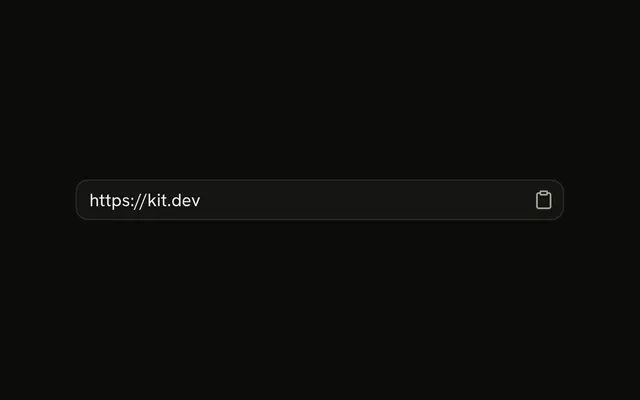
shadcn.io is not affiliated with official shadcn/ui
Code, terminal output, logs and diffs sit in one block, with a title and a copy button above them.
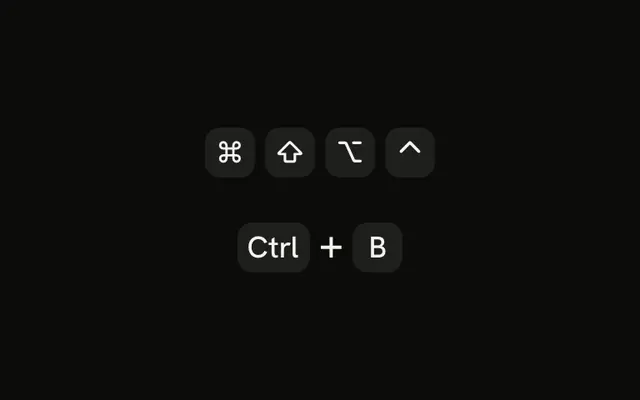
Use it wherever text has to be read or copied as written: a file in a message, a command, a stack trace, a tool's output in a Trace. For a key in a sentence use Kbd, and for inline code a code element. Syntax highlighting is a separate hook, so a block that only shows plain output stays small.
Installation
The install also adds useHighlightedCode and the highlighter it runs on, for syntax highlighting.
Anatomy
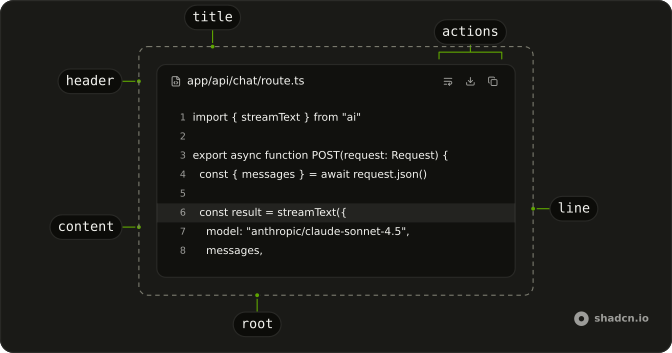
CodeBlock
├── CodeBlockHeader
│   ├── CodeBlockTitle
│   └── CodeBlockActions
│       └── CodeBlockCopyButton
├── CodeBlockActions (floating, when there is no header)
├── CodeBlockContent
│   └── CodeBlockLine
└── CodeBlockFooter
CodeBlockContent takes a string or a list of CodeBlockLine. Use lines when you need line variants or highlighted tokens.
Usage
import {
  CodeBlock, CodeBlockActions, CodeBlockContent, CodeBlockCopyButton,
  CodeBlockHeader, CodeBlockTitle,
} from "@/components/ui/code-block";<CodeBlock>
<CodeBlockHeader>
<CodeBlockTitle>Terminal</CodeBlockTitle>
<CodeBlockActions>
<CodeBlockCopyButton value="pnpm dev" />
</CodeBlockActions>
</CodeBlockHeader>
<CodeBlockContent>$ pnpm dev</CodeBlockContent>
</CodeBlock>Features
- It streams cheaply. A string child renders as one text node, and the highlighter keeps every line that did not change, so only the new lines render as code arrives.
- It copies cleanly. Line numbers and diff markers stay out of a selection, and blank lines survive the copy.
- It reads left to right. The content is always
dir="ltr". The header follows the page direction. - It highlights synchronously.
useHighlightedCoderuns on TanStack Highlight (opens in a new tab): no WASM, nothing to load, and the first render, on the server too, is already colored. It also colors ANSI escape codes in terminal output. - It fits where code shows up. Use it in a message, a Markdown fence, a Trace line, Tabs, a Dialog or a Prose article.
- It scrolls by keyboard. The content is focusable, and floating actions show on focus as well as on hover.
Accessibility
- Tab
- Moves focus to the copy button and the other actions, then to the content.
- Arrow Down
- When the content has focus, scrolls it down.
- Arrow Right
- When the content has focus, scrolls a long line into view.
- Enter
- Copies the value when focus is on the copy button.
- Space
- Copies the value when focus is on the copy button.
CodeBlockContentis aprewith acodeelement, and it always setsdir="ltr", so code reads left to right on a right-to-left page.- The content has
tabIndex={0}, so it can be focused and scrolled from the keyboard. PasstabIndex={-1}to remove the tab stop from a block that never scrolls. - Floating actions show while focus is inside the block, not only on hover.
- Line numbers are hidden from screen readers.
- A diff line carries a
+or−marker as well as a tint, so the change does not rely on color. CodeBlockCopyButtonis labelled Copy, and a polite live region announces Copied once the copy succeeds.- Give a wrap toggle
aria-pressed, and a Show More buttonaria-expandedwitharia-controlspointing at the content'sid.
Demos
Basic
A build log passed to CodeBlockContent as a string, with no header. It renders as one text node, so it stays cheap while output streams in. Start here for tool output that only needs to be read. Add a header once the reader needs a title or a copy button.
Header
A Terminal title with an icon, and a copy button on the end that copies only the command, not the output under it. CodeBlockCopyButton copies its value, whatever the block shows. A long title truncates. To link the title to a file, wrap CodeBlockTitle in an anchor rather than putting a link inside it.
Actions
Lint output with three buttons in CodeBlockActions: wrap, download and copy. The block has no wrap state of its own, so the demo keeps it and passes it to wrap, and the toggle says its state with aria-pressed. Add an action when the reader does something with the text. Give each icon button an aria-label.
Floating Actions
An install log with no header, its copy button in the top corner. CodeBlockActions as a direct child of CodeBlock floats at the top end and stays hidden until the block is hovered or focused. Touch screens always show it. Use it for a short snippet where a header row would be more chrome than code.
Line Numbers
A package.json with numbers in the gutter. lineNumbers on CodeBlockContent splits a string child into lines and numbers them with a CSS counter, so the numbers are never part of a selection. Number a file the reader will talk about by line. A one-line command does not need it.
Start Line
A snippet from the middle of a page, numbered from 995. startLine sets the first number, and the gutter grows to fit the widest one. Use it when the lines should match the file the code came from, such as a stack trace or a review comment.
Wrap
The same long error twice: scrolling sideways, then wrapped. Long lines scroll by default, which keeps code indentation honest. Add wrap for prose-like output, such as error messages and tool results, where scrolling would hide the end of the sentence. To let the reader choose, see Actions.
Highlighted Lines
A config file with two lines tinted. Render each line as a CodeBlockLine and set variant="highlighted" on the ones to call out. Point at the lines the surrounding text talks about, a few at most. When everything is highlighted, nothing is.
Diff
A component change with one line removed and three added. variant="removed" and variant="added" on CodeBlockLine each add a − or + marker in the gutter, outside the copied text, so the copy is the code alone. The demo reads the marker off the first character of each row of a patch.
Height
Forty request logs in a block capped at max-h-48. A max-h-* class on CodeBlockContent makes it scroll inside the block, and scroll-fade fades the edges that have more to show: left and right by default, top and bottom once it wraps. Add scroll-fade-y to a capped block that does not wrap, as here.
Show More
A 34-line component cut at max-h-64, with Show more in CodeBlockFooter. The demo keeps expanded, removes the cap when it is set, and gives the button aria-expanded and aria-controls. Use it for a long file in a message, where most readers only need the top.
const [expanded, setExpanded] = useState(false);
const id = useId();

<CodeBlockContent
  className={expanded ? undefined : "max-h-64 overflow-y-hidden scroll-fade-y"}
  id={id}
>
  {code}
</CodeBlockContent>
<CodeBlockFooter className="justify-center">
  <Button
    aria-controls={id}
    aria-expanded={expanded}
    onClick={() => setExpanded(!expanded)}
    size="xs"
    variant="ghost"
  >
    {expanded ? "Show less" : "Show more"}
  </Button>
</CodeBlockFooter>
Max Height
The same file, expanded to max-h-96 instead of its full length. Raise the cap rather than removing it when the file could take over the page. The expanded content scrolls inside the block, and its edges fade as it scrolls.
Size
The same install output at both sizes. size="sm" has tighter padding and text-xs code, for tool and Trace output that sits beside other steps. Keep the default for code that is the point of the page.
Destructive
A stack trace in the error tone. variant="destructive" colors the surface, the title and the text, so a failure reads as one at a glance. Use it for failed output, and still say what failed in the title.
Trace
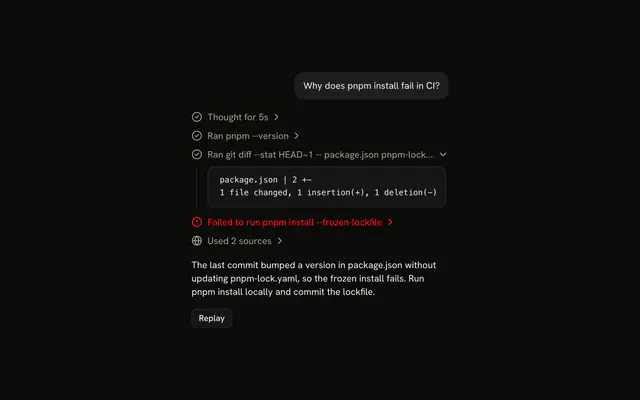
Two shell steps in a Trace, one passed and one failed, each with its output in a small block. Put a CodeBlock with size="sm" in TraceCollapsibleContent, and give CodeBlockContent wrap and max-h-64 so long output wraps and scrolls inside the step. The block sets its own text color, so the trace does not mute it.
Tabs
Three files of one change in Tabs, one CodeBlock in each TabsContent. The tab says the file name and the block's title says its path. Use tabs for files the reader looks at one at a time. When they need to compare two, show both.
Message
A question and an answer, with a route handler between two paragraphs of a Message. The block takes the column's width and keeps its own surface, so it reads as part of the answer. Keep the sentence that explains the code next to it, not inside it.
Typeset
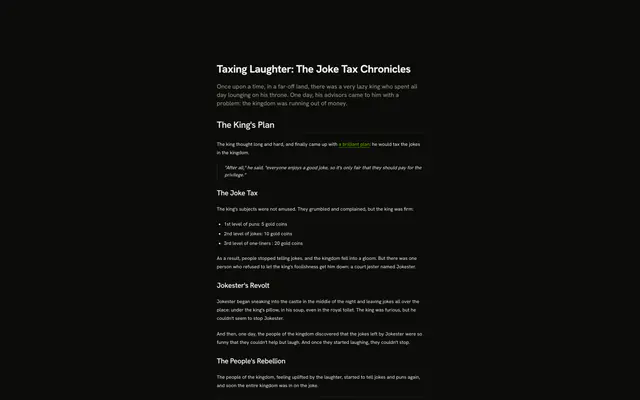
A heading, two paragraphs and a block inside a Prose article. The block keeps its own styles, and gets the same space above as a paragraph. Use it for docs and long answers, where the code is one part of the text.
RTL
A description and a terminal block in Arabic, with a language select to switch to Hebrew or English. The header follows the page direction, so the title moves to the start and the copy button to the end, while the code keeps reading left to right. Set dir on the page or on a parent, and the block follows it.
Syntax Highlighting
A JSON tool result, colored. useHighlightedCode(code, language) returns one rendered line per line of code, and each goes in a CodeBlockLine.
const lines = useHighlightedCode(code, "json");

<CodeBlock>
  <CodeBlockContent>
    {lines.map((line, index) => (
      <CodeBlockLine key={index}>{line}</CodeBlockLine>
    ))}
  </CodeBlockContent>
</CodeBlock>
The hook runs on TanStack Highlight (opens in a new tab). It is synchronous: there is no WASM and nothing to load, so the first render, and the one on the server, is already colored. Each token is a span with a class such as text-(--th-keyword), never an inline style, so the colors are CSS variables you can theme.
The install adds the variables to your theme for light and dark: twenty for tokens (--th-keyword, --th-string, --th-comment, --th-function…) and sixteen for terminal colors (--th-ansi-red, --th-ansi-bright-blue…), GitHub's light and dark palettes by default. Set them in :root and .dark to change the colors, or point them at your own tokens.
:root {
  --th-keyword: var(--primary);
  --th-comment: var(--muted-foreground);
}
Languages
A CSS file, a Python function and a plain-text note. A language the highlighter does not list renders as plain text, with no error.
The list is bash, css, diff, html, javascript, json, jsx, markdown, python, sql, tsx, typescript and yaml, plus the aliases js, ts, md, py, sh, shell, zsh and yml. To add one, import its grammar from @tanstack/highlight/languages/<name> (Go, Rust, Swift, PHP, TOML and two dozen more) in lib/highlighter-core.ts and add it to languages. Only the grammars you import end up in the bundle.
Terminal Output
A test run with green passes, a red failure and dim counts. Pass "ansi" as the language and the escape codes become colors: the sixteen colors as text or background, 256-color and RGB codes mapped to the nearest of them, bold, dim, italic, underline, strikethrough and inverse. Without it, the codes show as text.
Colors do not carry from one line to the next. Copy the text without its codes with stripAnsi, from lib/highlighter-core.ts, as the demo's copy button does.
Server Rendering
There is no demo for this: highlighting needs no setup on the server. useHighlightedCode returns colored lines on the first render, so a server render is already highlighted. highlightCode and loadHighlighter keep shadcn/ui's async signatures, so its server code works unchanged, and they resolve at once.
import { highlightCode } from "@/lib/highlighter";

export async function ServerCode({ code }: { code: string }) {
  const lines = (await highlightCode(code, "tsx")) ?? code.split("\n");

  return (
    <CodeBlock>
      <CodeBlockContent lineNumbers>
        {lines.map((line, index) => (
          <CodeBlockLine key={index}>{line}</CodeBlockLine>
        ))}
      </CodeBlockContent>
    </CodeBlock>
  );
}
Streaming
Five blocks written three characters at a time: a hook, a command, a diff, a route with highlighted lines and an env file, each copy button disabled until its block is complete. While code streams, the hook tokenizes it again on every update, about half a millisecond for a 300-line file, and a line that did not change keeps the nodes it had, so it is not rendered again. Replay runs it again.
Markdown
An answer written a word at a time, with a fenced block in the middle. The message is parsed with TanStack Markdown (opens in a new tab): paragraphs and inline code render as Markdown, and each fenced block becomes a CodeBlock titled with its language. While the closing fence has not arrived, the copy button is disabled. The parser runs on any framework, but this demo renders with its React renderer, so it is shown on React only.
const document = parseMarkdown(text, { extensions: [streamingMarkdownExtension()] });

document.children.map((node, index) =>
  node.type === "code" ? (
    <MarkdownCodeBlock code={node.value} key={index} language={node.lang ?? ""} />
  ) : (
    renderBlockReact(node, {}, String(index))
  )
);
FAQ
How do I add syntax highlighting to a Code Block in React?
Call useHighlightedCode with the code and a language, and render each line it returns in a CodeBlockLine inside CodeBlockContent. The install adds the hook and its highlighter. Highlighting is synchronous, so the first render is already colored and there is nothing to load or wait for. A language that isn't listed comes back as plain lines. Each line is a React node. highlightCode and loadHighlighter from lib/highlighter keep shadcn/ui's async signatures for code written against them.
Which languages does Code Block highlight?
bash, css, diff, html, javascript, json, jsx, markdown, python, sql, tsx, typescript and yaml, with aliases such as ts, js, sh and yml, plus "ansi" for terminal output. To add a language, import its grammar from @tanstack/highlight/languages in lib/highlighter-core.ts and add it to the languages list. Only the grammars you import are bundled.
How do I change the highlighting colors?
Each token is a span with a class on a CSS variable, such as text-(--th-keyword), never an inline style. The install adds the --th- variables for light and dark, GitHub's palettes by default, with --th-ansi- for terminal colors. Set them in :root and .dark, or point them at your theme's tokens, and every block follows.
Does Code Block work while code streams?
Yes. A string child is one text node, and useHighlightedCode tokenizes the whole code again on each update, which takes about half a millisecond for a few hundred lines. A line that didn't change keeps what was rendered for it, so it isn't rendered again. Disable the copy button until the block is complete, as the Streaming demo does.
What does the Code Block copy button copy?
CodeBlockCopyButton copies its value prop, not what is on screen, so a header can copy only the command while the block shows its output. Line numbers and diff markers are never part of a text selection either. For terminal output, pass the text through stripAnsi so the escape codes stay out of the copy. A polite live region announces Copied.
How do I show a diff or highlighted lines?
Render each line as a CodeBlockLine and set its variant: added and removed tint the line and put a + or − marker in the gutter, outside the copied text, and highlighted tints it without a marker. The demos read the marker off the first character of each row of a patch. Combine variants with lineNumbers and with highlighted tokens.
How do I style a Code Block with Base UI?
Edit the code block file under components/ui. The root sets data-variant and data-size, each line sets data-variant, and every part has its own data-slot to target. Cap the height with a max-h class on CodeBlockContent, and the edges fade with the scroll-fade utility as it scrolls.
How do I install Code Block in React?
Run the command in the Installation section on this page. It adds the code block file, Button for the copy button, the scroll-fade utility, and useHighlightedCode with its highlighter and color variables, so a highlighted demo works as soon as it's pasted. The command uses the shadcn CLI.
API Reference
CodeBlock
<div> data-slot="code-block"
size?"default" | "sm"
sm has tighter padding and text-xs code, for tool and trace output.
- Type
"default" | "sm"- Default
"default"
variant?"default" | "destructive"
The tone: destructive for errors and failed output.
- Type
"default" | "destructive"- Default
"default"
className?string
Merged with the part's classes.
data-size?string
Mirrors size.
data-variant?string
Mirrors variant.
CodeBlockActions
<div> data-slot="code-block-actions"
className?string
Merged with the part's classes.
CodeBlockContent
<pre> data-slot="code-block-content"
lineNumbers?boolean
Number each line. A string child is split into lines.
- Default
false
startLine?number
The number of the first line, when lineNumbers is set.
- Default
1
wrap?boolean
Wrap long lines instead of scrolling.
- Default
false
className?string
Merged with the part's classes.
data-numbered?string
Present when lineNumbers is set.
data-wrap?string
Present when wrap is set.
CodeBlockCopyButton
data-slot="code-block-copy-button"
valuestring
The text it copies, whatever the block shows.
clickEffect?boolean
Apply a click effect to the button.
- Default
true
focusableWhenDisabled?boolean
Whether the button should be focusable when disabled.
- Default
false
isLoading?boolean
Show a loading indicator.
- Default
false
nativeButton?boolean
Whether the component renders a native <button> element when replacing it
via the render prop.
Set to false if the rendered element is not a button (for example, <div>).
- Default
true
pill?boolean
Fully rounded corners.
- Default
false
size?"default" | "icon" | "icon-lg" | "icon-md" | "icon-sm" | "icon-xl" | "icon-xs" | "lg" | "md" | "sm" | "xl" | "xs"
Ark default: md.
- Type
"default" | "icon" | "icon-lg" | "icon-md" | "icon-sm" | "icon-xl" | "icon-xs" | "lg" | "md" | "sm" | "xl" | "xs"- Default
"icon-xs"
variant?"default" | "destructive" | "ghost" | "link" | "outline" | "secondary"
Ark default: default.
- Type
"default" | "destructive" | "ghost" | "link" | "outline" | "secondary"- Default
"ghost"
render?ReactElement | ((props: object, state: object) => ReactElement)
Replace the host element or compose it with another component.
- Type
ReactElement | ((props: object, state: object) => ReactElement)
className?string
Merged with the part's classes.
data-copied?string
Present when copied is set.
CodeBlockFooter
<div> data-slot="code-block-footer"
className?string
Merged with the part's classes.
CodeBlockHeader
<div> data-slot="code-block-header"
className?string
Merged with the part's classes.
CodeBlockLine
<span> data-slot="code-block-line"
variant?"added" | "default" | "highlighted" | "removed"
The line's state: added and removed tint it and add a + or − marker, highlighted tints it.
- Type
"added" | "default" | "highlighted" | "removed"- Default
"default"
className?string
Merged with the part's classes.
data-variant?string
Mirrors variant.
CodeBlockTitle
<div> data-slot="code-block-title"
className?string
Merged with the part's classes.
useHighlightedCode
const lines = useHighlightedCode(code, language);Returns one rendered line per line of code, for CodeBlockLine. A language that isn't in the list comes back as plain lines.
| Argument | Type | Description |
|---|---|---|
code | string | The code to highlight. A trailing newline is ignored. |
language | string | A language or alias from lib/highlighter-core.ts, or "ansi". |