shadcn.io is an independent project built on shadcn/ui
A card lists the variables a project needs, one row each: the name, a Required badge where the app won't start without it, and the value as a row of dots until the Switch in the header shows them all.
Use it where an agent hands over configuration: the keys a setup step created, the variables a deploy is missing, what a sandbox ran with. Each row's copy button copies the value even while it's hidden, or the name, or an export line for a shell. The mask is for the screen, not for security: the values are in the page, so don't send a secret the reader shouldn't have. For a whole .env file, use a Code Block.
Installation
Anatomy
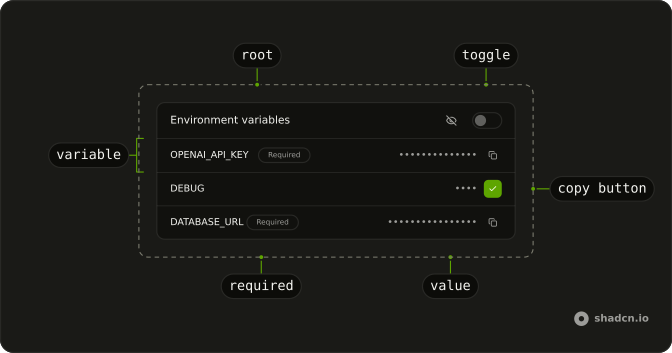
EnvironmentVariables
├── EnvironmentVariablesHeader
│   ├── EnvironmentVariablesTitle
│   └── EnvironmentVariablesToggle
└── EnvironmentVariablesContent
    └── EnvironmentVariable (one per variable)
        ├── EnvironmentVariableGroup
        │   ├── EnvironmentVariableName
        │   └── EnvironmentVariableRequired
        └── EnvironmentVariableGroup
            ├── EnvironmentVariableValue
            └── EnvironmentVariableCopyButton
Usage
import {
  EnvironmentVariable, EnvironmentVariableCopyButton,
  EnvironmentVariableGroup, EnvironmentVariableName,
  EnvironmentVariableRequired, EnvironmentVariables,
  EnvironmentVariablesContent, EnvironmentVariablesHeader,
  EnvironmentVariablesTitle, EnvironmentVariablesToggle,
  EnvironmentVariableValue,
} from "@/components/ui/environment-variables";<EnvironmentVariables>
<EnvironmentVariablesHeader>
<EnvironmentVariablesTitle />
<EnvironmentVariablesToggle />
</EnvironmentVariablesHeader>
<EnvironmentVariablesContent>
<EnvironmentVariable name="OPENAI_API_KEY" value="sk-proj-abc123xyz789">
<EnvironmentVariableGroup className="shrink-0">
<EnvironmentVariableName />
<EnvironmentVariableRequired />
</EnvironmentVariableGroup>
<EnvironmentVariableGroup>
<EnvironmentVariableValue />
<EnvironmentVariableCopyButton />
</EnvironmentVariableGroup>
</EnvironmentVariable>
</EnvironmentVariablesContent>
</EnvironmentVariables>Demos
Copy format
Three rows, one per value of copyFormat: value copies the value, name the name, and export a line a shell runs, export REDIS_URL="redis://localhost:6379". The line under the card shows what went on the clipboard, set from onCopy. Use export where the reader pastes into a terminal and name where they paste into a host's settings form; a copy works while the value is masked, so nobody has to show a key to copy it.
Controlled
showValues and onShowValuesChange hold the toggle in the demo's state, which hides the live keys again five seconds after they're shown. Hold it yourself when something outside the card decides, a timer, a permission, a second card that should follow the first. Uncontrolled, defaultShowValues sets where it starts.
Default row
EnvironmentVariable with no children lays out its own row: the name, then the value. defaultShowValues starts these development values shown, since there's nothing in them to hide. Compose the row from EnvironmentVariableGroup as soon as it needs a badge or a copy button.
Migrating from AI SDK Elements
If you added Environment Variables from AI SDK Elements (opens in a new tab), your project has a components/ai-elements/environment-variables.tsx. Run the command in the Installation section, then change the import from @/components/ai-elements/environment-variables to @/components/ui/environment-variables. Every part keeps its name and its props: showValues, defaultShowValues and onShowValuesChange on the root, name and value on a row, copyFormat, onCopy, onError and timeout on the copy button.
What changes is how they read. The title says "Environment variables" when you give it no words, a hidden value is "Hidden" to a screen reader instead of a run of bullets, and the copy button has a label that names the variable, "Copy the value of DATABASE_URL".
FAQ
Does masking a value keep it secret?
No. The value is in the page, in the component's props, and only drawn as dots, at most 20, so its length doesn't show. That keeps a key off a screen share. A secret the reader isn't allowed to have should never reach the browser: send its name with an empty value or a placeholder, and keep the real one on the server.
How do I show and hide every value at once?
EnvironmentVariablesToggle is a Switch in the header that shows or hides every value in the card, with an eye that says which. Start with the values shown with defaultShowValues, or hold the state yourself with showValues and onShowValuesChange, as the Controlled demo does to hide them again after five seconds.
What does the copy button copy?
The value by default, even while it's masked. copyFormat="name" copies the name and copyFormat="export" copies export NAME="value" for a shell. The icon turns into a check for timeout milliseconds, 2000 by default, and onCopy or onError tells you how it went: the clipboard needs a page served over HTTPS.
How do I mark a variable as required?
Put an EnvironmentVariableRequired beside its name, in the name's EnvironmentVariableGroup. It's a secondary Badge that says Required; give it other words for another mark, Optional or Missing, and a variant to change its color.
What does a screen reader hear for a hidden value?
"Hidden": the dots are hidden from assistive tech and a visually hidden word stands in for them. The toggle is a Switch named Show values, and each copy button names its variable, so a list of buttons isn't a list of "Copy". Once a copy works, a polite live region says Copied.
API Reference
EnvironmentVariables
showValues?boolean
Whether the values show (controlled).
defaultShowValues?boolean
Whether the values show at first, when uncontrolled.
- Default
false
onShowValuesChange?(show: boolean) → void
Called with true when the values are shown and false when hidden.
- Parameters
show– boolean- Returns
void
className?string
Merged with the part's classes.
EnvironmentVariable
namestring
The variable's name, as code reads it: DATABASE_URL.
valuestring
Its value, masked until the card shows its values.
className?string
Merged with the part's classes.
EnvironmentVariableCopyButton
data-slot="environment-variable-copy-button"
clickEffect?boolean
Apply a click effect to the button.
- Default
true
copyFormat?"export" | "name" | "value"
What it copies: the value, the name, or both as a shell line,
export NAME="value".
- Type
"export" | "name" | "value"- Default
"value"
isLoading?boolean
Show a loading indicator.
- Default
false
onCopy?() → void
Called once the text is on the clipboard.
- Returns
void
onError?(error: Error) → void
Called when the clipboard refuses the text, or there is none (a page not served over HTTPS).
- Parameters
error– Error- Returns
void
timeout?number
How long the check stays before the copy icon comes back, in milliseconds.
- Default
2000
asChild?boolean
Use the provided child element as the default rendered element, combining their props and behavior.
className?string
Merged with the part's classes.
data-copied?string
Present when copied is set.
EnvironmentVariableGroup
<div> data-slot="environment-variable-group"
className?string
Merged with the part's classes.
EnvironmentVariableName
<span> data-slot="environment-variable-name"
className?string
Merged with the part's classes.
EnvironmentVariableRequired
data-slot="environment-variable-required"
pill?boolean
Fully rounded corners.
- Default
false
size?"lg" | "md" | "sm"
The size.
- Type
"lg" | "md" | "sm"- Default
"md"
variant?"default" | "destructive" | "ghost" | "info" | "link" | "outline" | "secondary" | "success" | "warning"
Ark default: default.
- Type
"default" | "destructive" | "ghost" | "info" | "link" | "outline" | "secondary" | "success" | "warning"- Default
"secondary"
asChild?boolean
Use the provided child element as the default rendered element, combining their props and behavior.
className?string
Merged with the part's classes.
EnvironmentVariablesContent
<div> data-slot="environment-variables-content"
className?string
Merged with the part's classes.
EnvironmentVariablesHeader
<div> data-slot="environment-variables-header"
className?string
Merged with the part's classes.
EnvironmentVariablesTitle
<h3> data-slot="environment-variables-title"
className?string
Merged with the part's classes.
EnvironmentVariablesToggle
<div> data-slot="environment-variables-toggle"
checked?boolean
The controlled checked state of the switch.
defaultChecked?boolean
The initial checked state of the switch when rendered. Use when you don't need to control the checked state of the switch.
onCheckedChange?(details: CheckedChangeDetails) → void
Function to call when the switch is clicked.
- Type
(details: CheckedChangeDetails) → void- Parameters
details– { checked: boolean }- Returns
void
idstring
The unique identifier of the machine.
dir?"ltr" | "rtl"
The document's text/writing direction.
- Type
"ltr" | "rtl"- Default
"ltr"
disabled?boolean
Whether the switch is disabled.
form?string
The id of the form that the switch belongs to.
ids?object
The ids of the elements in the switch. Useful for composition.
- Type
{ root?: string; hiddenInput?: string; control?: string; label?: string; thumb?: string }
invalid?boolean
If true, the switch is marked as invalid.
label?string
Specifies the localized strings that identifies the accessibility elements and their states.
name?string
The name of the input field in a switch (Useful for form submission).
readOnly?boolean
Whether the switch is read-only.
required?boolean
If true, the switch input is marked as required,.
size?"sm" | "default"
The size.
- Type
"sm" | "default"
value?string | number
The value of switch input. Useful for form submission.
- Type
string | number- Default
"on"
asChild?boolean
Use the provided child element as the default rendered element, combining their props and behavior.
className?string
Merged with the part's classes.
EnvironmentVariableValue
<span> data-slot="environment-variable-value"
className?string
Merged with the part's classes.
data-masked?string