shadcn.io is not affiliated with official shadcn/ui
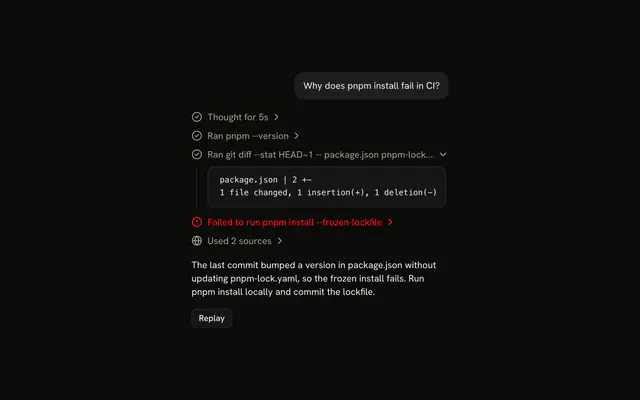
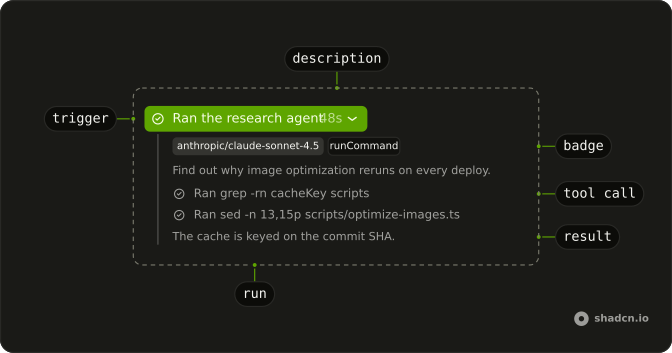
The agent hands part of the job to a subagent, and the reply shows it as one line: Ran the research subagent.
Use Subagent when one agent runs another and the reader should see what it did without reading its whole transcript. The line opens into the subagent's tool calls, each one opening into its output in a Code Block, and ends with what the subagent found. Each line is a Trace part, so there is no Subagent component to install in React: the composition is yours to edit. Keep the subagent's report short and let the agent's own reply, after the line, give the answer.
Installation
Subagent is a pattern. The command adds the parts it's built from, Trace, Code Block and Badge, and the code to copy is the demo's.
Anatomy
Trace
└── TraceCollapsible (the run)
    ├── TraceCollapsibleTrigger
    │   └── TraceLine (Ran the research agent)
    │       ├── TraceIcon
    │       ├── TraceTitle
    │       └── TraceDescription (how long it ran)
    └── TraceCollapsibleContent
        ├── Badge (its model and tools)
        ├── p (the task it was given)
        ├── Trace (its tool calls)
        │   └── TraceLine (one per tool call)
        └── p (what it found)
Usage
import { CircleCheckIcon } from "lucide-react";
import {
  Trace, TraceCollapsible, TraceCollapsibleContent,
  TraceCollapsibleTrigger, TraceIcon, TraceLine, TraceTitle,
} from "@/components/ui/trace";<Trace>
<TraceCollapsible>
<TraceCollapsibleTrigger>
<TraceLine>
<TraceIcon>
<CircleCheckIcon aria-hidden="true" />
</TraceIcon>
<TraceTitle>Ran the research agent</TraceTitle>
</TraceLine>
</TraceCollapsibleTrigger>
<TraceCollapsibleContent className="flex flex-col gap-3">
<Trace>
<TraceLine>
<TraceIcon>
<CircleCheckIcon aria-hidden="true" />
</TraceIcon>
<TraceTitle>Ran grep -rn cacheKey scripts</TraceTitle>
</TraceLine>
</Trace>
<p>The cache is keyed on the commit SHA.</p>
</TraceCollapsibleContent>
</TraceCollapsible>
</Trace>Demos
Running
The subagent mid-run: its line reads Running with a spinner and a shimmer, and its content holds the tool calls so far, one done and one still running. While the subagent runs, the line has status="running" and lists each call as it starts. Add the result under the calls when the subagent finishes, and change the title to Ran.
Details
The task the subagent was given sits at the top of the content, under its model and its one tool as Badge items, the tool's name in a mono face. How long it ran is a TraceDescription after the title, which stays whole when the title has to truncate. Use the details when the reader may want to check what the subagent was asked, and leave them out when the title already says it.
AI SDK
With the AI SDK, a subagent is a tool whose execute yields the subagent's UIMessage as it streams. Render the tool part as the line and part.output.parts as the nested Trace. Map each nested tool part as in Tool.
Each yield is a preliminary output: the part is output-available with preliminary: true. The final output replaces it, so check preliminary before you show "Ran".
| Tool part state | TraceLine status | Title |
|---|---|---|
input-streaming, input-available | "running" while the chat streams | Running … |
output-available with preliminary: true | "running" while the chat streams | Running … |
output-available | none | Ran … |
output-error, or a running state after the chat stops | "error" | Failed to run … |
Migrating from AI SDK Elements
If you added Agent from AI SDK Elements (opens in a new tab), your project has a components/ai-elements/agent.tsx wrapper. Paste this prompt into your coding agent to rebuild it on Trace, Code Block and Badge. Every export keeps its name and props, so the code that uses it keeps working.
Migrate components/ai-elements/agent.tsx from AI SDK Elements to the shadcn.io Trace, Code Block and Badge components.

Keep every export, with the same name and props, so the code that imports it keeps working. Only change how each part renders.

1. Read https://kit.dev/ui/ark/subagent.md and build Subagent the same way. If the project hasn't got Trace, Code Block and Badge, run the command in its Installation section.
2. Rebuild each part:
   - Import CodeBlock and CodeBlockContent from @/components/ui/code-block, not from ./code-block.
   - Agent renders a Trace with a TraceCollapsible.
   - AgentHeader renders a TraceCollapsibleTrigger with a TraceLine, a TraceIcon and a TraceTitle with the name, like "Ran the research agent". Show model in a Badge.
   - AgentContent renders a TraceCollapsibleContent.
   - AgentTools renders a Trace, and AgentTool a TraceLine for each tool call, instead of an Accordion.
   - Keep AgentInstructions and AgentOutput, with AgentOutput on CodeBlock.
3. Remove the imports the file no longer uses.
4. Run the type checker and fix any errors.
FAQ
What does installing Subagent add in React?
Trace, Code Block and Badge, the three parts the run is built from, with the Collapsible that Trace's lines open on and the shimmer utility for a running title. Subagent is a pattern, so no subagent file lands in your ui folder: copy the demo's code into your own component and feed it your subagent's parts. The command uses the shadcn CLI.
What does the line show while the subagent runs?
Running the research subagent, with a spinner and status="running", so the title shimmers. It is a plain line until the first tool call arrives, then a line that opens on the calls so far, the newest one running. When the subagent reports, the title turns to Ran and its report follows the calls.
Why does the line still say Running when the tool part is output-available?
Because a subagent's tool yields its messages as it goes, and each yield is a preliminary output: output-available with preliminary: true. Only the last one, without the flag, means it finished. Check preliminary before you show Ran, or the line says done after the first tool call.
How do I fold the run shut once the answer starts?
Hold the open state yourself, as undefined until the reader clicks, and pass your state or the running flag. The run opens while the subagent works and folds shut when it's done, unless the reader opened or closed it first.
Pass open={open ?? running} and set your state from onOpenChange, which receives { open }.
Where do the subagent's model, task and duration go?
The model and the tools it may call go in Badges at the top of the content, then the task as a sentence, as the Details demo shows. The duration is a TraceDescription after the title: it never truncates, so a long title gives way first. Leave all three out when the title already says enough.
Can the reader open the run and its tool calls with the keyboard?
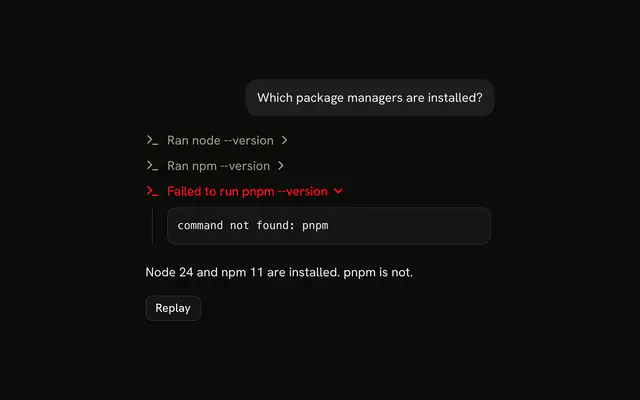
Yes. The run is a button with aria-expanded, and so is each finished tool call with output to show, so Tab moves through them and Enter or Space opens one. A tool call still running is plain text and not a tab stop. Running and Ran are in the titles, because the shimmer and the spinner say nothing to a screen reader.
Is this AI SDK Elements' Agent?
It does the same job under shadcn/ui's name for it: AI SDK Elements' Agent is Subagent here, and asking the MCP for agent finds this page. The Agent, AgentHeader and AgentTools wrappers become Trace lines, a Code Block and Badges. The Migrating from AI SDK Elements section has a prompt that rebuilds the old agent.tsx on these parts and keeps its exports.
API Reference
Subagent has no props of its own. The run is a TraceCollapsible whose TraceLine takes status and a TraceDescription, and its tool calls are a nested Trace: see Trace. A tool call's output is a Code Block, and the model and tools are Badge items.