shadcn.io is not affiliated with official shadcn/ui
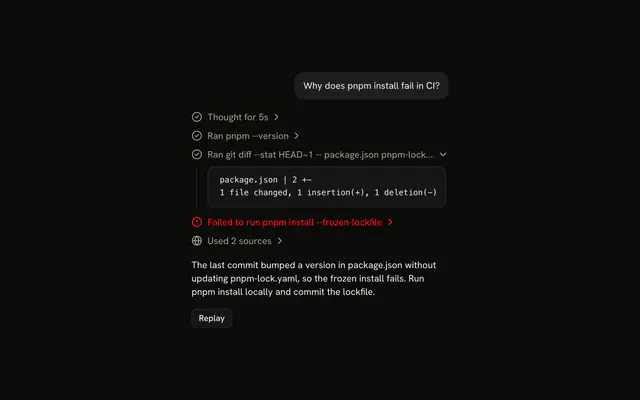
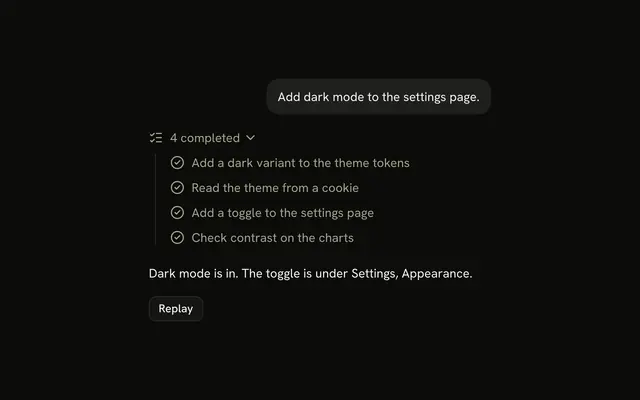
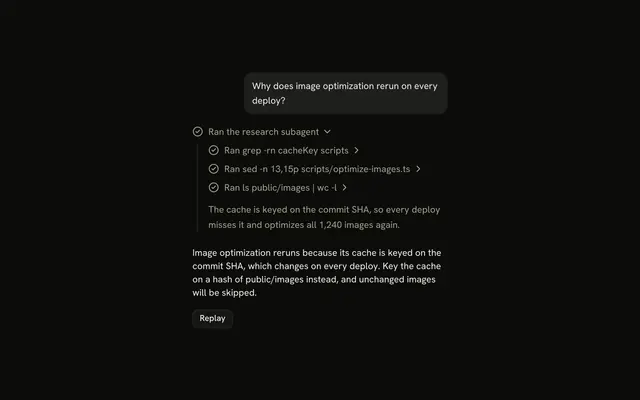
A task is a piece of work the agent is doing, such as finding the project files or updating a page. Its steps, a search, a read, an edit, appear under it as the agent takes them.
Use it when the steps come out of the work itself, so the agent only knows the next one once it has taken the last. Each task is a Trace line that expands into a Trace of its steps, so there is no Task component to install in React: the rows are yours to edit. Write the title in the present tense while the task runs and in the past tense once it is done, and don't list steps the agent hasn't taken yet: that is a Plan.
Task or Plan
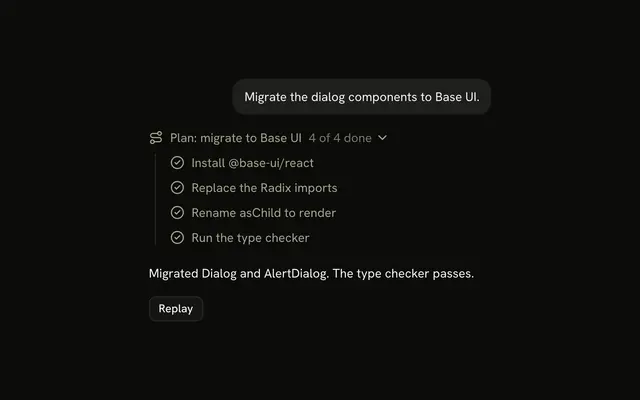
Both are a list of steps under a line that expands. The difference is when the steps are known.
Use Plan when the agent decides the steps before it starts. Use Task when the steps come from the work itself.
| Plan | Task | |
|---|---|---|
| Steps | Every step, from the start | Each step, once the agent takes it |
| Pending steps | Yes, waiting their turn | None |
| Title | The goal, with progress: "2 of 4 done" | What the agent is doing, then what it did |
| Per reply | One plan | One or more tasks, each closing when it is done |
Installation
Task is a pattern. The command adds the part it's built from, Trace, and the code to copy is the demo's.
Anatomy
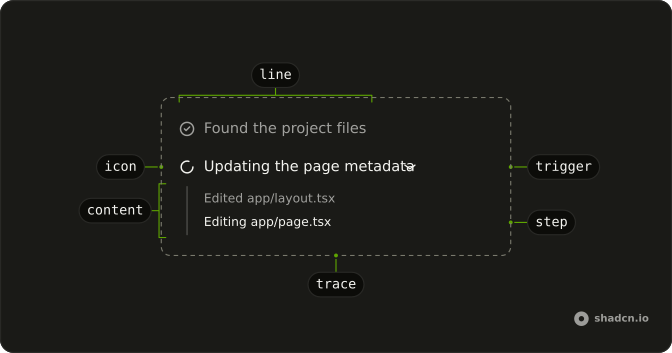
Trace
└── TraceCollapsible (one per task)
    ├── TraceCollapsibleTrigger
    │   └── TraceLine (status from the steps)
    │       ├── TraceIcon
    │       └── TraceTitle
    └── TraceCollapsibleContent
        └── Trace
            └── TraceLine (one per step)
Usage
import { FileTextIcon, SearchIcon } from "lucide-react";
import {
  Trace, TraceCollapsible, TraceCollapsibleContent,
  TraceCollapsibleTrigger, TraceIcon, TraceLine, TraceTitle,
} from "@/components/ui/trace";<Trace>
<TraceCollapsible>
<TraceCollapsibleTrigger>
<TraceLine>
<TraceTitle>Found the project files</TraceTitle>
</TraceLine>
</TraceCollapsibleTrigger>
<TraceCollapsibleContent>
<Trace>
<TraceLine>
<TraceIcon>
<SearchIcon aria-hidden="true" />
</TraceIcon>
<TraceTitle>Searched for app/page.tsx</TraceTitle>
</TraceLine>
<a href="/files/app/page.tsx">
<TraceLine>
<TraceIcon>
<FileTextIcon aria-hidden="true" />
</TraceIcon>
<TraceTitle>Read app/page.tsx</TraceTitle>
</TraceLine>
</a>
</Trace>
</TraceCollapsibleContent>
</TraceCollapsible>
</Trace>A step that has somewhere to go is a link around its TraceLine, like the file read here; a step with nothing to open stays a plain line.
Status
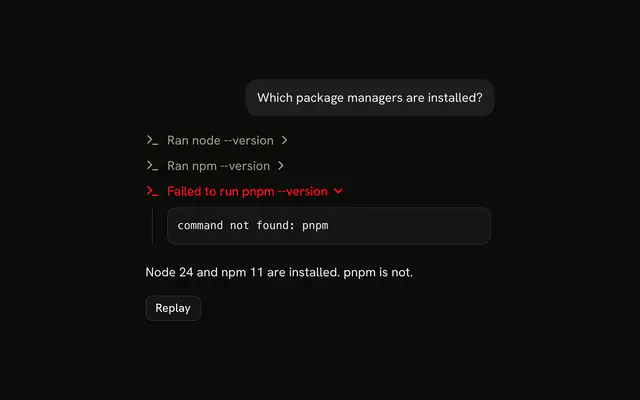
Set the task's status from its steps, and its title to match.
| Steps | status | Title |
|---|---|---|
| A step is still running | "running" | Updating the page metadata |
| A step failed | "error" | Failed to update the page metadata |
| Every step is done | none | Updated the page metadata |
Put the tasks of one reply in one Trace. Keep the running task open and close each one once it is done, unless the reader opened or closed it first: the demo holds the open state as undefined until the reader clicks, and passes the running flag till then.
That is open ?? running, set from onOpenChange.
Closed content stays mounted, so a task's steps keep their own state while it is closed.
AI SDK
Stream each task as a data part with its own id. The AI SDK replaces a data part that has the same id, so writing a task again with one more step updates it in place.
const stream = createUIMessageStream({
  execute: async ({ writer }) => {
    writer.write({ type: "data-task", id: "update", data: { title, steps } });
  },
});
On the client, the tasks are the message's data-task parts.
const tasks = message.parts.filter((part) => part.type === "data-task");Migrating from AI SDK Elements
If you added Task from AI SDK Elements (opens in a new tab), your project has a components/ai-elements/task.tsx wrapper. Paste this prompt into your coding agent to rebuild it on Trace. Every export keeps its name and props, so the code that uses it keeps working.
Migrate components/ai-elements/task.tsx from AI SDK Elements to the shadcn.io Trace component.

Keep every export, with the same name and props, so the code that imports it keeps working. Only change how each part renders.

1. Read https://kit.dev/ui/ark/task.md and build Task the same way. If the project hasn't got Trace, run the command in its Installation section.
2. Rebuild each part:
   - Task renders a Trace with a TraceCollapsible. Pass open and defaultOpen to the TraceCollapsible, and call onOpenChange with details.open from its onOpenChange.
   - TaskTrigger renders a TraceCollapsibleTrigger with a TraceLine and a TraceTitle with title.
   - TaskContent renders a TraceCollapsibleContent with a Trace for the steps.
   - TaskItem renders a TraceLine with a TraceTitle.
   - Keep TaskItemFile as it is.
3. Remove the imports the file no longer uses.
4. Run the type checker and fix any errors.
FAQ
What does installing Task add in React?
Trace, the one part a task is built from, with the Collapsible it opens on and the shimmer utility for a running title. Task is a pattern, so no task file lands in your ui folder: copy the demo's code into your own component and change the tasks. The command uses the shadcn CLI.
Should I use Task or Plan?
Task, when the agent finds its steps as it works and shows each one once it has taken it. Plan, when the agent writes the steps down before it starts and checks them off. A plan has pending steps; a task never does.
How does a task show that it is running or failed?
Its TraceLine takes status from the steps: running while one runs, which shimmers the title, and error once one fails, which turns the line destructive. The title says the same in words, "Updating the page metadata" and then "Updated the page metadata", because color and motion don't reach a screen reader.
Why does the running task open and the done one close?
So the reader sees the step in progress and the transcript stays short once the work is done. The demo passes the running flag as the open state until the reader opens or closes a task; after that, their choice wins.
How do I update a task while it streams?
Write it again under the same id. With the AI SDK, a data part with an id that is already in the message replaces the old one, so the task gains its new step in place instead of adding a second row.
Can the reader open a task with the keyboard?
Yes. Each task's trigger is a button: Tab reaches it, and Enter or Space opens or closes it. The steps inside are plain lines, so Tab skips them unless one is a link.
Is this the same as AI SDK Elements' Task?
It does the same job without a wrapper: Task was a Collapsible with its own trigger and item parts, and here each task is a Trace line that expands into a Trace of its steps. The Migrating from AI SDK Elements section has a prompt that rebuilds the old file on Trace and keeps its exports.
API Reference
Task has no props of its own. Each task is a Trace collapsible: status is TraceLine's, and the open state is TraceCollapsible's.