shadcn.io is not affiliated with official shadcn/ui
A row of short prompts sits above the message field, and a click sends one as it reads.
Use it for the first turn, when the reader doesn't know what to ask, and for follow-ups the agent can predict. Each suggestion is a Button with the prompt as its label, so there is no Suggestion component to install in Solid: the row is yours to edit. Keep each label short enough to read at a glance, and send the label as the message, word for word.
Installation
Suggestion is a pattern. The command adds the parts it's built from, Button and the scroll-fade utility, and the code to copy is the demo's.
Anatomy
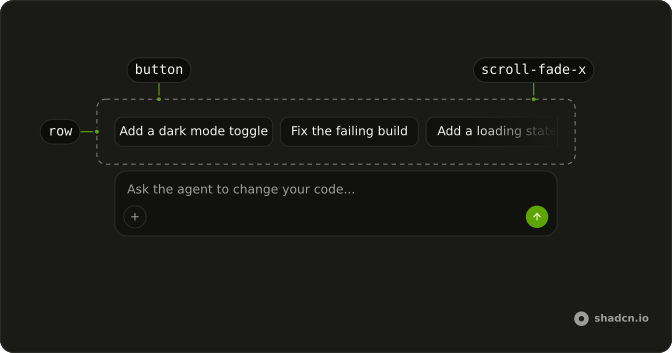
Row (div, scroll-fade-x)
└── Button (one per suggestion)
Usage
import { Button } from "@/components/ui/button";const suggestions = ["Add a dark mode toggle", "Fix the failing build"];
export function Suggestions(props: { onSend: (prompt: string) => void }) {
return (
<div class="scrollbar-none flex scroll-fade-x gap-2 overflow-x-auto overscroll-x-contain">
{suggestions.map((suggestion) => (
<Button
class="shrink-0"
key={suggestion}
onClick={() => props.onSend(suggestion)}
size="sm"
variant="outline"
>
{suggestion}
</Button>
))}
</div>
);
}Demos
Scrolling
Five suggestions in a column as narrow as a phone's composer, and a line that says which one was sent. The row scrolls sideways when the labels don't fit: scroll-fade-x fades the edge that has more to show and follows the reading direction, shrink-0 keeps each label on one line, and overscroll-x-contain stops a swipe at the end from moving the page. With three or four suggestions and the room to show them all, wrap the row (flex-wrap, no fade) instead.
AI SDK
The label is the message. Send it as it is.
AI SDK UI has no Solid package: post the label as the user's message to your chat route.
Hide or disable the row while a reply streams, so a second click doesn't queue a message the reader didn't mean to send: with the AI SDK, while status is submitted or streaming.
Migrating from AI SDK Elements
AI SDK Elements is for React. In Solid, start from the demo above: its row is all there is to Suggestion.
FAQ
What does installing Suggestion add in Solid?
Button and the scroll-fade utility, the two parts the row is built from. Suggestion is a pattern, so no suggestion file lands in your ui folder: copy the demo's code into your own component and change the labels. The command uses the shadcn CLI.
What should a suggestion send?
Its label, word for word, as the reader's message. The reader decides from what the button says, so a hidden longer prompt would send something they never read. If a suggestion needs more context, put it in the label or in the system prompt.
How many suggestions should the row show?
Three to six. Fewer than three reads as a menu with gaps, and past six the reader scrolls instead of choosing. When they all fit, wrap the row with flex-wrap and drop the fade; when they don't, keep one scrolling line.
Why does the row fade at its edges?
scroll-fade-x masks the edge that has more to show, so a cut-off label reads as more to scroll rather than a broken layout. The fade follows the reading direction, so in a right-to-left page it starts on the right. It is CSS only, and an edge with nothing past it stays sharp.
What happens if the reader clicks while a reply streams?
The demo answers at once, but a real agent takes a while, and a second click would send another message mid-reply. Hide or disable the row while the chat's status is submitted or streaming, and bring it back with the next set of suggestions once the reply ends.
Can the reader reach the suggestions with the keyboard?
Yes. Each suggestion is a Button, so Tab moves through them in order, and Enter or Space sends the one in focus. The row scrolls to keep the focused button in view.
Is this the same as AI SDK Elements' Suggestion?
It does the same job without a wrapper: Suggestions was a ScrollArea and Suggestion a Button, and here the row is a div with the scroll-fade utility around plain Buttons. The Migrating from AI SDK Elements section has a prompt that rebuilds the old file on these parts and keeps its exports.
API Reference
Suggestion has no props of its own. Each suggestion is a Button: variant, size and the click handler are Button's. The row is a div with the scroll-fade utility's scroll-fade-x class.