shadcn.io is not affiliated with official shadcn/ui
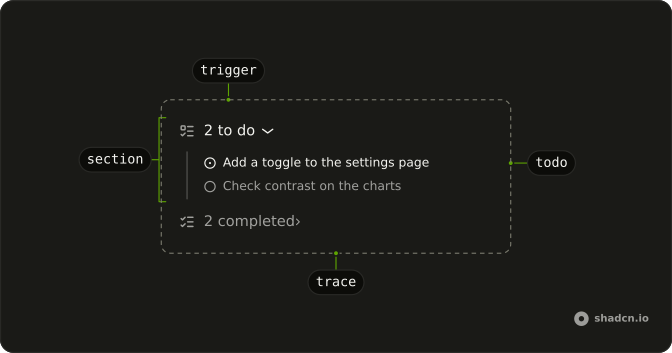
The agent's todos sit in two sections, To do and Completed, each a line with its count that opens onto the list, and the icon on each todo shows where it is.
Use it for the todo list an agent keeps while it works: it rewrites the list as it goes, so a todo moves from To do to Completed when it's done and the counts follow. Each section is a Trace line that expands, so there is no Queue component to install in Solid. A todo with more to say opens to show it; one without stays a plain line, so the reader isn't asked to open something empty.
Installation
Queue is a pattern. The command adds the part it's built from, Trace, and the code to copy is the demo's.
Anatomy
Trace
├── TraceCollapsible (To do)
│   ├── TraceCollapsibleTrigger
│   │   └── TraceLine (2 to do)
│   └── TraceCollapsibleContent
│       └── Trace
│           └── TraceLine (one per todo)
└── TraceCollapsible (Completed)
    ├── TraceCollapsibleTrigger
    │   └── TraceLine (1 completed)
    └── TraceCollapsibleContent
        └── Trace
            └── TraceLine (one per todo)
Usage
import {
  CircleCheckIcon, CircleIcon, ListChecksIcon, ListTodoIcon,
} from "lucide-solid";
import {
  Trace, TraceCollapsible, TraceCollapsibleContent,
  TraceCollapsibleTrigger, TraceIcon, TraceLine, TraceTitle,
} from "@/components/ui/trace";
export function Queue() {
return (
<Trace>
<TraceCollapsible>
<TraceCollapsibleTrigger>
<TraceLine>
<TraceIcon>
<ListTodoIcon aria-hidden="true" />
</TraceIcon>
<TraceTitle>2 to do</TraceTitle>
</TraceLine>
</TraceCollapsibleTrigger>
<TraceCollapsibleContent>
<Trace>
<TraceLine>
<TraceIcon>
<CircleIcon aria-hidden="true" />
</TraceIcon>
<TraceTitle>Update the registry snapshots</TraceTitle>
</TraceLine>
<TraceLine>
<TraceIcon>
<CircleIcon aria-hidden="true" />
</TraceIcon>
<TraceTitle>Add tests for the combobox</TraceTitle>
</TraceLine>
</Trace>
</TraceCollapsibleContent>
</TraceCollapsible>
<TraceCollapsible>
<TraceCollapsibleTrigger>
<TraceLine>
<TraceIcon>
<ListChecksIcon aria-hidden="true" />
</TraceIcon>
<TraceTitle>1 completed</TraceTitle>
</TraceLine>
</TraceCollapsibleTrigger>
<TraceCollapsibleContent>
<Trace>
<TraceLine>
<TraceIcon>
<CircleCheckIcon aria-hidden="true" />
</TraceIcon>
<TraceTitle>Add a changeset</TraceTitle>
</TraceLine>
</Trace>
</TraceCollapsibleContent>
</TraceCollapsible>
</Trace>
);
}
Set defaultOpen on the To do section's TraceCollapsible to show what's left at first, as the demos do.
Demos
Descriptions
Five todos, three with a description: a todo with one is a TraceCollapsible that opens to show it, and a todo without one stays a TraceLine. To do starts open and Completed closed, so the reader sees what's left first. Keep a description to a sentence on why or how; what to do belongs in the title.
<TraceCollapsible>
  <TraceCollapsibleTrigger>
    <TraceLine>
      <TraceIcon>
        <CircleIcon aria-hidden="true" />
      </TraceIcon>
      <TraceTitle>Fix the focus ring on the select trigger</TraceTitle>
    </TraceLine>
  </TraceCollapsibleTrigger>
  <TraceCollapsibleContent>
    It is clipped by overflow-hidden on the field.
  </TraceCollapsibleContent>
</TraceCollapsible>
AI SDK
The agent writes its todos with a tool, writeTodos in this example. Each call sends the whole list, so render the last call and skip one whose input is still streaming.
AI SDK UI has no Solid package: read the last complete writeTodos call from your chat route's stream.
Map each todo status to a section, an icon and a TraceLine status. Set "running" on the todo in progress only while the chat streams, so its title stops shimmering when the agent stops.
| Todo status | Section | Icon | TraceLine status |
|---|---|---|---|
pending | To do | CircleIcon | none |
in_progress | To do | CircleDotIcon | "running" while the chat streams |
completed | Completed | CircleCheckIcon | none |
Migrating from AI SDK Elements
AI SDK Elements is for React. In Solid, start from the demo above: its two sections are all there is to Queue.
FAQ
What does installing Queue add in Solid?
Trace, the part the sections and todos are built from, with the Collapsible they open on and the shimmer utility the running todo uses. Queue is a pattern, so no queue file lands in your ui folder: copy the demo's code into your own component. The command uses the shadcn CLI.
When should I use Queue instead of Plan?
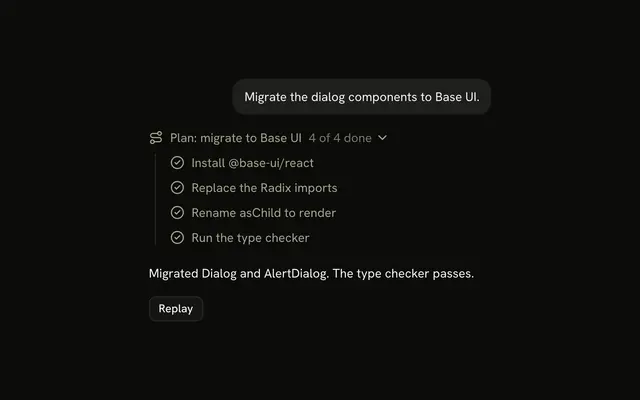
Use Queue for a todo list the agent keeps and rewrites as it works, where what matters is what's left. Use Plan for steps decided before the agent starts, in order, with a count of how many are done.
Why are To do and Completed separate sections?
So the reader sees what's left without scrolling past what's done. Each section's title carries its count, so a closed section still reads. Hide a section when it's empty: there is nothing to open, and an empty Completed reads as noise.
How does a todo show it's in progress?
With a dot instead of an empty circle, and status set to running on its TraceLine, which shimmers the title. Set it only while the chat streams, so a todo doesn't look busy after the agent stops. A completed todo gets a check and moves to Completed.
How do I add a description to a todo?
Make that todo a TraceCollapsible, with its line in the trigger and the description in TraceCollapsibleContent, as the Descriptions demo does. Leave a todo with nothing more to say as a plain TraceLine, so it isn't a button that opens onto nothing.
Can the reader open the sections with the keyboard?
Yes. Each section line, and each todo with a description, is a button with aria-expanded: Tab moves through them and Enter or Space opens or closes one. Plain todos are read but aren't tab stops. The chevrons point to the inline end in a right-to-left page.
API Reference
Queue has no props of its own. Each section and each todo is a Trace line: TraceCollapsible holds a section's open state, and TraceLine takes a todo's status.