shadcn.io is an independent project built on shadcn/ui
One background that glides to the item under the pointer, or to the one that's chosen, and takes its size on the way.
Use it behind a row of links, a menu's rows, a segmented control or a grid of cards, where a hover wash per item would blink from one to the next. For a choice with panels, use Tabs; for a labeled single choice, Segment Group. In React, Ark UI measures each item, so items of any size and layout work.
Installation
Anatomy
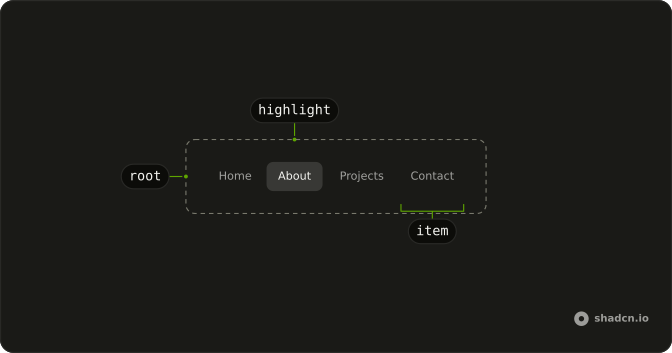
MotionHighlight
└── MotionHighlightItem
Usage
import {
  MotionHighlight, MotionHighlightItem,
} from "@/components/ui/motion-highlight";<MotionHighlight hover>
<MotionHighlightItem asChild value="home">
<button type="button">Home</button>
</MotionHighlightItem>
<MotionHighlightItem asChild value="about">
<button type="button">About</button>
</MotionHighlightItem>
</MotionHighlight>Each item sets data-highlighted while the highlight is on it and data-active while it's the chosen one, so data-highlighted:text-foreground darkens the text the highlight sits behind.
Demos
Tabs
A segmented range picker: without hover the highlight marks the chosen item only and moves on a click. highlightClassName makes it a raised white pill on a muted track, and each button sets aria-pressed, because the highlight is only drawn. Use it for a view switch where value is read elsewhere on the page.
List
A menu's actions in a column, the highlight in the accent color following the pointer and the keyboard focus from row to row. The rows are buttons of the same width, so only the vertical position moves. It reads as one moving selection rather than a wash flashing on and off.
Cards
Four guide links in a two-column grid. The highlight crosses rows and columns and takes each card's size, which a sliding underline can't do. Use it for a set of large links, and keep each card a single link so the highlight matches what a click opens.
FAQ
What's the difference between hover and click in Motion Highlight?
With hover, the highlight follows the pointer and the keyboard focus, and goes back to the chosen item when the pointer leaves, or fades out if nothing is chosen. Without it, the highlight marks the chosen item only and moves when another is clicked, as in the Tabs demo. Either way a click chooses the item.
How do I control the chosen item in React?
Give each MotionHighlightItem a value, then keep the chosen one in state and pass it back, or set defaultValue. The Tabs demo stores it and writes it back.
Pass value, and onValueChange receives the clicked item's value as a string.
How do I style the highlight with Ark UI?
Pass highlightClassName on MotionHighlight: it's merged over the default rounded-md bg-muted, so rounded-full bg-primary/10 or bg-background shadow-sm replaces it. Style the items' text with data-highlighted: and data-active:. The highlight sits behind the items, so they need no background of their own.
Should MotionHighlightItem wrap my button or become it?
Pass asChild and the item becomes your button or link, so the highlight is measured on the element people click and the data attributes land on it. Without asChild the item is a div around its child, which is fine for a block such as a card's whole body.
Does Motion Highlight work in a grid or a scrolling list?
Yes. Each item is measured by its place inside MotionHighlight, so rows, columns and grids all work, as do items of different sizes. The highlight is re-measured when the root or an item resizes. Put MotionHighlight inside the scrolling element, not around it, so the highlight scrolls with the items.
API Reference
MotionHighlight
value?string
The item highlighted at rest, when controlled.
defaultValue?string
The item highlighted at rest, at first, when uncontrolled.
onValueChange?(value: string) → void
Called with an item's value when it's chosen (clicked).
- Parameters
value– string- Returns
void
highlightClassName?string
Classes for the highlight itself (rounded-md bg-muted by default).
hover?boolean
Whether the highlight follows the pointer and keyboard focus. Without it the highlight marks the chosen item only, and moves on a click.
- Default
false
className?string
Merged with the part's classes.
--motion-highlight-heightstring--motion-highlight-widthstring--motion-highlight-xstring
The highlight's place, set from its item.
--motion-highlight-ystringMotionHighlightItem
<div> data-slot="motion-highlight-item"
valuestring
The item's value: the highlight's value when it's chosen.
disabled?boolean
Whether the item is skipped: never highlighted or chosen.
- Default
false
asChild?boolean
Use the provided child element as the default rendered element, combining their props and behavior.
data-active?stringdata-disabled?string
Present when disabled is true.
data-highlighted?stringdata-value?string
Mirrors value.
--motion-highlight-xstring
The highlight's place, set from its item.