shadcn.io is not affiliated with official shadcn/ui
The value is a URL or a short string, and the frame turns it into a code. Scanning it opens that target on a phone.
Use it for a login handoff, a ticket, or a link on a slide. Copying the URL on this screen is a Clipboard button, and it's faster if nobody is scanning. In Solid, Ark UI keeps the squares dark on a light background, because many cameras fail if those colors flip.
Installation
Anatomy
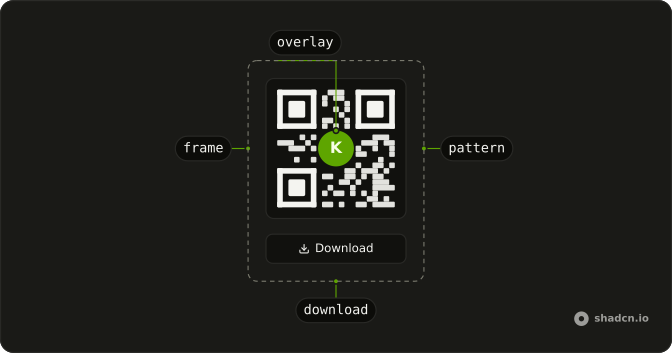
QrCode
├── QrCodeFrame
│   └── QrCodePattern
├── QrCodeOverlay
└── QrCodeDownload
Usage
import { QrCode, QrCodeFrame } from "@/components/ui/qr-code";<QrCode value="https://www.x.com/vinihvc">
<QrCodeFrame />
</QrCode>Accessibility
- Enter
- Activate the focused control.
- Space
- Activate the focused control.
Demos
Download
Type and the code redraws. Short strings use error correction L, then M, Q, and H as the text grows, so a longer payload stays scannable. The buttons save a PNG or an SVG named qr-code, through QrCodeDownload with mimeType and fileName. The field starts empty and still draws, so hide that frame if an empty code should not be offered for download.
Error Correction
One URL in four frames, labeled L, M, Q, and H, with the level set through ecc inside encoding. Recovery is about 7, 15, 25, and 30 percent, and each step packs the modules tighter. Pick H when a logo covers the center or the code will be printed. Drop toward L for a long URL that would otherwise turn into a texture too fine to scan.
Overlay
A bold K sits in the center through QrCodeOverlay, on a code for the site URL. Use an overlay for a mark people should recognize, and keep it to about a quarter of the code, which is how this one scales. Covering the middle removes modules, so set ecc to H before you ship it. Correction is left unset here.
Size
One frame is 6rem and the other is 8rem, set with --qr-code-size on QrCode. Eight rem is the default, so the second is stock size and the first is the compact print. A class on QrCodeFrame adds the border and radius without changing the modules. Use the smaller size in a card or dialog, and the larger one when the phone will be across a room.
FAQ
How do I generate a QR code from a URL in Solid?
Pass the URL, or any text, as value on QrCode, and QrCodeFrame draws the code. It redraws when the value changes, so you can tie it to an input, as the Download demo above does.
How do I change the size of the QR Code?
Set the --qr-code-size CSS variable on QrCode, as the Size demo does with [--qr-code-size:6rem]. It's 8rem by default, and an overlay scales to a quarter of it.
How do I put a logo in the middle of a QR Code?
Add QrCodeOverlay with your image or icon inside, as in the Overlay demo, and raise the error correction to H through encoding. The extra redundancy lets the code still scan with its center covered.
Which error correction level should my QR Code use?
Set it with ecc in encoding: L recovers about 7% damage, M 15%, Q 25% and H 30%. Use H with a logo or for print, and a lower level for long URLs, since more correction makes the code denser. The Error Correction demo shows all four.
How do I download the QR Code as a PNG or an SVG in Solid?
Wrap your button in QrCodeDownload with a fileName and a mimeType: image/png, image/jpeg (with quality) or image/svg+xml. The Download demo above offers PNG and SVG side by side.
Does the QR Code work in dark mode?
It keeps black modules on a white frame in both themes on purpose, since many phone scanners fail on inverted codes. To use other colors, change bg-white and fill-black on QrCodeFrame in the component file, and keep the contrast strong.
API Reference
QrCode
<div> data-slot="qr-code"
value?string
The controlled value to encode.
defaultValue?string
The initial value to encode when rendered. Use when you don't need to control the value of the qr code.
onValueChange?(details: ValueChangeDetails) → void
Callback fired when the value changes.
- Type
(details: ValueChangeDetails) → void- Parameters
details– { value: string }- Returns
void
idstring
The unique identifier of the machine.
dir?"ltr" | "rtl"
The document's text/writing direction.
- Type
"ltr" | "rtl"- Default
"ltr"
encoding?QrCodeGenerateOptions
The qr code encoding options.
ids?object
The element ids.
- Type
{ root?: string; frame?: string; overlay?: string }
pixelSize?number
The pixel size of the qr code.
asChild?(props: ParentProps) => JSX.Element
Render your own element: a function that gets the part's props to spread on it.
- Type
(props: ParentProps) => JSX.Element
class?string
Merged with the part's classes.
--qr-code-sizestring--qrcode-heightstring
The height of the Root.
--qrcode-pixel-sizestring
The size of the Root.
--qrcode-widthstring
The width of the Root.
QrCodeFrame
<svg> data-slot="qr-code-frame"
asChild?(props: ParentProps) => JSX.Element
Render your own element: a function that gets the part's props to spread on it.
- Type
(props: ParentProps) => JSX.Element
class?string
Merged with the part's classes.
--qr-code-sizestringQrCodePattern
<path> data-slot="qr-code-pattern"
asChild?(props: ParentProps) => JSX.Element
Render your own element: a function that gets the part's props to spread on it.
- Type
(props: ParentProps) => JSX.Element
--qr-code-sizestringQrCodeOverlay
<div> data-slot="qr-code-overlay"
asChild?(props: ParentProps) => JSX.Element
Render your own element: a function that gets the part's props to spread on it.
- Type
(props: ParentProps) => JSX.Element
class?string
Merged with the part's classes.
--qr-code-overlay-sizestringQrCodeDownload
<button> data-slot="qr-code-download-trigger"
fileNamestring
The name of the file.
mimeType"image/png" | "image/jpeg" | "image/svg+xml"
The mime type of the image.
- Type
"image/png" | "image/jpeg" | "image/svg+xml"
quality?number
The quality of the image.
asChild?(props: ParentProps) => JSX.Element
Render your own element: a function that gets the part's props to spread on it.
- Type
(props: ParentProps) => JSX.Element