shadcn.io is not affiliated with official shadcn/ui
Markdown or CMS HTML goes in the wrapper, and the article styles come with it.
Use it when the markup is already written. A settings block you compose by hand is a Card, not an article. In Solid, Ark UI wraps the HTML, and the article styles are classes on that wrapper.
Installation
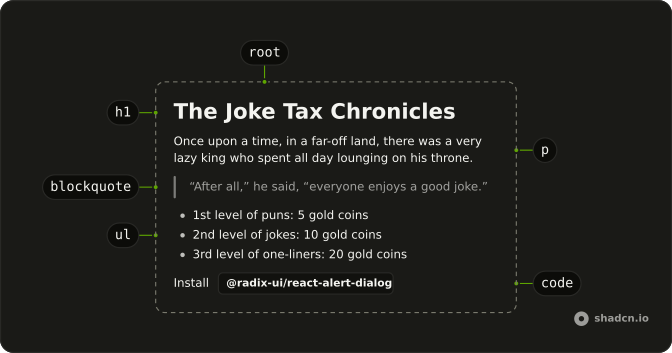
Anatomy
Usage
<div>
<h1 class="scroll-m-20 text-4xl font-extrabold tracking-tight text-balance">
Taxing Laughter: The Joke Tax Chronicles
</h1>
<p class="text-xl leading-7 text-muted-foreground [&:not(:first-child)]:mt-6">
Once upon a time, in a far-off land, there was a very lazy king who spent
all day lounging on his throne. One day, his advisors came to him with a
problem: the kingdom was running out of money.
</p>
<h2 class="mt-10 scroll-m-20 border-b pb-2 text-3xl font-semibold tracking-tight transition-colors first:mt-0">
The King's Plan
</h2>
<p class="leading-7 [&:not(:first-child)]:mt-6">
The king thought long and hard, and finally came up with{" "}
<a
class="font-medium text-primary underline underline-offset-4"
href="#"
>
a brilliant plan
</a>
: he would tax the jokes in the kingdom.
</p>
<blockquote class="mt-6 border-l-2 pl-6 italic">
"After all," he said, "everyone enjoys a good joke, so
it's only fair that they should pay for the privilege."
</blockquote>
<h3 class="mt-8 scroll-m-20 text-2xl font-semibold tracking-tight">
The Joke Tax
</h3>
<p class="leading-7 [&:not(:first-child)]:mt-6">
The king's subjects were not amused. They grumbled and complained, but
the king was firm:
</p>
<ul class="my-6 ml-6 list-disc [&>li]:mt-2">
<li>1st level of puns: 5 gold coins</li>
<li>2nd level of jokes: 10 gold coins</li>
<li>3rd level of one-liners : 20 gold coins</li>
</ul>
<p class="leading-7 [&:not(:first-child)]:mt-6">
As a result, people stopped telling jokes, and the kingdom fell into a
gloom. But there was one person who refused to let the king's
foolishness get him down: a court jester named Jokester.
</p>
<h3 class="mt-8 scroll-m-20 text-2xl font-semibold tracking-tight">
Jokester's Revolt
</h3>
<p class="leading-7 [&:not(:first-child)]:mt-6">
Jokester began sneaking into the castle in the middle of the night and
leaving jokes all over the place: under the king's pillow, in his
soup, even in the royal toilet. The king was furious, but he couldn't
seem to stop Jokester.
</p>
<p class="leading-7 [&:not(:first-child)]:mt-6">
And then, one day, the people of the kingdom discovered that the jokes left
by Jokester were so funny that they couldn't help but laugh. And once
they started laughing, they couldn't stop.
</p>
<h3 class="mt-8 scroll-m-20 text-2xl font-semibold tracking-tight">
The People's Rebellion
</h3>
<p class="leading-7 [&:not(:first-child)]:mt-6">
The people of the kingdom, feeling uplifted by the laughter, started to
tell jokes and puns again, and soon the entire kingdom was in on the joke.
</p>
<div class="my-6 w-full overflow-y-auto">
<table class="w-full">
<thead>
<tr class="m-0 border-t p-0 even:bg-muted">
<th class="border px-4 py-2 text-left font-bold [&[align=center]]:text-center [&[align=right]]:text-right">
King's Treasury
</th>
<th class="border px-4 py-2 text-left font-bold [&[align=center]]:text-center [&[align=right]]:text-right">
People's happiness
</th>
</tr>
</thead>
<tbody>
<tr class="m-0 border-t p-0 even:bg-muted">
<td class="border px-4 py-2 text-left [&[align=center]]:text-center [&[align=right]]:text-right">
Empty
</td>
<td class="border px-4 py-2 text-left [&[align=center]]:text-center [&[align=right]]:text-right">
Overflowing
</td>
</tr>
<tr class="m-0 border-t p-0 even:bg-muted">
<td class="border px-4 py-2 text-left [&[align=center]]:text-center [&[align=right]]:text-right">
Modest
</td>
<td class="border px-4 py-2 text-left [&[align=center]]:text-center [&[align=right]]:text-right">
Satisfied
</td>
</tr>
<tr class="m-0 border-t p-0 even:bg-muted">
<td class="border px-4 py-2 text-left [&[align=center]]:text-center [&[align=right]]:text-right">
Full
</td>
<td class="border px-4 py-2 text-left [&[align=center]]:text-center [&[align=right]]:text-right">
Ecstatic
</td>
</tr>
</tbody>
</table>
</div>
<p class="leading-7 [&:not(:first-child)]:mt-6">
The king, seeing how much happier his subjects were, realized the error of
his ways and repealed the joke tax. Jokester was declared a hero, and the
kingdom lived happily ever after.
</p>
<p class="leading-7 [&:not(:first-child)]:mt-6">
The moral of the story is: never underestimate the power of a good laugh
and always be careful of bad ideas.
</p>
</div>
Demos
H1
The article title is text-4xl and extrabold, with tight tracking and text-balance, so a long line wraps instead of leaving one word alone. scroll-m-20 keeps it clear of a sticky header when an anchor lands on it, and you only want one of these per article. The centered alignment is only in this file. Drop it when the title should line up with the body.
H2
A chapter break rather than the title: text-3xl and semibold, with a bottom border, so the next part of the article reads as a new section. first:mt-0 stops a top margin from stacking when this heading is the first thing in the column. Use it between major parts, and leave subsections to the smaller headings, which do not draw that rule.
H3
The heading under a chapter. text-2xl and semibold, with no border, so it does not pretend to be another H2. Reach for it when a section has parts of its own, such as a list of rates under a plan, and a bordered heading would be too much. scroll-m-20 is here for the same sticky-header offset as the title.
H4
The smallest heading in this set, text-xl and semibold. Use it inside an H3 when you still need a title in the outline, but another 2xl line would shout. If the words are emphasis rather than a section, Large is the treatment that stays out of the outline. Four levels is already a lot for one article.
P
Body copy. leading-7, and a top margin only when the paragraph is not the first child, so it sits tight under a heading and breathes between paragraphs. This is the class for the story itself, including a link in the primary color when you have one. A larger muted sentence under the title is Lead, not this.
Blockquote
A line someone said, set in italic with a thick border and inset padding. Use it for a quotation inside the article, not for a warning or a tip. Those want an Alert, which has a role and an icon. The right-to-left preview moves the border to the start edge, so do not copy this physical left border into an rtl page.
Table
A small comparison inside the article: bordered cells, a bold header, and muted zebra rows. The wrapper scrolls sideways when the columns outgrow the measure. Use it for a handful of facts, such as a treasury next to a mood. A sortable data grid is a Table, which is a component rather than article markup.
List
A disc list, indented, with space between the items, for rates, rules, and other short points that should scan. The numbers in this one are the content, not the marker, so the list stays unordered. Steps that have to stay in sequence belong in an ordered list with the same spacing, and either way the items should stay short.
Inline Code
A package name or a prop in the middle of a sentence: mono, semibold, small, on a muted chip with a little padding. Use it for a mention such as a package import, where a full code block would break the paragraph. Multi-line samples still belong in a fence, because this chip is one token, not a listing.
Lead
The dek under the title is text-xl and muted, one sentence that says what the page is about before the body starts. Use a single Lead, or the article has no introduction, just a stack of large lines. Body copy stays on the P classes.
Large
A short line at text-lg and semibold. It is a div, not a heading, so it stays out of the document outline. Use it for a prompt such as a confirmation question, where you want weight without inventing an H3. A real section title should still be a heading, or the outline and the anchors will skip it.
Small
The small element, at text-sm, medium weight, with the line height collapsed, suits fine print and a compact label beside a value. If that text is the accessible name of a control, use a Label so the click and the name stay attached. This class is only the size, and it does not associate anything.
Muted
Hint text at text-sm in the muted color, the line under a control that says what to type, for secondary copy that should not compete with the label. Inside a form, a Field description is the better home, because it stays tied to the control when the field goes invalid. Standalone muted text will not.
Rtl
The same article in Arabic, with dir set to rtl on the wrapper. The list uses a logical margin, the quote uses a start border, and table cells align to the start, so the indent follows the language. Set that direction on Prose or a parent when the content is right to left. Latin snippets that still use a physical left edge will not flip.
FAQ
How do I style Markdown or CMS content with Prose in Solid?
Wrap the rendered HTML in Prose, and its headings, paragraphs, lists, tables, quotes and code take the typography styles without classes of their own. That suits Markdown, MDX or rich text from a CMS, where you can't add a class to every element.
How do I change the width of the Prose content?
Prose caps its width at a readable line length (max-w-[37em]) and centers itself with mx-auto. Override either with className, such as max-w-none to let it fill its container.
Should I use Prose or style each heading with Tailwind classes?
Use Prose for content you don't write element by element, like Markdown or a CMS. When you build a page by hand, style each element with Tailwind classes instead, as the Usage snippet does; the demos above show the classes for each one, from H1 to Muted.
Does Prose work in dark mode?
Yes. Its styles use your theme's color tokens, such as the border, muted and primary colors, so text, links, code and table rows follow your light and dark themes with nothing extra to set.
Does Prose support right-to-left languages?
Set dir="rtl" on Prose or on a parent, as the RTL demo above does with Arabic text, so the text and its punctuation run right to left.
API Reference
Prose
<div> data-slot="prose"
asChild?(props: ParentProps) => JSX.Element
Render your own element: a function that gets the part's props to spread on it.
- Type
(props: ParentProps) => JSX.Element
class?string
Merged with the part's classes.
With other components
Card
LayoutThe article on a surface
Separator
LayoutBreak the sections
Link Overlay
NavigationA linked title
Kbd
TypographyA key in the sentence
Table
DataA grid in the article
Table of Contents
NavigationThe headings