shadcn.io is not affiliated with official shadcn/ui
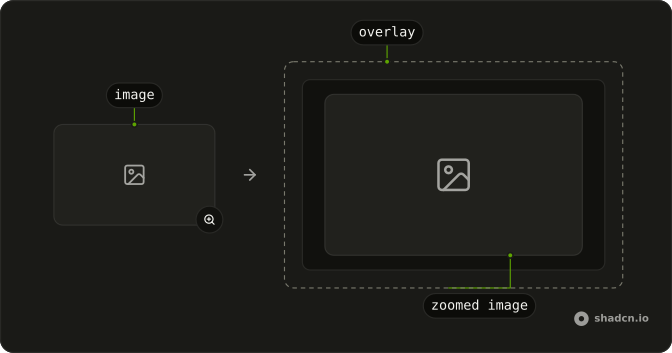
A photo, an SVG, or a diagram opens larger where it sits.
Use it when making the picture bigger is the whole task. Choosing a region to store is an Image Cropper. In React, Ark UI opens on click, not on hover, and does not fetch a sharper file unless you pass one.

Installation
Anatomy
Usage
import { ImageZoom } from "@/components/ui/image-zoom";<ImageZoom
alt="A desk by a window"
className="max-w-sm rounded-xl"
height={450}
src="https://images.unsplash.com/photo-1497366216548-37526070297c?auto=format&fit=crop&w=800&q=80"
width={800}
/>Demos
Svg
Pass the graphic as a child instead of src. The zoom looks for the first image, the first svg, an element with role img, or an element carrying data-zoom. A photo instead passes src, alt, width, and height, and the component draws that image. Use the child for inline art that is not a file, and set an aria-label, because alt would have nowhere to go.
FAQ
How do I zoom an SVG with Image Zoom in React?
Pass the SVG, or any diagram, as the child of ImageZoom instead of src, and the zoom finds the first img, svg, element with role img, or element with data-zoom, as the Svg demo does. When children are set, Image Zoom does not render an img of its own. A plain photo uses src, alt, width, and height, as Usage does.
How do I show a sharper picture while Image Zoom is open?
The enlarged view uses the same src as the trigger unless you pass zoomInProps. Put the larger image's src there, along with any other img attributes for that view, so the small preview can stay light. The zoomed image itself is taken from zoomInProps.
rmiz is forwarded to the zoom library and can override the built-in zoom margin of 20, but it does not set the zoomed image.
What alt text should I set on Image Zoom?
alt defaults to an empty string, which marks the photo as decorative. Set alt when the picture carries meaning that nearby text does not repeat. width and height are passed through to the img, and the class on Image Zoom lands on that img. The Svg demo labels the graphic with aria-label instead, because it is not an img.
Does Image Zoom open on hover or on click?
It opens when the image is clicked, not when it is hovered, and the enlarged view is the zoom library's own layer, so overflow hidden on a parent does not clip it. The wrapper renders a span around the trigger. This is a viewer, not a crop tool, so use Image Cropper when people must pick a region and you need that rectangle.
Does Image Zoom fetch the image in React?
No, Image Zoom does not fetch the picture. The browser loads src the same way it loads any other image, and zoomInProps can point the enlarged view at a sharper file.
The installed file includes a client directive because the zoom library keeps open state, so a server page can render Image Zoom without adding another directive.
How do I install Image Zoom in React?
Run the command in the Installation section above. It adds Image Zoom to your ui folder as one component, not a set of parts, and it includes the zoom dependency. Usage shows a photo, and the Svg demo shows a diagram passed as children. The command uses the shadcn CLI.
API Reference
ImageZoom
children?React.ReactNode
Custom trigger. Zoom finds the first img, svg, [role="img"], or [data-zoom].
rmiz?Omit<UncontrolledProps, "children" | "zoomImg">
Props for react-medium-image-zoom.
- Type
Omit<UncontrolledProps, "children" | "zoomImg">
zoomInProps?React.ComponentProps<"img">
Image props when zoomed. Defaults to the trigger src.
- Type
React.ComponentProps<"img">
className?string
Merged with the part's classes.
With other components
Aspect Ratio
LayoutThe thumbnail box
Dialog
OverlaysThe zoomed view
Card
LayoutThe image on a surface
Carousel
MediaZoom one slide
Button
ButtonsOpen and close
Skeleton
FeedbackWhile the image loads
Related
Image Cropper
MediaChange the frame
Avatar
MediaA small face, not a zoom
Hover Card
OverlaysA preview on hover
Frame
LayoutA border around the image
Attachment
MediaThe file itself
Marker
MediaA pin on the picture