shadcn.io is not affiliated with official shadcn/ui
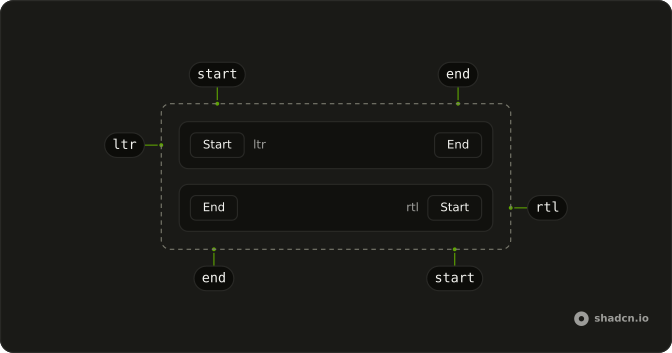
The provider sets reading direction for one region and leaves the rest of the page alone.
Wrap a subtree when only that region reads the other way, and set dir on the same element so the CSS follows. One field on its own can take dir on an Input and skip the provider. In React, Ark UI menus and arrow keys read the provider, which the attribute alone does not set.
Installation
Anatomy
Usage
import { DirectionProvider } from "@/components/ui/direction";<DirectionProvider direction="ltr">
<p>Content inherits the provided direction.</p>
</DirectionProvider>import { useDirection } from "@/components/ui/direction";
const Example = () => {
const direction = useDirection();
return <div>Current direction: {direction}</div>;
};See the RTL configuration guide for document-level direction. This page does not replace locale setup.
Demos
Rtl
The same Start and End row, but the provider direction is rtl and the wrapper sets dir to match. useDirection reports rtl, Start moves to the right, and the end margin pushes End toward the left. Set both. One without the other leaves either the components or the CSS unflipped.
FAQ
How do I set up a right-to-left (RTL) layout in React?
Set dir="rtl" on the html element and wrap the app in DirectionProvider with direction="rtl". The attribute flips the CSS and Tailwind's rtl: variants; the provider tells the components, so popovers, sliders and arrow keys follow the reading direction. The RTL guide covers the whole setup.
Why do I need DirectionProvider if the html tag already has dir?
Because the two do different jobs. The dir attribute only changes the layout; the components read the direction from the provider to place their menus and to map the left and right arrow keys. With only one of them, the page is half mirrored.
How do I read the current text direction in a component?
Call useDirection() inside the provider: it returns "ltr" or "rtl". Use it to swap an icon or to set dir on an element you render yourself.
How does DirectionProvider relate to the locale?
It sets the locale too: pass locale, like ar-EG or he-IL, for formatting dates and numbers, or leave it out and the provider picks a locale for that direction.
API Reference
DirectionProvider
direction?"ltr" | "rtl"
The reading direction it sets for everything inside it.
- Type
"ltr" | "rtl"
locale?string
The locale it sets. When unset, direction picks one (ar-BH for rtl, * en-US otherwise).
useDirection
With other components
Dropdown Menu
MenusPanels open the other way
Select
SelectionList follows reading
Slider
ControlsArrow keys reverse
Sheet
OverlaysSlides from the start
Tabs
NavigationArrows follow reading
Menubar
MenusSubmenus open inward
Related
Accordion
DisclosureChevrons stay on the end
Card
LayoutForms that mirror
Field
InputsLabels flip with dir
Native Select
SelectionInherits html dir
Pagination
NavigationNext stays at the end
Breadcrumb
NavigationTrail reads backward