shadcn.io is not affiliated with official shadcn/ui
Shadcn Table of Contents for React and Tailwind
Highlights the heading in view on docs and long pages.
Installation
bunx --bun shadcn@latest add https://kit.dev/r/toc.jsonpnpm dlx shadcn@latest add https://kit.dev/r/toc.jsonnpx shadcn@latest add https://kit.dev/r/toc.jsonyarn shadcn@latest add https://kit.dev/r/toc.jsonInstall the following dependencies:
bun add @ark-ui/react lucide-reactpnpm add @ark-ui/react lucide-reactnpm install @ark-ui/react lucide-reactyarn add @ark-ui/react lucide-reactCopy and paste the following code into your project.
"use client";

import {
  Toc as ArkToc,
  useToc as useArkToc,
  useTocContext as useArkTocContext,
} from "@ark-ui/react/toc";
import { CircleArrowUpIcon } from "lucide-react";
import type React from "react";
import { useEffect, useRef, useState } from "react";
import { cn } from "@/lib/utils";

export type {
  TocActiveChangeDetails,
  TocItemData,
} from "@ark-ui/react/toc";

export const useToc = useArkToc;
export const useTocContext = useArkTocContext;
export const TocContext = ArkToc.Context;

const DEFAULT_TOP_OFFSET = 180;
const TOP_PX = 48;
const BOTTOM_PX = 48;

const getScroller = (from: Element | null) => {
  const root = from?.closest("[data-slot=toc]");
  return root?.querySelector<HTMLElement>("[data-slot=toc-content]") ?? null;
};

const readTop = (scroller: HTMLElement | null) =>
  scroller ? scroller.scrollTop : window.scrollY;

const scrollToY = (
  scroller: HTMLElement | null,
  top: number,
  behavior: ScrollBehavior
) => {
  if (scroller) {
    scroller.scrollTo({ behavior, top });
    return;
  }
  window.scrollTo({ behavior, top });
};

const scrollMetrics = (scroller: HTMLElement | null) => {
  if (scroller) {
    return {
      left: scroller.scrollHeight - scroller.scrollTop - scroller.clientHeight,
      overflow: scroller.scrollHeight - scroller.clientHeight,
    };
  }
  const el = document.scrollingElement;
  if (!el) {
    return { left: Number.POSITIVE_INFINITY, overflow: 0 };
  }
  return {
    left: el.scrollHeight - el.scrollTop - el.clientHeight,
    overflow: el.scrollHeight - el.clientHeight,
  };
};

const headingScrollTop = (
  heading: HTMLElement,
  scroller: HTMLElement | null
) => {
  const margin =
    Number.parseFloat(getComputedStyle(heading).scrollMarginTop) || 0;
  if (scroller) {
    const frame = scroller.getBoundingClientRect();
    const rect = heading.getBoundingClientRect();
    return Math.max(0, scroller.scrollTop + (rect.top - frame.top) - margin);
  }
  return Math.max(
    0,
    window.scrollY + heading.getBoundingClientRect().top - margin
  );
};

const isOnlyActive = (activeIds: string[], id: string) =>
  activeIds.length === 1 && activeIds[0] === id;

const pinActiveToEdges = (
  scroller: HTMLElement | null,
  toc: {
    activeIds: string[];
    items: { value: string }[];
    setActiveIds: (ids: string[]) => void;
  }
) => {
  const first = toc.items[0]?.value;
  const last = toc.items.at(-1)?.value;
  if (!(first && last)) {
    return;
  }
  const { left, overflow } = scrollMetrics(scroller);
  if (overflow > BOTTOM_PX && left <= BOTTOM_PX) {
    if (!isOnlyActive(toc.activeIds, last)) {
      toc.setActiveIds([last]);
    }
    return;
  }
  if (readTop(scroller) <= TOP_PX && !isOnlyActive(toc.activeIds, first)) {
    toc.setActiveIds([first]);
  }
};

const tocRootClassName = cn(
  "group/toc",
  "relative flex w-full items-start gap-8"
);

const pushHash = (value: string) => {
  const hash = `#${value}`;
  if (window.location.hash === hash) {
    return;
  }
  const oldURL = window.location.href;
  window.history.pushState(null, "", hash);
  window.dispatchEvent(
    new HashChangeEvent("hashchange", {
      newURL: window.location.href,
      oldURL,
    })
  );
};

const clearHash = () => {
  if (!window.location.hash) {
    return;
  }
  const oldURL = window.location.href;
  window.history.pushState(
    null,
    "",
    `${window.location.pathname}${window.location.search}`
  );
  window.dispatchEvent(
    new HashChangeEvent("hashchange", {
      newURL: window.location.href,
      oldURL,
    })
  );
};

const readLocationHash = () => {
  try {
    return decodeURIComponent(window.location.hash.slice(1));
  } catch {
    return window.location.hash.slice(1);
  }
};

const TocEdgePin = () => {
  const toc = useTocContext();
  const tocRef = useRef(toc);
  tocRef.current = toc;
  const itemsKey = toc.items.map((item) => item.value).join();
  const activeKey = toc.activeIds.join();
  const ref = useRef<HTMLSpanElement>(null);

  useEffect(() => {
    if (!itemsKey) {
      return;
    }
    const scroller = getScroller(ref.current);
    const target: EventTarget = scroller ?? window;
    let frame = 0;

    const pin = () => pinActiveToEdges(scroller, tocRef.current);

    const onScroll = () => {
      cancelAnimationFrame(frame);
      frame = requestAnimationFrame(pin);
    };

    pin();
    target.addEventListener("scroll", onScroll, { passive: true });
    window.addEventListener("resize", onScroll);
    return () => {
      cancelAnimationFrame(frame);
      target.removeEventListener("scroll", onScroll);
      window.removeEventListener("resize", onScroll);
    };
  }, [itemsKey]);

  useEffect(() => {
    if (!itemsKey) {
      return;
    }
    const first = tocRef.current.items[0]?.value;
    const last = tocRef.current.items.at(-1)?.value;
    if (activeKey === first || activeKey === last) {
      return;
    }
    pinActiveToEdges(getScroller(ref.current), tocRef.current);
  }, [activeKey, itemsKey]);

  return (
    <span
      aria-hidden="true"
      className="hidden"
      data-slot="toc-edge-pin"
      ref={ref}
    />
  );
};

export const Toc = (props: React.ComponentProps<typeof ArkToc.Root>) => {
  const { children, className, ...rest } = props;

  return (
    <ArkToc.Root
      className={cn(tocRootClassName, className)}
      data-slot="toc"
      {...rest}
    >
      {children}
      <TocEdgePin />
    </ArkToc.Root>
  );
};

export const TocRootProvider = (
  props: React.ComponentProps<typeof ArkToc.RootProvider>
) => {
  const { children, className, ...rest } = props;

  return (
    <ArkToc.RootProvider
      className={cn(tocRootClassName, className)}
      data-slot="toc"
      {...rest}
    >
      {children}
      <TocEdgePin />
    </ArkToc.RootProvider>
  );
};

export const TocContent = (
  props: React.ComponentProps<typeof ArkToc.Content>
) => {
  const { className, ref, ...rest } = props;

  return (
    <ArkToc.Content
      className={cn(
        "min-h-0 min-w-0 flex-1",
        "overflow-y-auto overscroll-contain",
        "scrollbar-thin scrollbar-track-transparent scrollbar-thumb-foreground/20",
        className
      )}
      data-slot="toc-content"
      {...rest}
      ref={ref}
    />
  );
};

export const TocNav = (
  props: React.ComponentProps<typeof ArkToc.Nav> & { scrollToTop?: boolean }
) => {
  const { children, className, scrollToTop = false, ...rest } = props;

  return (
    <ArkToc.Nav
      className={cn(
        "sticky top-0",
        "flex w-48 shrink-0 flex-col gap-3 self-start",
        "min-h-0 overflow-visible",
        "data-[placement=left]:order-first",
        className
      )}
      data-slot="toc-nav"
      {...rest}
    >
      {children}
      {scrollToTop ? <TocScrollToTop /> : null}
    </ArkToc.Nav>
  );
};

export const TocTitle = (props: React.ComponentProps<typeof ArkToc.Title>) => {
  const { className, ...rest } = props;

  return (
    <ArkToc.Title
      className={cn(
        "px-2",
        "font-medium text-muted-foreground text-xs tracking-wide",
        className
      )}
      data-slot="toc-title"
      {...rest}
    />
  );
};

export const TocList = (props: React.ComponentProps<typeof ArkToc.List>) => {
  const { className, ...rest } = props;

  return (
    <ArkToc.List
      className={cn(
        "relative m-0 list-none p-0",
        "before:absolute before:inset-s-0 before:inset-y-0 before:w-px before:bg-border",
        className
      )}
      data-slot="toc-list"
      {...rest}
    />
  );
};

export const TocItem = (props: React.ComponentProps<typeof ArkToc.Item>) => {
  const { className, ...rest } = props;

  return (
    <ArkToc.Item
      className={cn(
        "data-[depth=3]:ps-3",
        "data-[depth=4]:ps-5.5",
        "data-[depth=5]:ps-8",
        className
      )}
      data-slot="toc-item"
      {...rest}
    />
  );
};

export const TocLink = (props: React.ComponentProps<typeof ArkToc.Link>) => {
  const { className, onClick, ...rest } = props;

  const handleClick = (event: React.MouseEvent<HTMLAnchorElement>) => {
    onClick?.(event);
    if (event.defaultPrevented) {
      return;
    }
    if (event.button !== 0) {
      return;
    }
    if (event.metaKey || event.ctrlKey || event.shiftKey || event.altKey) {
      return;
    }
    const href = event.currentTarget.getAttribute("href");
    if (!href?.startsWith("#")) {
      return;
    }
    let value: string;
    try {
      value = decodeURIComponent(href.slice(1));
    } catch {
      return;
    }
    if (!value) {
      return;
    }
    event.preventDefault();
    const heading = document.getElementById(value);
    const scroller = getScroller(event.currentTarget);
    if (!scroller) {
      pushHash(value);
    }
    if (!heading) {
      return;
    }
    scrollToY(scroller, headingScrollTop(heading, scroller), "instant");
  };

  return (
    <ArkToc.Link
      className={cn(
        "relative block",
        "rounded-md px-2 py-1",
        "text-muted-foreground text-sm leading-5 no-underline",
        "transition-colors duration-150 ease-[cubic-bezier(0.2,0,0,1)]",
        "hover:text-foreground",
        "data-active:font-medium data-active:text-foreground",
        "outline-none focus-visible:ring-[3px] focus-visible:ring-ring/32",
        "motion-reduce:transition-none!",
        className
      )}
      data-slot="toc-link"
      {...rest}
      onClick={handleClick}
    />
  );
};

export const TocIndicator = (
  props: React.ComponentProps<typeof ArkToc.Indicator>
) => {
  const { className, ...rest } = props;

  return (
    <ArkToc.Indicator
      className={cn(
        "pointer-events-none absolute inset-s-0 w-0.5 rounded-full bg-primary",
        "top-(--top) h-(--height)",
        "transition-[top,height] duration-150 ease-[cubic-bezier(0.2,0,0,1)]",
        "motion-reduce:transition-none!",
        className
      )}
      data-slot="toc-indicator"
      {...rest}
    />
  );
};

export const TocScrollToTop = (
  props: React.ComponentProps<"button"> & { offset?: number }
) => {
  const {
    children,
    className,
    offset = DEFAULT_TOP_OFFSET,
    onClick,
    ...rest
  } = props;
  const toc = useTocContext();
  const ref = useRef<HTMLButtonElement>(null);
  const [visible, setVisible] = useState(false);

  useEffect(() => {
    const scroller = getScroller(ref.current);
    const target: EventTarget = scroller ?? window;
    const update = () => {
      setVisible(readTop(scroller) >= offset);
    };
    update();
    target.addEventListener("scroll", update, { passive: true });
    return () => target.removeEventListener("scroll", update);
  }, [offset]);

  const handleClick = (event: React.MouseEvent<HTMLButtonElement>) => {
    onClick?.(event);
    if (event.defaultPrevented) {
      return;
    }
    const first = toc.items[0]?.value;
    if (first) {
      toc.setActiveIds([first]);
    }
    scrollToY(getScroller(event.currentTarget), 0, "instant");
    const hash = readLocationHash();
    if (hash && toc.items.some((item) => item.value === hash)) {
      clearHash();
    }
  };

  return (
    <button
      className={cn(
        "relative inline-flex items-center gap-2 self-start",
        "rounded-md py-1 text-muted-foreground text-sm leading-5",
        "transition-colors duration-150 ease-[cubic-bezier(0.2,0,0,1)]",
        "hover:text-foreground",
        "outline-none focus-visible:ring-[3px] focus-visible:ring-ring/32",
        "motion-reduce:transition-none!",
        !visible && "hidden",
        className
      )}
      data-slot="toc-scroll-to-top"
      onClick={handleClick}
      ref={ref}
      type="button"
      {...rest}
    >
      {children ?? (
        <>
          <CircleArrowUpIcon aria-hidden="true" className="size-4" />
          Scroll to top
        </>
      )}
    </button>
  );
};Update the import paths to match your project setup.
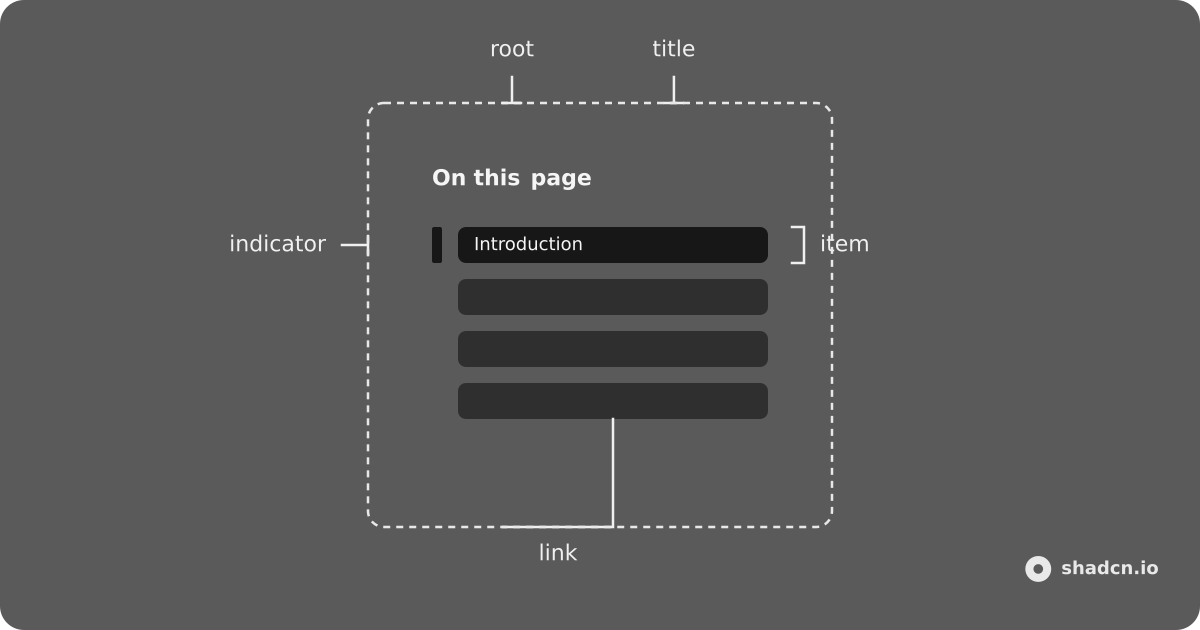
Anatomy
Usage
import { useCallback, useRef } from "react";
import {
  Toc,
  TocContent,
  TocIndicator,
  TocItem,
  TocLink,
  TocList,
  TocNav,
  TocTitle,
} from "@/components/ui/toc";
interface Item {
depth: number;
label: string;
lines: number;
value: string;
}
const items: Item[] = [
{
depth: 2,
label: "Introduction",
lines: 8,
value: "toc-basic-introduction",
},
{
depth: 2,
label: "Getting Started",
lines: 7,
value: "toc-basic-getting-started",
},
{
depth: 2,
label: "Installation",
lines: 6,
value: "toc-basic-installation",
},
{ depth: 2, label: "Usage", lines: 9, value: "toc-basic-usage" },
{ depth: 2, label: "Conclusion", lines: 7, value: "toc-basic-conclusion" },
];
const TocDemo = () => {
const contentRef = useRef<HTMLElement | null>(null);
const getScrollEl = useCallback(() => contentRef.current, []);
return (
<Toc className="max-w-2xl" items={items} scrollEl={getScrollEl}>
<TocContent className="h-80 pe-2" ref={contentRef}>
{items.map((item) => (
<section
className="not-first:mt-12 flex flex-col gap-3"
key={item.value}
>
<h2
className="scroll-mt-4 font-heading font-semibold text-lg"
id={item.value}
>
{item.label}
</h2>
<div
className="rounded-md bg-muted"
style={{ height: `${item.lines * 0.75}rem` }}
/>
</section>
))}
</TocContent>
<TocNav scrollToTop>
<TocTitle>On this page</TocTitle>
<TocList>
<TocIndicator />
{items.map((item) => (
<TocItem item={item} key={item.value}>
<TocLink href={`#${item.value}`}>{item.label}</TocLink>
</TocItem>
))}
</TocList>
</TocNav>
</Toc>
);
};Demos
Nested
Root Provider
With Collapsible
With Hover
With Indicator
With Rail
With Select
With Tree View
API Reference
Toc
div
PropType
AttributeType
CSS variableType
TocTitle
h2
PropType
AttributeType
TocList
ul
PropType
AttributeType
TocItem
li
PropType
AttributeType
CSS variableType
TocLink
a
PropType
AttributeType
TocIndicator
div
PropType
AttributeType
CSS variableType
TocContent
article
PropType
AttributeType
TocNav
nav
PropType
AttributeType
TocScrollToTop
PropType
AttributeType
TocRootProvider
div
PropType
AttributeType
CSS variableType
useToc
PropType
TocContext
PropType